
Introduction
Thank you for purchasing the EMOS N-698 Wireless Doorbell. This manual provides essential information for the safe and efficient installation, operation, and maintenance of your new doorbell system. Please read these instructions carefully before use and retain them for future reference.
The EMOS N-698 is a wireless doorbell system featuring a plug-in receiver and a remote push button. It offers 32 selectable melodies, 3 volume levels, and a self-learning pairing function for easy setup.
Safety Information
- Ensure the receiver is plugged into a standard 230V AC outlet. Do not use with incompatible power sources.
- Do not expose the receiver or transmitter to water, excessive moisture, or extreme temperatures.
- Do not attempt to open or repair the device yourself. Refer all servicing to qualified personnel.
- Keep out of reach of children.
- Avoid placing the receiver near large metal objects or other electronic devices that may interfere with the wireless signal.
Package Contents
Verify that all components are present and undamaged:
- 1x EMOS N-698 Wireless Doorbell Receiver (Plug-in unit)
- 1x EMOS N-698 Wireless Doorbell Transmitter (Push button)
- Mounting hardware (screws, adhesive pad)
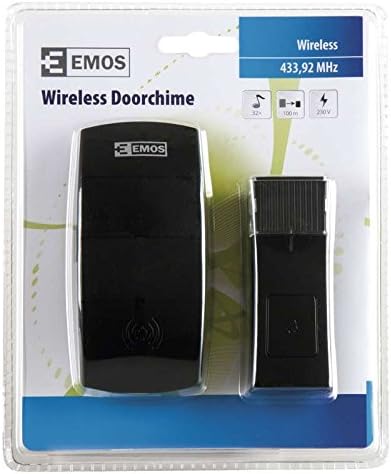
Image: EMOS N-698 Wireless Doorbell in its retail blister packaging, showing both the receiver and the push button.
Setup and Installation
1. Receiver Installation
- Select a suitable indoor 230V AC power outlet within range of your desired push button location.
- Plug the EMOS N-698 receiver directly into the power outlet. The receiver will power on.
2. Transmitter (Push Button) Installation
- Choose a flat, clean surface near your door for the push button. Ensure the location is easily accessible to visitors.
- Clean the mounting surface thoroughly to ensure proper adhesion if using the adhesive pad.
- Option A (Adhesive): Peel the backing from the adhesive pad and firmly press the push button onto the chosen surface for at least 30 seconds.
- Option B (Screws): Use the provided screws to securely mount the push button to the wall.
3. Pairing the Transmitter and Receiver (Self-Learning)
The EMOS N-698 features a self-learning function, simplifying the pairing process:
- Plug in the receiver.
- Press and hold the pairing button on the receiver (refer to the diagram below for location) for approximately 3-5 seconds until you hear a short chime or see an indicator light flash. This indicates it's in pairing mode.
- Within 10 seconds, press the push button (transmitter) once. The receiver should chime with the currently selected melody, confirming successful pairing.
- If pairing is unsuccessful, repeat steps 2 and 3.
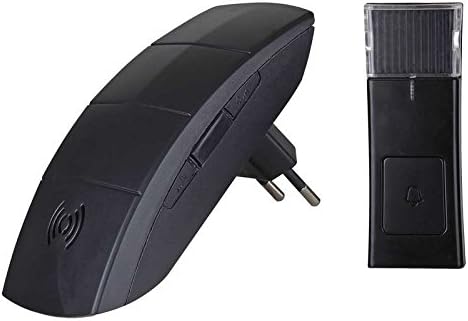
Image: The EMOS N-698 Wireless Doorbell receiver (left, with plug) and the push button transmitter (right). The receiver has control buttons on its side for pairing and settings.
Operating Instructions
1. Melody Selection
- The receiver offers 32 different melodies.
- To change the melody, press the "Melody" button on the side of the receiver. Each press will cycle through the available melodies.
- Once you hear a desired melody, stop pressing the button. The selected melody will be saved.
2. Volume Adjustment
- The receiver has 3 adjustable volume levels.
- To adjust the volume, press the "Volume" button on the side of the receiver. Each press will cycle through the volume levels (Low, Medium, High).
3. Optical Signal
In addition to an audible chime, the receiver provides an optical signal (flashing light) when the push button is pressed. This feature is useful in noisy environments or for individuals with hearing impairments.

Image: An angled view of the EMOS N-698 Wireless Doorbell components, highlighting the sleek design of both the plug-in receiver and the remote push button.
Maintenance
- Cleaning: Wipe the surfaces of both the receiver and transmitter with a soft, dry cloth. Do not use abrasive cleaners or solvents.
- Transmitter Power: The push button transmitter appears to be self-powered (e.g., kinetic or solar-charged). If the button stops working, ensure it is clean and not obstructed. If issues persist, re-pairing may be necessary.
- Receiver Power: Ensure the receiver remains securely plugged into a functioning 230V outlet.
Troubleshooting
| Problem | Possible Cause | Solution |
|---|---|---|
| Doorbell does not ring. | Receiver unplugged or no power. Transmitter battery low/dead (if applicable). Out of range. Not paired. | Ensure receiver is securely plugged into a live 230V outlet. Re-pair the transmitter and receiver (see Setup section). Move receiver closer to the transmitter. Check for obstructions between units. |
| Poor wireless range. | Obstructions (thick walls, metal objects). Interference from other electronic devices. | Relocate the receiver or transmitter to minimize obstructions. Move the doorbell away from other wireless devices (e.g., Wi-Fi routers, microwaves). |
| Melody or volume cannot be changed. | Buttons not pressed correctly. Receiver malfunction. | Ensure buttons are pressed firmly. Unplug and re-plug the receiver to reset it. If problem persists, contact support. |
Specifications
| Model Number | N-698 |
| Brand | EMOS |
| Receiver Power Supply | 230 V AC |
| Number of Melodies | 32 |
| Volume Levels | 3 |
| Pairing Principle | Self Learning |
| Optical Signal | Yes |
| Item Weight | 0.352 ounces (approx. 10 grams) |
| Package Dimensions | 7.4 x 5.67 x 0.63 inches |
| Color | Black |
Warranty and Support
For warranty information or technical support, please refer to the documentation provided with your purchase or contact EMOS customer service directly. Keep your proof of purchase for warranty claims.
For further assistance, visit the official EMOS website or contact their support channels.