
1. Introduction
This manual provides essential instructions for the proper setup, operation, and maintenance of your GUESS HORIZON W0379G3 Men's Chronograph Quartz Watch. Please read this manual thoroughly to ensure optimal performance and longevity of your timepiece.
The GUESS HORIZON W0379G3 features a durable stainless steel case and bracelet, a striking blue dial, and a precise quartz movement with chronograph and date functions. It is designed for everyday wear and is water-resistant up to 50 meters.
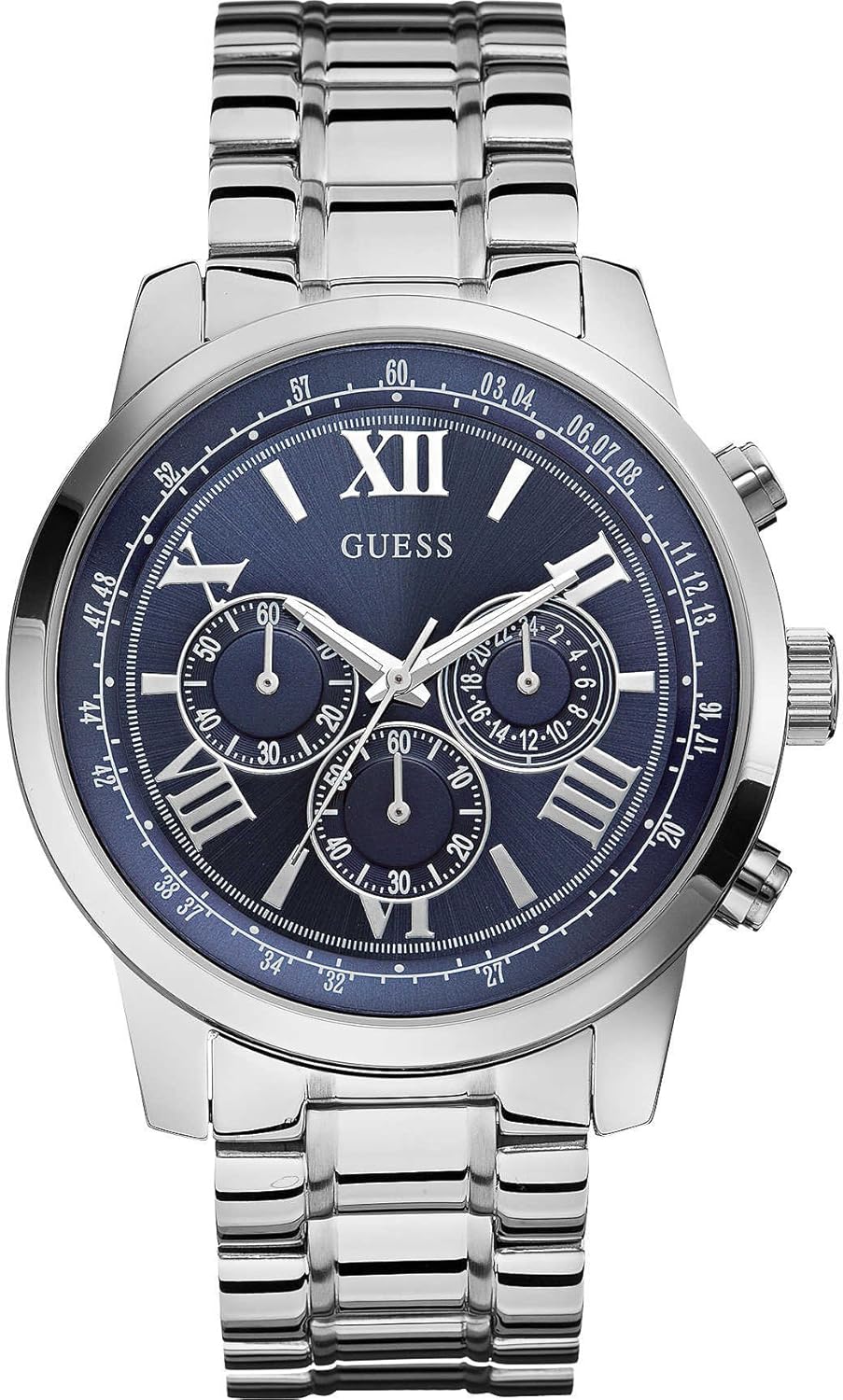
Figure 1: Front view of the GUESS HORIZON W0379G3 Men's Chronograph Quartz Watch. This image displays the watch's stainless steel case and bracelet, blue dial with Roman numerals, three sub-dials for chronograph functions, and the crown and pushers on the side.
2. Setup
2.1 Setting the Time
- Pull the crown out to the second click position (farthest out).
- Turn the crown to set the hour and minute hands to the correct time. Ensure AM/PM is correctly set if your watch has a 24-hour indicator or date changes at midnight.
- Push the crown back into the normal position.
2.2 Setting the Date
- Pull the crown out to the first click position.
- Turn the crown clockwise or counter-clockwise (depending on the movement) to set the date. Avoid setting the date between 9 PM and 3 AM, as this can interfere with the date change mechanism.
- Push the crown back into the normal position.
2.3 Bracelet Adjustment
The stainless steel bracelet may require adjustment for a comfortable fit. It is recommended to have this procedure performed by a qualified jeweler or watch technician to avoid damage to the bracelet or watch.
3. Operating the Chronograph
Your GUESS HORIZON W0379G3 watch is equipped with a chronograph function for measuring elapsed time.
3.1 Starting and Stopping the Chronograph
- Press the upper pusher (A) to start the chronograph. The chronograph second hand and minute hand will begin to move.
- Press the upper pusher (A) again to stop the chronograph. The elapsed time will be indicated by the chronograph hands.
3.2 Resetting the Chronograph
- After stopping the chronograph, press the lower pusher (B) to reset all chronograph hands to their zero positions.
- If the chronograph is running, pressing the lower pusher (B) will not reset it. It must be stopped first.
4. Maintenance
4.1 Cleaning Your Watch
Regular cleaning helps maintain the appearance of your watch. Wipe the case and bracelet with a soft, dry cloth. For water-resistant models, a slightly damp cloth can be used, followed by drying. Avoid using chemical cleaners or abrasive materials.
4.2 Water Resistance
Your watch is water-resistant up to 50 meters (5 ATM). This means it is suitable for short periods of recreational swimming. It is not suitable for diving, snorkeling, or prolonged water exposure. Always ensure the crown is fully pushed in before any contact with water. Do not operate the crown or pushers while the watch is wet or submerged.
4.3 Battery Replacement
The watch is powered by a lithium-metal battery. When the watch stops or the second hand begins to jump in irregular intervals (indicating low battery), it is time for a battery replacement. This procedure should be performed by a qualified watch technician to ensure proper sealing and functionality.

Figure 2: The packaging box for the GUESS HORIZON W0379G3 watch. The box is designed to protect the watch and often contains the instruction manual and warranty information.
5. Troubleshooting
- Watch Not Running: Check if the crown is fully pushed in. If the watch still does not run, the battery may need replacement.
- Incorrect Time/Date: Refer to Section 2 for instructions on setting the time and date. Ensure the crown is securely pushed back in after adjustment.
- Chronograph Hands Not Resetting to Zero: If the chronograph hands do not return to the 12 o'clock position after resetting, a calibration may be required. Consult a professional watch technician.
- Condensation Under Crystal: This may indicate a loss of water resistance. Avoid further contact with water and have the watch inspected by a professional immediately.
6. Specifications
| Feature | Detail |
|---|---|
| Model Number | W0379G3 |
| Brand | GUESS |
| Movement | Quartz |
| Case Material | Stainless Steel |
| Case Diameter | 45 mm |
| Dial Color | Blue |
| Bracelet Material | Stainless Steel |
| Water Resistance | 50 meters (5 ATM) |
| Functions | Time, Date, Chronograph |
| Battery Type | 1 Lithium-metal (included) |
| Product Dimensions | 11.99 x 11.99 x 11.99 cm |
| Product Weight | 300 g |
7. Warranty and Support
Your GUESS watch is covered by a manufacturer's warranty against defects in materials and workmanship. Please refer to the warranty card included with your purchase for specific terms, conditions, and duration. For warranty service or technical support, please contact GUESS customer service or an authorized service center.
Keep your proof of purchase for warranty claims.


