
1. Introduction
The Leviton T5832-HGT is a 20-Amp Hospital Grade USB Charger/Tamper-Resistant Duplex Receptacle designed for demanding environments such as hospitals, educational institutions, and commercial spaces. This innovative device combines two traditional AC outlets with two USB charging ports, allowing for convenient power and charging solutions in a single unit. Its tamper-resistant design enhances safety, while the hospital-grade rating ensures durability and reliable performance.

Figure 1: Leviton T5832-HGT 20-Amp Hospital Grade USB Charger/Tamper-Resistant Duplex Receptacle.
2. Key Features
- Dual USB Charging Ports: Equipped with two 3.6A, 5V DC USB ports for simultaneous charging of mobile devices.
- Smart Chip Technology: USB ports feature a smart chip that recognizes the requirements of attached devices and optimizes charging speed accordingly.
- Tamper-Resistant Outlets: Integrated shutter mechanism helps prevent insertion of foreign objects, enhancing safety.
- Hospital Grade: Constructed for high-abuse applications, meeting stringent hospital-grade standards for durability and reliability.
- 20-Amp Capacity: Suitable for 20-amp circuits, providing robust power delivery.
- Flexible Wiring Options: Designed for both back and side wiring for ease of installation.
- Low Vampire Power: Engineered to minimize standby power consumption.
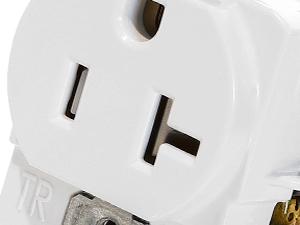
Figure 2: Detail of the receptacle face with USB ports and tamper-resistant AC outlets.
3. Safety Information
WARNING: To avoid fire, shock, or death, turn off power at the circuit breaker or fuse box and test that power is off before wiring. Installation should be performed by a qualified electrician if you are not familiar with electrical wiring procedures.
- Always disconnect power before working on electrical circuits.
- Use appropriate personal protective equipment (PPE).
- Ensure all wiring connections are secure and comply with local electrical codes.
- Do not exceed the specified electrical ratings of the device.
- This device is for indoor use only.
4. Installation
Follow these steps for proper installation of your Leviton T5832-HGT receptacle. If you are unsure about any step, consult a qualified electrician.
4.1. Tools Required
- Screwdrivers (Phillips and flathead)
- Wire strippers/cutters
- Voltage tester
- Electrical tape (optional)
4.2. Installation Steps
- Turn Off Power: Locate the circuit breaker or fuse that controls the outlet you are replacing or installing. Turn it OFF. Verify power is off using a voltage tester.
- Remove Old Receptacle (if applicable): Unscrew the wallplate and then the mounting screws holding the old receptacle in the electrical box. Carefully pull the old receptacle out of the box.
- Disconnect Wires: Disconnect the wires from the old receptacle. Note which wire was connected to which terminal (hot, neutral, ground).
- Prepare Wires: If necessary, strip approximately 1/2 inch (12.7 mm) of insulation from the ends of the circuit wires.
- Connect Wires to New Receptacle: The T5832-HGT supports both back-wiring (inserting straight wires into holes and tightening screws) and side-wiring (wrapping wires around terminal screws).
- Green or Bare Copper Wire (Ground): Connect to the green ground screw.
- White Wire (Neutral): Connect to the silver terminal screw.
- Black or Colored Wire (Hot/Live): Connect to the brass terminal screw.
- Mount Receptacle: Carefully fold the wires into the electrical box. Insert the new receptacle into the box and secure it with the mounting screws.
- Install Wallplate: Attach the new wallplate (not included) over the receptacle.
- Restore Power: Turn the power back ON at the circuit breaker or fuse box.
- Test: Test the AC outlets and USB ports to ensure proper functionality.
5. Operating Instructions
Using your Leviton T5832-HGT receptacle is straightforward:
- AC Outlets: Insert standard electrical plugs into the two tamper-resistant AC outlets. The tamper-resistant mechanism requires equal pressure on both slots for the shutters to open.
- USB Charging Ports: Plug your USB-compatible charging cable into one of the two USB ports. Connect the other end to your mobile device (smartphone, tablet, etc.). The smart chip will detect your device and deliver optimal charging power up to 3.6A (shared between both ports).
The USB ports are designed to provide balanced power, ensuring efficient charging even when two devices are connected simultaneously.
6. Maintenance
The Leviton T5832-HGT requires minimal maintenance to ensure long-lasting performance.
- Cleaning: To clean the receptacle, first turn off power at the circuit breaker. Use a soft, damp cloth to wipe the surface. Do not use abrasive cleaners or solvents, as these can damage the finish.
- Periodic Inspection: Periodically check the receptacle for any signs of damage, loose connections, or discoloration. If any issues are observed, turn off power and consult a qualified electrician.
7. Troubleshooting
If you encounter issues with your Leviton T5832-HGT, refer to the following troubleshooting guide:
| Problem | Possible Cause | Solution |
|---|---|---|
| No power to AC outlets or USB ports. | Circuit breaker tripped or fuse blown. Loose wiring connection. | Check and reset the circuit breaker or replace the fuse. Turn off power and check wiring connections. |
| USB device charging slowly or not at all. | Faulty USB cable. Device requires more power than available. Two devices drawing maximum power. | Try a different USB cable. Ensure your device is compatible with 5V USB charging. If charging two devices, one may charge slower. |
| Plug does not insert into AC outlet. | Tamper-resistant shutters are engaged. | Apply firm, even pressure to both prongs of the plug simultaneously to open the shutters. |
8. Specifications
| Specification | Detail |
|---|---|
| Model Number | T5832-HGT |
| Brand | Leviton |
| Amperage | 20 Amps |
| Voltage | 125V AC (for outlets), 5V DC (for USB) |
| USB Output | 3.6A (shared), 5V DC |
| Receptacle Type | Duplex, Tamper-Resistant, Hospital Grade |
| Wiring Type | Back and Side Wired |
| Product Dimensions | 1.74 x 1.43 x 4.05 inches |
| Weight | 3.2 ounces |
| Material | Viton (face material) |
| Compatible Devices | All USB 2.0 devices |
9. Warranty and Support
Leviton products are backed by a limited warranty. For specific warranty details, registration, or technical support, please refer to the documentation included with your product or visit the official Leviton website. You can typically find support resources, FAQs, and contact information for customer service there.
Leviton Official Website: www.leviton.com