
1. Introduction
The Exerpeutic 100XL Magnetic Resistance Manual Treadmill is designed to provide an effective fitness walking experience. This manual treadmill offers a convenient way to engage in regular exercise, featuring magnetic resistance, incline adjustments, and a heart pulse monitoring system. This instruction manual provides essential information for the safe and efficient use, setup, and maintenance of your treadmill.

Figure 1.1: The Exerpeutic 100XL Magnetic Resistance Manual Treadmill in its operational state.
2. Safety Information
Before operating the Exerpeutic 100XL treadmill, please read and understand all safety instructions. Failure to follow these instructions may result in injury or damage to the product.
- User Weight Capacity: Do not exceed the maximum user weight of 325 lbs (147 kg).
- Stable Surface: Always place the treadmill on a flat, stable surface to prevent tipping.
- Clearance: Ensure adequate clear space around the treadmill during use.
- Footwear: Wear appropriate athletic footwear when using the treadmill.
- Handrails: Utilize the extra-long safety handles for balance and security, especially when starting or stopping.
- Incline Adjustment: Adjust the incline only when the treadmill is stationary and you are not on the belt.
- Magnetic Tension: Adjust magnetic tension gradually to find a comfortable and effective workout level.
- Children and Pets: Keep children and pets away from the treadmill during operation.
- Medical Advice: Consult a physician before starting any exercise program. Stop exercising immediately if you feel faint, dizzy, or experience pain.
3. Setup and Assembly
The Exerpeutic 100XL treadmill comes largely pre-assembled. Follow these steps to complete the setup:
- Unpacking: Carefully remove all components from the packaging. Inspect for any damage.
- Base Assembly: Attach any necessary leg extensions or base supports as per the included quick assembly guide. Ensure all bolts are securely tightened.
- LCD Monitor Attachment: Connect the LCD monitor panel to the main frame. Ensure all cables are properly connected and secured.
- Battery Installation: Install the required batteries into the LCD monitor. (Note: If the display does not function, ensure batteries are new and correctly inserted).
- Placement: Position the treadmill on a level, stable surface.

Figure 3.1: Illustration of adjusting the treadmill incline mechanism.

Figure 3.2: Detail of the quick release incline adjustment for setting the treadmill's angle.
4. Operation
4.1 Starting Your Workout
The Exerpeutic 100XL is a manual treadmill, meaning the belt moves with your steps. Begin by standing on the side platforms, then step onto the belt and start walking at a comfortable pace. Hold onto the extra-long safety handles for stability.

Figure 4.1: A user demonstrating proper posture while walking on the treadmill.

Figure 4.2: Detail of feet engaging with the treadmill belt during a workout.
4.2 Adjusting Magnetic Resistance (Pacer Control)
The treadmill features an 8-level magnetic tension 'Pacer Control' system. This unique technology helps stabilize the speed of the belt and allows you to walk at various difficulty levels. Turn the knob on the console to increase or decrease the resistance.

Figure 4.3: The console displaying the magnetic tension control knob.
4.3 Incline Adjustment
The treadmill offers 3 quick-release incline positions: 8, 10, and 15 degrees. Adjusting the incline increases the intensity of your workout, helping to burn more calories and build endurance. Ensure the treadmill is stationary before adjusting the incline.
4.4 Heart Pulse System
The integrated heart pulse pads on the handles allow you to measure your target heart rate. Grip the sensors firmly with both hands to get a reading on the LCD display. This feature helps you monitor your workout intensity.

Figure 4.4: Detail of the heart pulse sensors located on the handrails.
4.5 LCD Display Functions
The computer LCD display provides real-time workout data:
- Elapsed Time: Shows the duration of your workout.
- Distance Walked: Displays the total distance covered.
- Calorie Burn: Estimates the calories burned during your session.
- Speed: Indicates your current walking speed.
- Heart Rate: Shows your heart rate when gripping the pulse sensors.

Figure 4.5: The LCD console displaying various workout metrics.
4.6 Folding and Storage
The Exerpeutic 100XL treadmill is designed for easy folding and storage. It features transportation wheels for convenient movement when folded.
- Folding: Carefully lift the rear of the treadmill deck until it locks into an upright position.
- Moving: Tilt the folded treadmill onto its transportation wheels and roll it to your desired storage location.
- Unfolding: To unfold, release the locking mechanism and gently lower the deck until it rests flat on the floor.

Figure 4.6: A user demonstrating the folding mechanism of the treadmill.
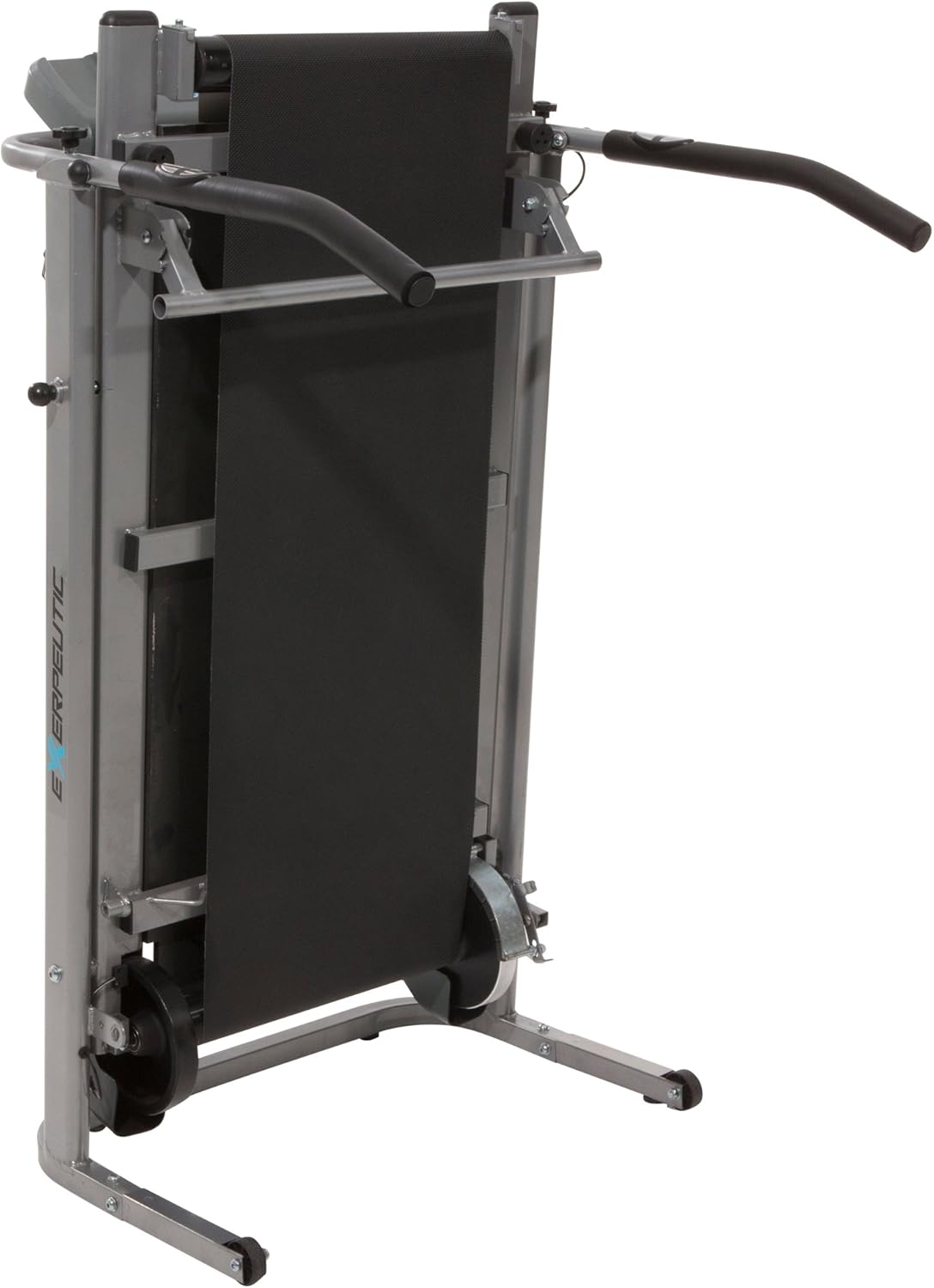
Figure 4.7: The treadmill in its compact, folded state, ready for storage.
5. Maintenance
Regular maintenance ensures the longevity and optimal performance of your Exerpeutic 100XL treadmill.
- Cleaning: Wipe down the treadmill after each use with a damp cloth to remove sweat and dust. Avoid abrasive cleaners.
- Belt Alignment: Periodically check the treadmill belt for proper alignment. If the belt drifts to one side, refer to the assembly guide for instructions on how to adjust it. A slight quarter-turn adjustment is often sufficient.
- Lubrication: Consult the original assembly guide for specific lubrication requirements for the treadmill belt. Over-lubrication can be detrimental.
- Hardware Check: Regularly inspect all bolts, nuts, and connections to ensure they are tight and secure.
6. Troubleshooting
This section addresses common issues you might encounter with your Exerpeutic 100XL treadmill.
- Treadmill Belt Not Moving Smoothly:
- Ensure the magnetic tension is not set too high for your current walking speed.
- Check for proper belt alignment.
- Verify that the treadmill is on a level surface.
- LCD Display Not Working:
- Check the batteries in the console. Replace them with new ones if necessary.
- Ensure all cable connections to the console are secure.
- Unstable Feeling During Use:
- Confirm all assembly bolts are tightened.
- Ensure the treadmill is on a firm, level surface.
- Utilize the extra-long handrails for stability.
- Heart Rate Monitor Inaccurate:
- Ensure your hands are firmly gripping both pulse sensors.
- Skin contact must be consistent and direct.
7. Specifications
| Feature | Detail |
|---|---|
| Model Number | 4010 |
| Product Dimensions (D x W x H) | 50" x 29" x 50" |
| Item Weight | 73 Pounds |
| Maximum User Weight | 325 Pounds |
| Material | Carbon Steel, Alloy Steel (Frame) |
| Magnetic Resistance Levels | 8 |
| Incline Positions | 3 (8, 10, 15 degrees) |
| Tread Belt Dimensions | 16" x 45" |
| Flywheels | Twin 6" diameter, precision balanced |
| Display Type | LCD Screen |
| Metrics Measured | Time, Distance, Calories, Speed, Heart Rate |
| Folded Size (L x W x H) | 24" x 15" x 60" |
| Assembly Required | Yes (Minimal) |
8. Warranty and Support
8.1 Warranty Information
The Exerpeutic 100XL Magnetic Resistance Manual Treadmill comes with a 3 Year Limited Warranty. This warranty covers manufacturing defects and ensures the quality and durability of your product. Please retain your proof of purchase for warranty claims.
8.2 Customer Support
For any questions, technical assistance, or warranty claims, please contact Exerpeutic customer support. Refer to the contact information provided in your product packaging or visit the official Exerpeutic website.
9. Product Overview Video
Video 9.1: An official product video providing an overview of the Exerpeutic 100XL Magnetic Resistance Manual Treadmill, demonstrating its features and operation.


