
1. Introduction and Overview
This manual provides essential instructions for the safe and efficient use of your Pioneer AVH-X7550BT LCD Touchscreen DVD Player. The AVH-X7550BT features a 17.8cm VGA touch panel display with LED backlight, offering versatile media playback and connectivity options for an enhanced in-car entertainment experience.
Key features include:
- MIXTRAX (MIXTRAX EZ for Quick Non-Stop MIX Play)
- DivX/MPEG-1, -2, -4/MP3/WMA/iTunes AAC/WAV Playback from USB Device
- Built-in Bluetooth Wireless Technology for hands-free calling and wireless audio streaming
- Android MTP - Direct Control for certain Android phones
- Color Customization (5-Display Colors and 112-Key Colors)
- DVD/CD Player with DVD Video Playback
- Ready for MirrorLink
- 8-Band Graphic EQ
- Back-Up Camera Ready
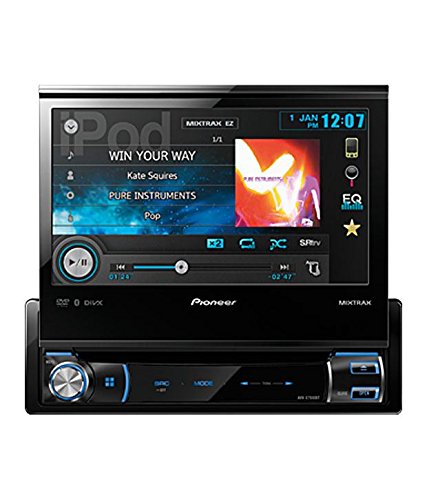
Figure 1: Front view of the Pioneer AVH-X7550BT with the screen extended, displaying media playback information.
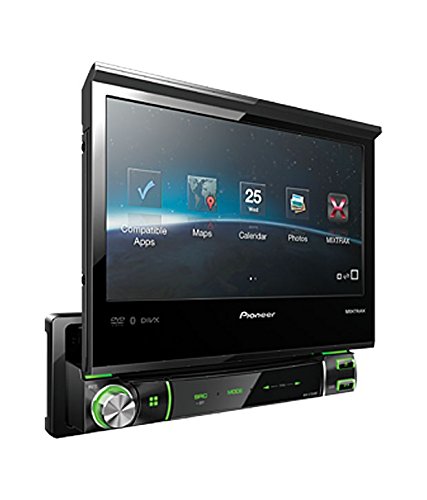
Figure 2: Angled view of the Pioneer AVH-X7550BT with the screen extended, showing various application icons.
2. Setup and Installation
Proper installation is crucial for optimal performance and safety. It is highly recommended that this unit be installed by a qualified professional car audio technician.
2.1 Initial Power-Up
- After installation, ensure all connections are secure.
- Turn on your vehicle's ignition to power the unit.
- Follow on-screen prompts for initial setup, which may include language selection and clock setting.
2.2 Wiring Considerations
Refer to the detailed wiring diagram provided with your product packaging for specific connections. Ensure correct power, ground, speaker, and accessory wire connections to prevent damage to the unit or vehicle electrical system.
3. Operating Instructions
3.1 Basic Operations
- Power On/Off: Press the [SRC/OFF] button to turn the unit on. Press and hold to turn off.
- Volume Control: Use the rotary knob or on-screen controls to adjust the volume level.
- Source Selection: Press the [SRC] button to cycle through available audio/video sources (e.g., Tuner, DVD, USB, Bluetooth Audio).
3.2 Touch Panel Display
The 17.8cm VGA touch panel allows intuitive control of the unit's functions. Tap icons or swipe to navigate menus and settings.
3.3 Media Playback
- DVD/CD: Insert a disc into the disc slot. Playback will begin automatically. Use on-screen controls for navigation (play, pause, skip).
- USB Device: Connect a USB storage device to the USB port. The unit supports MP3, WMA, iTunes AAC, WAV, DivX, MPEG-1, -2, and -4 files. Select 'USB' as the source.
- MIXTRAX EZ: Activate MIXTRAX EZ for a non-stop mix play experience with various DJ-style effects.
3.4 Bluetooth Functions
- Pairing: Enable Bluetooth on your mobile phone and search for the AVH-X7550BT. Follow the pairing instructions on both devices.
- Hands-Free Calling: Once paired, you can make and receive calls directly through the unit.
- Wireless Audio: Stream music from your Bluetooth-enabled device to the AVH-X7550BT.
3.5 Android MTP and MirrorLink
- Android MTP: Connect certain Android phones via USB for direct control and media playback.
- MirrorLink: The unit is ready for MirrorLink, allowing compatible smartphones to display their interface on the unit's screen. Additional adapters or software may be required.
3.6 Audio and Display Customization
- 8-Band Graphic EQ: Access the equalizer settings to fine-tune the audio output to your preference.
- Color Customization: Personalize the display with 5 different display colors and 112 key colors.
4. Maintenance
Regular maintenance helps ensure the longevity and performance of your AVH-X7550BT.
- Cleaning the Display: Use a soft, dry cloth to gently wipe the touchscreen. For stubborn smudges, slightly dampen the cloth with water or a screen-safe cleaner. Avoid harsh chemicals.
- Disc Care: Handle discs by their edges. Keep them clean and free of scratches. Store discs in their cases when not in use.
- General Care: Avoid exposing the unit to extreme temperatures, direct sunlight for prolonged periods, or excessive moisture.
5. Troubleshooting
If you encounter issues with your unit, refer to the following common troubleshooting steps:
- No Power: Check all power connections and the vehicle's fuse box. Ensure the ignition is on.
- No Sound: Verify speaker connections. Check volume levels and ensure the mute function is not active. Confirm the correct audio source is selected.
- Disc Not Playing: Ensure the disc is inserted correctly and is clean and free of damage. Check if the disc format is supported.
- Bluetooth Connection Issues: Ensure Bluetooth is enabled on both the unit and your mobile device. Try unpairing and re-pairing the devices.
- Touchscreen Unresponsive: Try resetting the unit (refer to your product's specific reset procedure, often a small button requiring a pointed object).
If problems persist, contact Pioneer customer support or a qualified service technician.
6. Specifications
| Feature | Specification |
|---|---|
| Brand | Pioneer |
| Model | AVH X7550BT |
| Display Type | LCD |
| Screen Size | 17.8 Centimetres |
| Media Type | CD, DVD |
| Compatible Devices | Mobile Phone |
| Special Features | Bluetooth Tethering, MP3, Primary Camera, Touchscreen, USB, Video Playback |
| Connector Type | Bluetooth |
| Operating System | Android (for compatible devices) |
| Form Factor | Touchscreen |
7. Warranty and Support
For warranty information, please refer to the warranty card included with your product packaging or visit the official Pioneer website. For technical support, service, or inquiries, please contact Pioneer customer service through their official channels.
You can find more information and support resources by visiting the Pioneer Store on Amazon.


