
1. Safety Information
Please read these safety instructions carefully before operating the TROTEC TTK 122 E dehumidifier. Failure to comply with these instructions may result in electric shock, fire, or injury.
- Ensure the power supply matches the voltage specified on the unit's rating label.
- Do not operate the unit with a damaged power cord or plug.
- Keep the unit upright during transport and operation. If the unit has been tilted, allow it to stand upright for at least 12 hours before plugging it in to prevent compressor damage.
- Do not block the air inlet or outlet. Maintain adequate clearance around the unit for proper airflow.
- Do not insert objects into the unit's openings.
- Do not use the unit in areas where flammable gases or liquids are stored.
- Always unplug the unit before cleaning, maintenance, or when not in use.
- Keep children and pets away from the unit during operation.
- Empty the water tank regularly to prevent overflow.
2. Product Overview
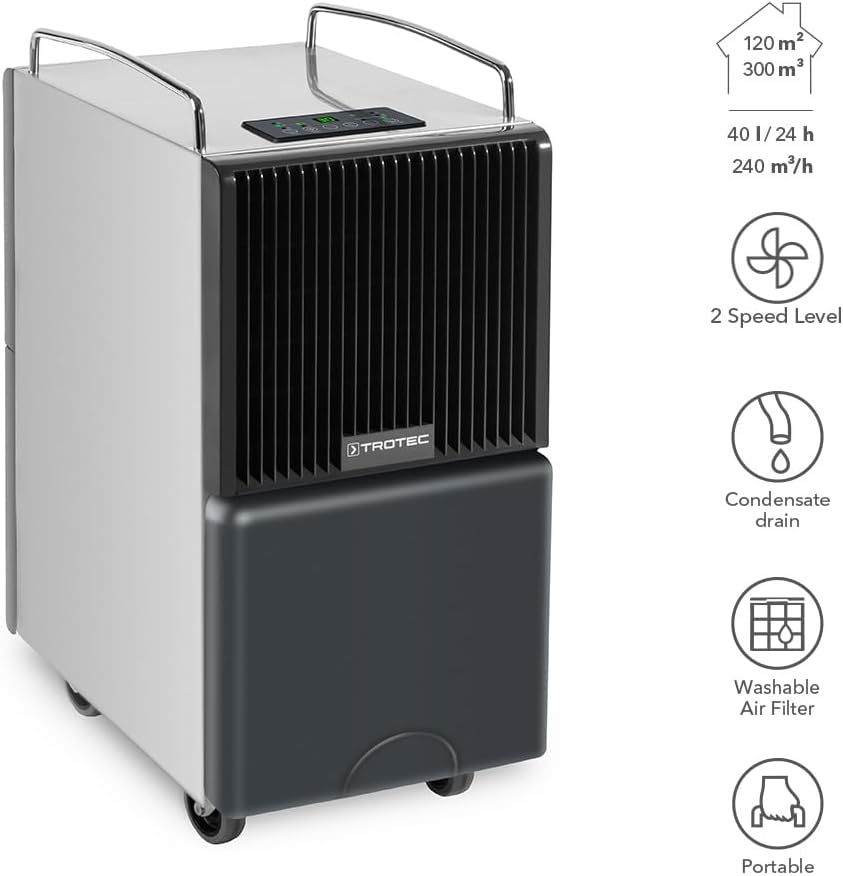
The TROTEC TTK 122 E is a high-performance dehumidifier designed for effective humidity control in various environments. It features a robust construction, a maximum dehumidification capacity of 40 liters per day, and is suitable for rooms up to 120 m² or 300 m³.
Key features include two fan speed levels, a continuous condensate drain option, a washable air filter, and a portable design with wheels and handles for easy movement.

3. Setup
3.1 Unpacking
Carefully remove the dehumidifier from its packaging. Inspect the unit for any signs of damage. Retain the packaging for future storage or transport.
3.2 Initial Placement and Waiting Period
Place the dehumidifier on a stable, level surface. Ensure there is at least 20 cm of space around the unit for proper air circulation. Important: If the unit has been transported horizontally or tilted, allow it to stand upright for a minimum of 12 hours before plugging it into a power outlet. This allows the refrigerant to settle, preventing potential damage to the compressor.
3.3 Power Connection
Plug the power cord into a grounded electrical outlet. Ensure the outlet meets the power requirements of the unit.
3.4 Water Tank Installation / Continuous Drainage
The water tank should be correctly inserted into the unit. For continuous operation without needing to empty the tank, connect a suitable hose (not included) to the continuous drainage outlet. Ensure the hose is routed downwards to allow gravity drainage into a floor drain or larger container.

4. Operating Instructions
The control panel allows you to manage the dehumidifier's functions. Familiarize yourself with the buttons and indicators.

4.1 Power On/Off
- Press the On/Off button to turn the unit on or off.
- The unit features an automatic restart function, resuming its last settings after a power interruption.
4.2 Mode Selection
- Press the Mode button to cycle through available operating modes (e.g., automatic dehumidification, continuous dehumidification, laundry drying).
4.3 Fan Speed Adjustment
- Use the Speed button to select between low and high fan speeds. Higher speeds result in faster dehumidification but may produce more noise.
4.4 Setting Target Humidity
- Use the + and - buttons to set your desired relative humidity level. The unit will operate until this level is reached, then cycle on and off to maintain it.
4.5 Timer Function
- Press the Timer button to set an operating duration (e.g., 1-24 hours) after which the unit will automatically turn off.
5. Maintenance
Regular maintenance ensures optimal performance and extends the lifespan of your dehumidifier. Always unplug the unit before performing any maintenance.
5.1 Emptying the Water Tank
When the water tank is full, the unit will automatically stop operating and an indicator light will illuminate. Carefully remove the water tank, empty it, and reinsert it securely. The unit will resume operation.
5.2 Cleaning the Air Filter
The washable air filter should be cleaned regularly (e.g., every two weeks or as needed) to prevent dust buildup and maintain efficiency.
- Turn off and unplug the dehumidifier.
- Locate and remove the air filter from the unit (refer to Figure 5.1).
- Wash the filter with lukewarm water and a mild detergent. Rinse thoroughly.
- Allow the filter to air dry completely before reinserting it into the unit. Do not use a dryer or direct heat.

5.3 Cleaning the Unit Exterior
Wipe the exterior of the unit with a soft, damp cloth. Do not use harsh chemicals, abrasive cleaners, or solvents, as these can damage the surface.
5.4 Storage
If storing the unit for an extended period, ensure the water tank is empty and clean, and the air filter is clean and dry. Store the unit in an upright position in a dry, dust-free environment.
6. Troubleshooting
If you encounter issues with your dehumidifier, refer to the following common problems and solutions:
| Problem | Possible Cause | Solution |
|---|---|---|
| Unit does not turn on | No power supply; Power cord not plugged in; Power outage | Check power connection; Ensure outlet is functional; Restore power |
| No water collected | Humidity level too low; Room temperature too low; Air filter clogged; Unit in fan-only mode | Adjust target humidity; Ensure room temperature is above 5°C; Clean air filter; Select dehumidification mode |
| Unit stops operating, Full Tank indicator on | Water tank is full or incorrectly inserted | Empty water tank and reinsert it correctly |
| Reduced dehumidification efficiency | Air filter clogged; Air inlet/outlet blocked; Room too large | Clean air filter; Clear obstructions; Ensure unit is suitable for room size |
| Unusual noise | Unit not on a level surface; Loose parts; Internal issue | Place on a level surface; Contact customer support if noise persists |
If the problem persists after attempting these solutions, please contact TROTEC customer support.
7. Specifications
Detailed technical specifications for the TROTEC TTK 122 E Dehumidifier:

| Specification | Value |
|---|---|
| Model Name | TTK 122 E |
| Model Number | 1120000123 |
| Moisture Removal Capacity | 40 Liters per day |
| Airflow Rate | 240 Cubic meters per hour |
| Recommended Room Size (Area) | Up to 120 m² |
| Recommended Room Size (Volume) | Up to 300 m³ |
| Water Tank Volume | 40 Liters (Note: User reviews indicate effective capacity around 9-10 Liters before auto-stop) |
| Product Dimensions (L x W x H) | 31P x 45.3l x 63.5H centimeters (30.99 x 43.51 x 65 cm) |
| Item Weight | 27.5 Kilograms |
| Material | Alloy Steel |
| Color | Black |
| Special Feature | Portable |
| Operating Mode | Comfort |
| Upper Temperature Range | 35 Degrees Celsius |
| Country of Origin | Spain |
8. Warranty and Support
For warranty information, technical support, or service inquiries regarding your TROTEC TTK 122 E dehumidifier, please refer to the warranty card included with your purchase or visit the official TROTEC website. You can also contact TROTEC customer service directly for assistance.


