
1. Introduction
Thank you for choosing the Retevis RT32 Kids Walkie Talkie. This manual provides essential information for the safe and effective use of your two-way radio. Please read it thoroughly before operation and retain it for future reference.
The Retevis RT32 is designed for children, offering clear communication with 22 channels, VOX function, and a built-in flashlight. Its compact size and durable design make it suitable for various outdoor and indoor activities.
2. What's in the Box
Upon opening your package, please ensure all items are present and in good condition:
- 2 x Retevis RT32 Walkie Talkies
- 2 x Belt Clips
- 2 x Lanyards
- 1 x User Manual

Image: The package contents for the Retevis RT32 Walkie Talkies, showing two green walkie talkies, two green lanyards, and two green belt clips.
3. Product Overview
Familiarize yourself with the various parts and controls of your Retevis RT32 Walkie Talkie:

Image: A detailed diagram labeling the components of the Retevis RT32 Walkie Talkie, including the antenna, earpiece jack, lamp, lamp button, down button, call button, talk button, speaker, microphone, up button, menu button, and power button.
- Antenna: For transmitting and receiving signals.
- Earpiece Jack: Connect an external earpiece (not included).
- Lamp: Built-in flashlight.
- Lamp Button: Activates the flashlight.
- Down Button: Navigates menus and decreases values.
- Call Button: Sends a call tone to other radios on the same channel.
- Talk Button (PTT): Press and hold to transmit your voice.
- Speaker: Outputs received audio.
- Microphone: Captures your voice for transmission.
- Up Button: Navigates menus and increases values.
- Menu Button: Accesses settings and functions.
- Power Button: Turns the radio on/off.
4. Setup
4.1 Battery Installation
Each Retevis RT32 Walkie Talkie requires 4 AAA batteries (not included).
- Locate the battery compartment cover on the back of the walkie talkie.
- Press down on the tab and slide the cover downwards to open.
- Insert 4 AAA batteries, ensuring correct polarity (+/-) as indicated inside the compartment.
- Replace the battery compartment cover by sliding it upwards until it clicks into place.
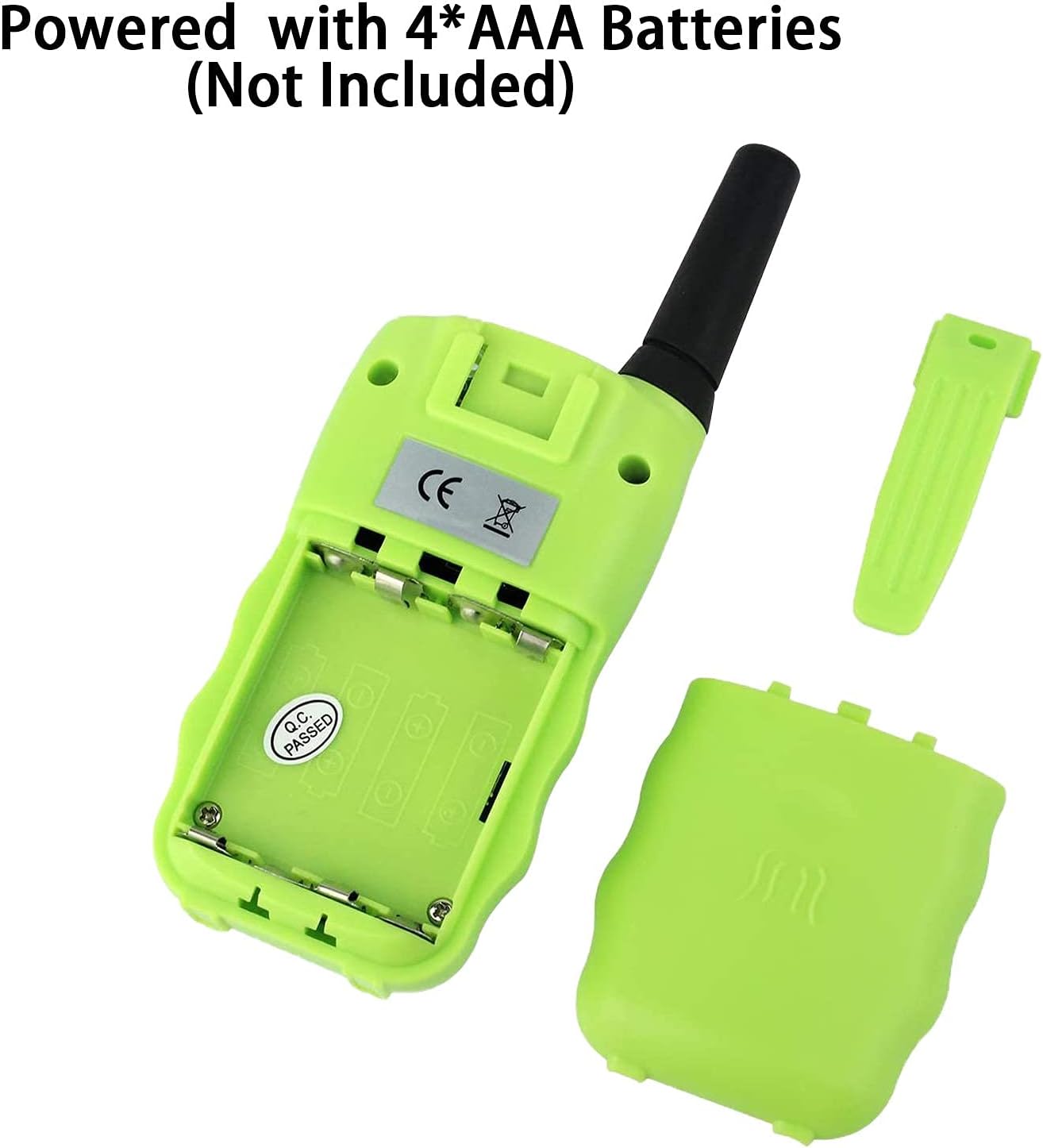
Image: The back of the Retevis RT32 Walkie Talkie with the battery cover removed, illustrating the correct placement for four AAA batteries.
4.2 Attaching the Belt Clip and Lanyard
- Belt Clip: Slide the belt clip onto the designated slot on the back of the walkie talkie until it locks securely.
- Lanyard: Thread the lanyard through the small loop at the top of the walkie talkie, near the antenna, and secure it.

Image: A Retevis RT32 Walkie Talkie with a belt clip attached to the back and a lanyard threaded through the top, demonstrating how to carry the device.
5. Basic Operation
5.1 Power On/Off and Volume Adjustment
- Power On/Off: Press and hold the Power Button (red button) for 3 seconds. A beep sound will confirm the action.
- Volume Adjustment: Press the Up or Down buttons to increase or decrease the volume.
Video: Demonstrates how to power on/off the Retevis RT32 walkie talkie and adjust the volume using the Up and Down buttons.
5.2 Channel Selection
The RT32 has 22 available channels. To communicate, both walkie talkies must be on the same channel.
- Press the Menu Button once. The channel number on the display will start to flash.
- Use the Up or Down buttons to select your desired channel (1-22).
- Press the PTT (Talk) Button to save the setting.
5.3 Setting Sub-codes (CTCSS/DCS)
Sub-codes help reduce interference from other radios by filtering out transmissions that do not use the same sub-code. Both radios must have the same channel and sub-code to communicate.
- Press the Menu Button twice. The sub-code number will start to flash.
- Use the Up or Down buttons to select your desired sub-code.
- Press the PTT (Talk) Button to save the setting.
5.4 Call Ringtone Selection
You can choose from several call ringtones.
- Press the Menu Button four times. The current ringtone setting will flash.
- Use the Up or Down buttons to preview and select a ringtone.
- Press the PTT (Talk) Button to save the setting.
5.5 VOX Function (Voice Operated Exchange)
VOX allows you to transmit without pressing the PTT button. The radio will automatically transmit when it detects your voice. You can adjust its sensitivity or turn it off.
- Press the Menu Button five times. The VOX setting (e.g., "0F" for off, or a sensitivity level like "01", "02", "03") will flash.
- Use the Up or Down buttons to select a VOX sensitivity level (1-3, with 3 being most sensitive) or turn it OFF.
- Press the PTT (Talk) Button to save the setting.
5.6 Key Tones (Beep Sound)
You can enable or disable the key tones (beep sound when pressing buttons).
- Press the Menu Button six times. The key tone setting will flash.
- Use the Up or Down buttons to turn key tones ON or OFF.
- Press the PTT (Talk) Button to confirm changes.
5.7 Transmit Power (TX Power)
Adjust the transmit power between high and low. High power provides longer range but consumes more battery. Low power conserves battery life.
- Press the Menu Button eight times. The TX power setting (H/L) will flash.
- Use the Up or Down buttons to select High (H) or Low (L) power.
- Press the PTT (Talk) Button to confirm changes.
5.8 Scan Function
The scan function allows the radio to automatically scan through channels to find active conversations.
- To activate scan: Press the SCAN Button (often the 'MON' button on this model).
- The radio will cycle through channels until it detects a signal. It will stop on the active channel.
- To stop scan: Press the PTT (Talk) Button or the SCAN Button again.
5.9 Keyboard Lock
The keyboard lock prevents accidental changes to settings.
- To activate/deactivate keyboard lock: Long press the Menu Button until a lock icon appears/disappears on the display.
6. Special Features
6.1 Flashlight
The built-in flashlight provides illumination in low-light conditions.
- To turn the flashlight ON/OFF: Press the Lamp Button (blue button).

Image: A Retevis RT32 Walkie Talkie with its flashlight activated, casting light on a nighttime camping scene with two tents.
7. Maintenance
- Cleaning: Wipe the walkie talkie with a soft, damp cloth. Do not use harsh chemicals or abrasive cleaners.
- Storage: If storing for extended periods, remove the batteries to prevent leakage and corrosion. Store in a cool, dry place.
- Water Resistance: This product is NOT water resistant. Avoid exposure to water or high humidity.
- Battery Replacement: Replace all 4 AAA batteries at the same time. Do not mix old and new batteries or different types of batteries.
8. Troubleshooting
| Problem | Possible Cause | Solution |
|---|---|---|
| No power | Batteries are dead or incorrectly installed. | Replace batteries or check polarity. |
| Cannot communicate with other radios | Radios are on different channels or sub-codes. Out of range. | Ensure all radios are on the same channel and sub-code. Move closer to the other radio. |
| Poor sound quality / Static | Low battery. Out of range. Interference. | Replace batteries. Move closer. Change channel/sub-code. Avoid obstacles. |
| Keyboard locked | Keyboard lock function is active. | Long press the Menu button to unlock the keyboard. |
| Display flashing uncontrollably | Potential internal malfunction or software glitch. | Try resetting the radio (see below). If the issue persists, contact customer support. |
8.1 Resetting the Radio
If you experience persistent issues, you can try resetting the radio to its factory default settings.
- In the shutdown state, press the Power Button and the Menu Button at the same time to reset the radio.
9. Specifications
| Feature | Detail |
|---|---|
| Model | RT32 |
| Brand | Retevis |
| Number of Channels | 22 |
| Frequency Range | 462-467 MHz |
| Talking Range Maximum | 3 Kilometers (approx. 1.86 miles) |
| Power Source | 4 x AAA batteries (not included) |
| Product Dimensions | 5.51 x 1 x 2.17 inches |
| Item Weight | 2.5 ounces |
| Special Features | VOX, Flashlight, Keyboard Lock, Belt Clip, Lanyard |
| Water Resistance Level | Not Water Resistant |
10. Warranty and Support
Retevis products are designed for reliability and performance. For specific warranty information, please refer to the warranty card included with your purchase or visit the official Retevis website.
If you encounter any issues or have questions regarding your Retevis RT32 Walkie Talkie, please contact Retevis Customer Support. Contact details can typically be found on the product packaging or the official Retevis website.
Online Resources: For additional support, FAQs, and product information, please visit the Retevis Store on Amazon.


