
1. Introduction
This manual provides essential information for the safe and efficient installation, operation, and maintenance of the Uponor Thermal Actuator ST230, 230V, Model 1013006. Please read these instructions carefully before proceeding with installation or use. Retain this manual for future reference.
2. Product Overview
The Uponor Thermal Actuator ST230, 230V, Model 1013006 is designed for controlling the return valves on Uponor Vario S manifolds in underfloor heating systems. It operates on 230 Volts and features a screw connection IG M 30 x 1.5, a stroke indicator, and a 1.0-meter connection cable with wire end ferrules. The unit is splash-proof with an IP54 rating and is CE and RoHS certified.

Figure 2.1: Uponor Thermal Actuator ST230, 230V, Model 1013006. This image shows the blue housing of the actuator with the Uponor logo and the grey screw connection base.
3. Safety Information
- Installation and electrical connections must be performed by a qualified electrician or authorized personnel in accordance with local regulations and standards.
- Ensure the main power supply is disconnected before performing any installation, maintenance, or troubleshooting.
- Do not open the actuator housing. There are no user-serviceable parts inside.
- Protect the device from direct water spray or immersion, despite its splash-proof rating.
- Use only genuine Uponor components and accessories.
4. Setup and Installation
The thermal actuator is designed for easy mounting on Uponor Vario S manifold return valves. Follow these steps for proper installation:
- Ensure the heating system is depressurized and the manifold valves are in the correct position for actuator mounting.
- Carefully screw the actuator onto the valve connection (IG M 30 x 1.5) by hand until it is securely fastened. Do not overtighten.
- Connect the 230V electrical cable to the appropriate control unit or thermostat terminals. The cable is 0.75 mm² x 1.0 m and comes with wire end ferrules for secure connection.
- Verify all connections are secure and correctly wired according to the system's electrical diagram.
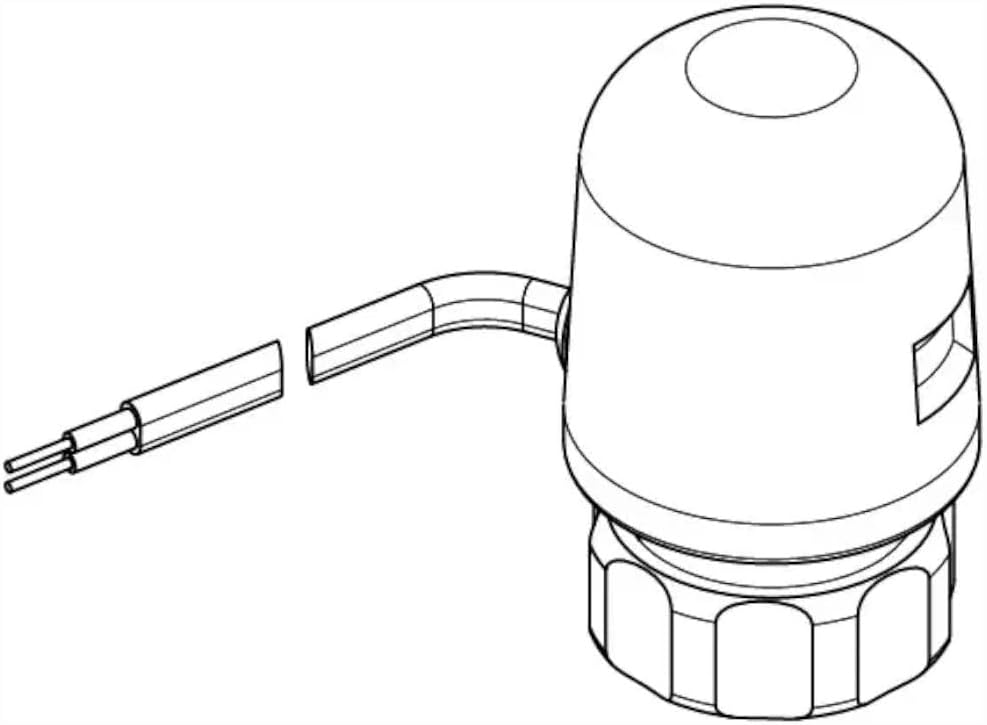
Figure 4.1: Diagram showing the Uponor Thermal Actuator with its integrated connection cable. This illustrates the actuator's form factor and cable exit point.

Figure 4.2: Dimensional drawing of the Uponor Thermal Actuator, indicating key measurements (do, h, G) for installation planning. 'do' represents the outer diameter, 'h' the height, and 'G' the thread size.
5. Operating Instructions
The Uponor Thermal Actuator operates automatically in conjunction with a room thermostat or heating control system. When the control system signals a demand for heat, the actuator receives power, causing its internal element to expand and open the valve. When the heat demand is met, power is removed, and the actuator cools, closing the valve.
- Stroke Indicator: The actuator is equipped with a stroke indicator, typically a small pin or window, which visually confirms the valve's open or closed position. Observe this indicator to verify proper operation.
- Initial Operation: After installation and power-up, allow a short period for the actuator to respond to the control signal and fully open or close the valve.
6. Maintenance
The Uponor Thermal Actuator ST230, 230V, Model 1013006 is designed for maintenance-free operation. No regular servicing or lubrication is required.
- Keep the exterior of the actuator clean and free from dust or debris. Use a soft, dry cloth for cleaning.
- Do not use abrasive cleaners or solvents.
- Periodically check the electrical connections for any signs of wear or damage.
7. Troubleshooting
If the thermal actuator is not functioning as expected, consider the following:
- Actuator not opening/closing:
- Check if the control system (thermostat) is calling for heat.
- Verify that the actuator is receiving 230V power.
- Ensure electrical connections are secure and correct.
- Confirm the actuator is correctly screwed onto the valve.
- No visible movement of stroke indicator:
- Allow sufficient time for the actuator to react (thermal actuators have a delay).
- Check power supply and control signal.
If issues persist after checking these points, contact qualified service personnel.
8. Specifications

Figure 8.1: Technical data sheet for the Uponor Thermal Actuator ST230, 230V, Model 1013006, providing detailed specifications and contact information.
| Specification | Value |
|---|---|
| Brand | Uponor |
| Model Number | 1013006 |
| Manufacturer | Uponor |
| Product Dimensions (L x W x H) | 5 x 5 x 7.5 cm |
| Weight | 120 Grams |
| Voltage | 230 Volts |
| Maximum Voltage | 230 Volts |
| Connector Type | Spade |
| Contact Material | Stainless Steel |
| Insulation Material | Polyolefin |
| Terminal Type | Spade Terminal |
| Compliant Specifications | CE, RoHS |
| Country of Origin | Germany |
| International Article Code (EAN) | 04021598002937 |
| Connection Cable | 0.75 mm² x 1.0 m, without plug, with wire end ferrules |
| Protection Class | IP54 (Splash-proof) |
| Valve Connection | Screw connection IG M 30 x 1.5 |
| Feature | Stroke indicator |
9. Warranty and Support
Uponor products are manufactured to high-quality standards. For specific warranty terms and conditions, please refer to the documentation provided with your purchase or contact Uponor directly. Information regarding spare parts availability is not provided in the product specifications.
Contact Information:
Uponor GmbH
Industriestraße 56
97437 Hassfurt
Germany
Telephone: +4932210090856
Email: Kundenservice@uponor.com
Website: www.uponor.com/de-de


