
1. Introduction
Product Overview
This ITC Chrome Flip Drain Assembly is designed for efficient and convenient drainage in sinks. It features a pivot flip mechanism, eliminating the need for traditional pop-up assemblies, which simplifies installation. Constructed from solid brass, it offers durability and an aesthetic appeal superior to plastic or basket drain plugs. The design allows for adjustment to various sink depths, and its compact overall depth facilitates installation in restricted spaces.
Key Features
- Simplified installation compared to traditional pop-up drains.
- Durable solid brass construction.
- Adjustable design to accommodate various sink depths.
- Features a 90-degree elbow for flexible plumbing connections.
- Requires a 1.5-inch cut-out size for installation.
2. Safety Information
Please read all instructions carefully before installation and use. Failure to follow these instructions may result in property damage or injury. Keep this manual for future reference.
- Always turn off the water supply before beginning any plumbing work.
- Wear appropriate personal protective equipment, such as safety glasses and gloves.
- Ensure all connections are properly sealed to prevent leaks.
- Do not overtighten connections, as this can damage components.
- If you are unsure about any part of the installation process, consult a qualified plumber.
3. Package Contents
The package for the ITC 98110-CH-DB Chrome Flip Drain Assembly typically includes:
- One (1) ITC 98110-CH-DB Chrome Flip Drain Assembly (including flange, body, gaskets, and mounting nut).
4. Installation Instructions
Before You Begin:
Ensure the sink has a 1.5-inch cut-out for the drain. Gather necessary tools such as plumber's putty or silicone sealant, a wrench, and a soft cloth.
Installation Steps:
- Prepare the Sink Opening: Clean the sink drain opening thoroughly. Apply a bead of plumber's putty or silicone sealant around the underside of the drain flange.
- Position the Drain: Insert the drain assembly into the sink opening from above, ensuring the flange is centered and seated properly.
- Secure the Drain: From underneath the sink, attach the rubber gasket and mounting nut. Hand-tighten first, then use a wrench to secure firmly, being careful not to overtighten. The assembly is adjustable to fit various sink depths.
- Connect Plumbing: Attach the 90-degree elbow to the drain assembly. Connect your existing plumbing (e.g., P-trap) to the elbow. Ensure all connections are watertight.
- Test for Leaks: Fill the sink with water and then drain it, checking for any leaks around the drain assembly and plumbing connections. Tighten any leaking connections as needed.
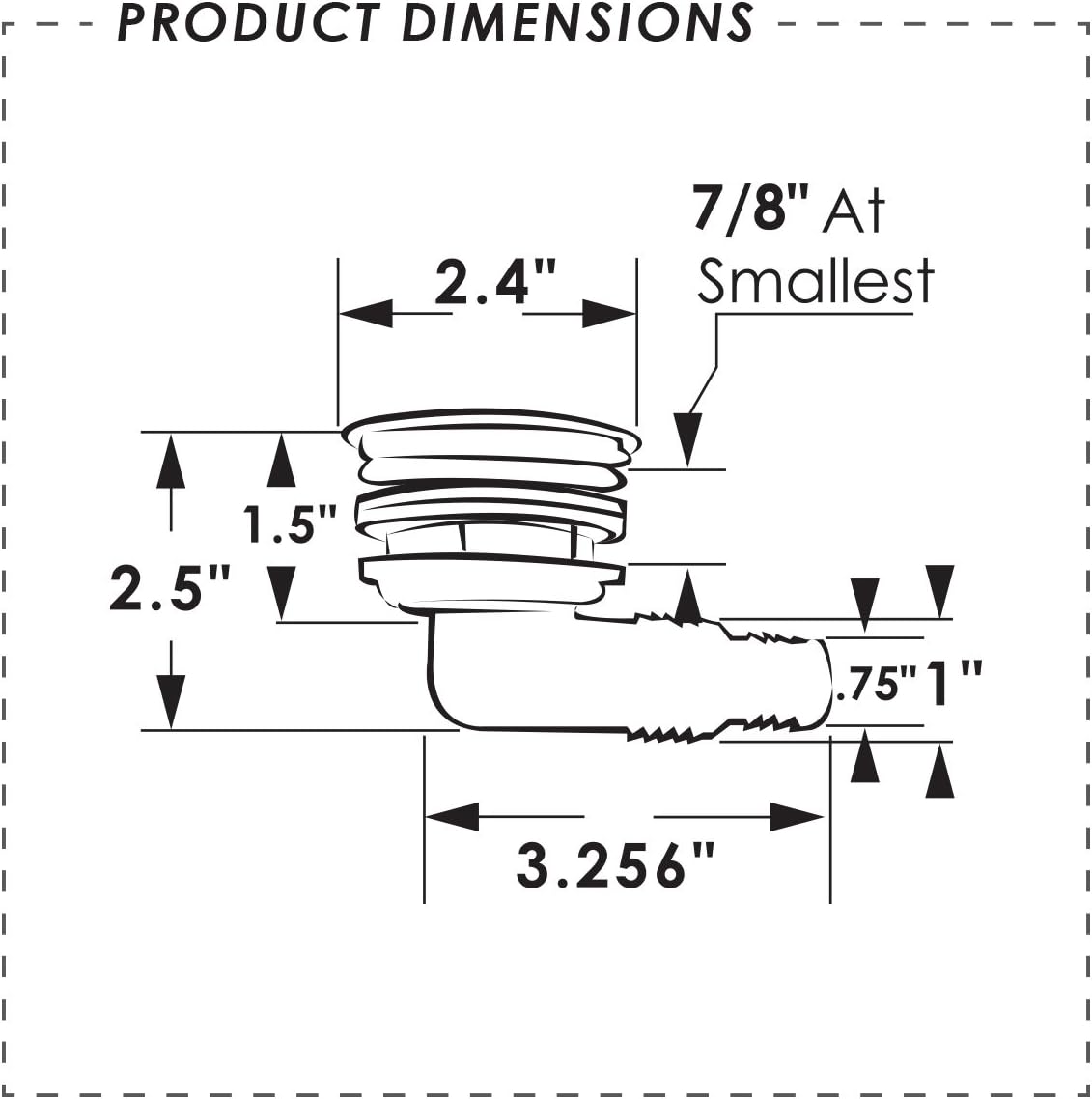
Figure 1: Product Dimensions. This diagram illustrates the key measurements for installation, including a 1.5-inch cut-out size and an overall depth of approximately 2.5 inches.

Figure 2: ITC 98110-CH-DB Chrome Flip Drain Assembly. This image shows the complete drain assembly with its chrome finish and integrated flip mechanism.
5. Operation
Using the Flip Drain:
To close the drain and retain water in the sink, simply push down on the flip mechanism located within the drain opening. To open the drain and allow water to flow out, push the flip mechanism again to its open position. Ensure the mechanism moves freely for proper function.
6. Maintenance and Care
Cleaning:
Clean the chrome finish regularly with a soft cloth and mild, non-abrasive cleaner. Avoid harsh chemicals, abrasive pads, or strong detergents that can damage the finish. Rinse thoroughly with water and dry with a soft cloth to prevent water spots.
Inspection:
Periodically check for any signs of wear, corrosion, or leaks. Ensure the flip mechanism operates smoothly and is free of debris. If any components appear damaged, consider replacement.
7. Troubleshooting
Slow Drainage:
- Check for obstructions in the drain or P-trap.
- Ensure the flip mechanism is fully open and not partially blocking the flow.
Leaks:
- Verify all plumbing connections are tight.
- Inspect gaskets and seals for damage or improper seating; replace if necessary.
- Ensure plumber's putty or sealant was applied correctly during installation.
Flip Mechanism Not Operating Smoothly:
- Clean any debris (e.g., hair, soap residue) from around the flip mechanism.
- Ensure the mechanism is not obstructed by foreign objects.
8. Specifications
| Manufacturer | ITC |
| Model | 98110-CH-DB |
| Brand | ITC |
| Product Dimensions | 10.16 x 6.35 x 6.99 cm (4 x 2.5 x 2.75 inches) |
| Item Weight | 272 g (0.6 lbs) |
| Material | Brass, Plastic |
| Colour | Chrome |
| Cut-out Size | 1.5 inches |
| Overall Depth | Approximately 2.256 inches |
| UPC | 733328150149, 096496000570 |
| ASIN | B00L8KP10K |
| Date First Available | July 28, 2015 |
9. Warranty and Support
Warranty Information:
Please refer to the manufacturer's official website or contact their customer service for detailed warranty information regarding the ITC 98110-CH-DB Chrome Flip Drain Assembly. Warranty terms may vary and typically cover manufacturing defects.
Customer Support:
For technical assistance, replacement parts, or further inquiries, please contact ITC customer support. Contact details can typically be found on the product packaging or the manufacturer's official website. When contacting support, please have your product model number (98110-CH-DB) and purchase information readily available.