
EE 300010611
EE Osprey Mobile Wi-Fi User Manual
Model: 300010611
Introduction
The EE Osprey Mobile Wi-Fi device allows you to take your broadband connection with you, providing portable 4GEE data access. It enables up to 10 devices to connect simultaneously to its Wi-Fi network. Featuring a 3000mAh built-in battery, it offers up to 6 hours of usage between charges, making it ideal for on-the-go connectivity.

Image: Front view of the EE Osprey Mobile Wi-Fi device, displaying its screen with network signal, 4G indicator, EE logo, and battery status. The device is black with yellow sides.
Box Contents
Please check the package contents to ensure all items are present:
- 1x 4GEE Mobile Wi-Fi Hotspot Device
- USB Cable
- Mains Charger
- Lanyard
- SIM Card
- Quick Start Guide
- 'Keep Me Card'
- Safety Information Leaflet
Setup
1. Inserting the SIM Card
Before first use, you need to insert the provided SIM card into the device.
- Locate the SIM card slot on the device. This is typically found under a removable cover or a dedicated slot on the side.
- Carefully open the SIM card slot cover.
- Insert the SIM card into the slot with the gold contacts facing down and the notched corner aligned correctly.
- Gently push the SIM card until it clicks into place.
- Close the SIM card slot cover securely.
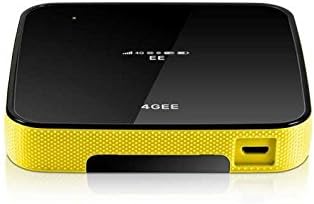
Image: Side view of the EE Osprey Mobile Wi-Fi device, highlighting the USB charging port and the textured yellow side panel.
2. Charging the Device
For optimal performance, fully charge the device before its first use.
- Connect the provided USB cable to the device's charging port.
- Connect the other end of the USB cable to the mains charger.
- Plug the mains charger into a power outlet.
- The device's indicator light or screen will show charging status.
- Once fully charged, disconnect the charger.
3. Powering On
Press and hold the power button (usually located on the side or top) until the screen illuminates and the device starts up.
Operating Instructions
Connecting to the Wi-Fi Network
To connect your devices (laptops, tablets, smartphones) to the EE Osprey Mobile Wi-Fi:
- Ensure the EE Osprey device is powered on and has established a network connection (indicated by signal bars on its screen).
- On your Wi-Fi enabled device, open the Wi-Fi settings.
- Search for available Wi-Fi networks. The EE Osprey network will typically appear as "EE WiFi" followed by a unique identifier.
- Select the EE Osprey network.
- When prompted, enter the Wi-Fi password (SSID Key). This information is usually found on a sticker inside the device's battery compartment, on the 'Keep Me Card', or on the device's screen.
- Once the password is entered correctly, your device will connect to the EE Osprey Mobile Wi-Fi network.
The device supports connection for up to 10 devices simultaneously.
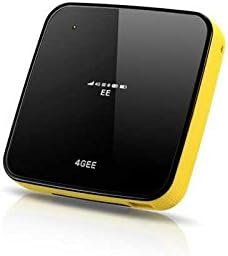
Image: Angled view of the EE Osprey Mobile Wi-Fi device, showcasing its compact and portable design with the black front and yellow side.
Monitoring Data Usage
The device's display provides status information, including data usage and battery life. You can also manage your data and top-up via the EE online account or app, as indicated by the 'Keep Me Card'.
Maintenance
Battery Care
- Avoid fully discharging the battery frequently.
- Charge the device using only the provided charger and USB cable.
- Do not expose the device to extreme temperatures, as this can affect battery life.
- If storing the device for an extended period, charge it to about 50% before storage.
General Device Care
- Keep the device clean by wiping it with a soft, dry cloth.
- Avoid exposing the device to water or excessive moisture.
- Do not drop or subject the device to strong impacts.
- Store the device in a cool, dry place when not in use.
Troubleshooting
| Problem | Possible Cause | Solution |
|---|---|---|
| Device does not power on. | Low or no battery charge. | Connect the device to the charger and allow it to charge for at least 30 minutes before attempting to power on again. |
| Cannot connect to Wi-Fi network. | Incorrect Wi-Fi password; device out of range; too many connected devices. | Verify the Wi-Fi password. Move closer to the Osprey device. Disconnect some devices if 10 are already connected. Restart both the Osprey and the connecting device. |
| No internet access despite Wi-Fi connection. | No network signal; SIM card issue; data allowance depleted. | Check the signal strength on the Osprey device's screen. Ensure the SIM card is correctly inserted. Check your data allowance via your EE account. Try restarting the device. |
| Slow internet speed. | Weak signal; network congestion; device interference. | Move to an area with better network coverage. Reduce the number of connected devices. Avoid placing the device near other electronic equipment that may cause interference. |
Specifications
| Model Number | 300010611 |
| Brand | EE |
| Connectivity Technology | Wi-Fi |
| Wireless Communication Standard | 802.11ac |
| Battery | 3000mAh Lithium Ion (included) |
| Battery Life (approx.) | Up to 6 hours |
| Max Connected Devices | 10 |
| Colour | Black and yellow |
| Antenna Type | Internal |
| Control Method | Touch |
| Package Dimensions | 13.8 x 10.8 x 5.2 cm |
| Weight | 359.99 g |
Warranty and Support
This device is SIM FREE and locked to the EE Network. For warranty information and customer support, please refer to the 'Safety Information Leaflet' included in your package or visit the official EE website. Keep your proof of purchase for any warranty claims.
Legal Disclaimer: This device is SIM FREE and locked to the EE Network.
Related documents300010611


Ask a question about this manual
Ask about setup, troubleshooting, compatibility, parts, safety, or missing instructions. Manuals+ will review the question and use this page’s manual context to help answer it.