
1. Introduction
This manual provides detailed instructions for the safe installation, operation, and maintenance of your Leviton 5801-W Single Receptacle. This device is a 20 Amp, 125 Volt, NEMA 5-20R straight blade grounding receptacle designed for residential and commercial applications. Please read this manual thoroughly before beginning installation to ensure proper function and safety.
2. Safety Information
WARNING: To avoid fire, shock, or death, turn off power at the circuit breaker or fuse box and test that power is off before wiring. All wiring must be in accordance with national and local electrical codes. If you are unsure about any part of these instructions, consult a qualified electrician.
- Always disconnect power before working on electrical circuits.
- Use only copper wire with this device. Do not use aluminum wire.
- Ensure all wire connections are secure and properly insulated.
- Do not exceed the specified electrical ratings (20A, 125V).
- This device is intended for indoor use only.
3. Package Contents
Verify that your package contains the following items:
- Leviton 5801-W Single Receptacle (Quantity as purchased, e.g., 10 units)
- Mounting Screws
4. Installation (Setup)
Tools Required: Screwdriver (Phillips and/or Flathead), Wire Strippers, Electrical Tape, Voltage Tester.
- Turn Off Power: Locate the circuit breaker or fuse that controls the power to the outlet where you will install the receptacle. Turn it OFF. Use a voltage tester to confirm that the power is completely off at the outlet.
- Remove Old Receptacle (if applicable): Unscrew and carefully pull the existing receptacle from the electrical box. Disconnect the wires, noting which wire was connected to which terminal.
- Prepare Wires: Strip approximately 1/2 inch (12.7 mm) of insulation from the ends of the circuit wires. Ensure the wire ends are clean and straight.
- Wire Connections: Connect the wires to the new Leviton 5801-W receptacle as follows:
- Green or Bare Copper Wire: Connect to the green grounding screw.
- White Wire (Neutral): Connect to the silver screw.
- Black or Colored Wire (Hot/Live): Connect to the brass screw.
- Mount Receptacle: Carefully fold the wires into the electrical box. Insert the receptacle into the box and secure it with the provided mounting screws.
- Install Wallplate: Attach the decorative wallplate (not included) over the receptacle.
- Restore Power: Turn the power back ON at the circuit breaker or fuse box.
- Test: Plug a device into the new receptacle to ensure it is functioning correctly.
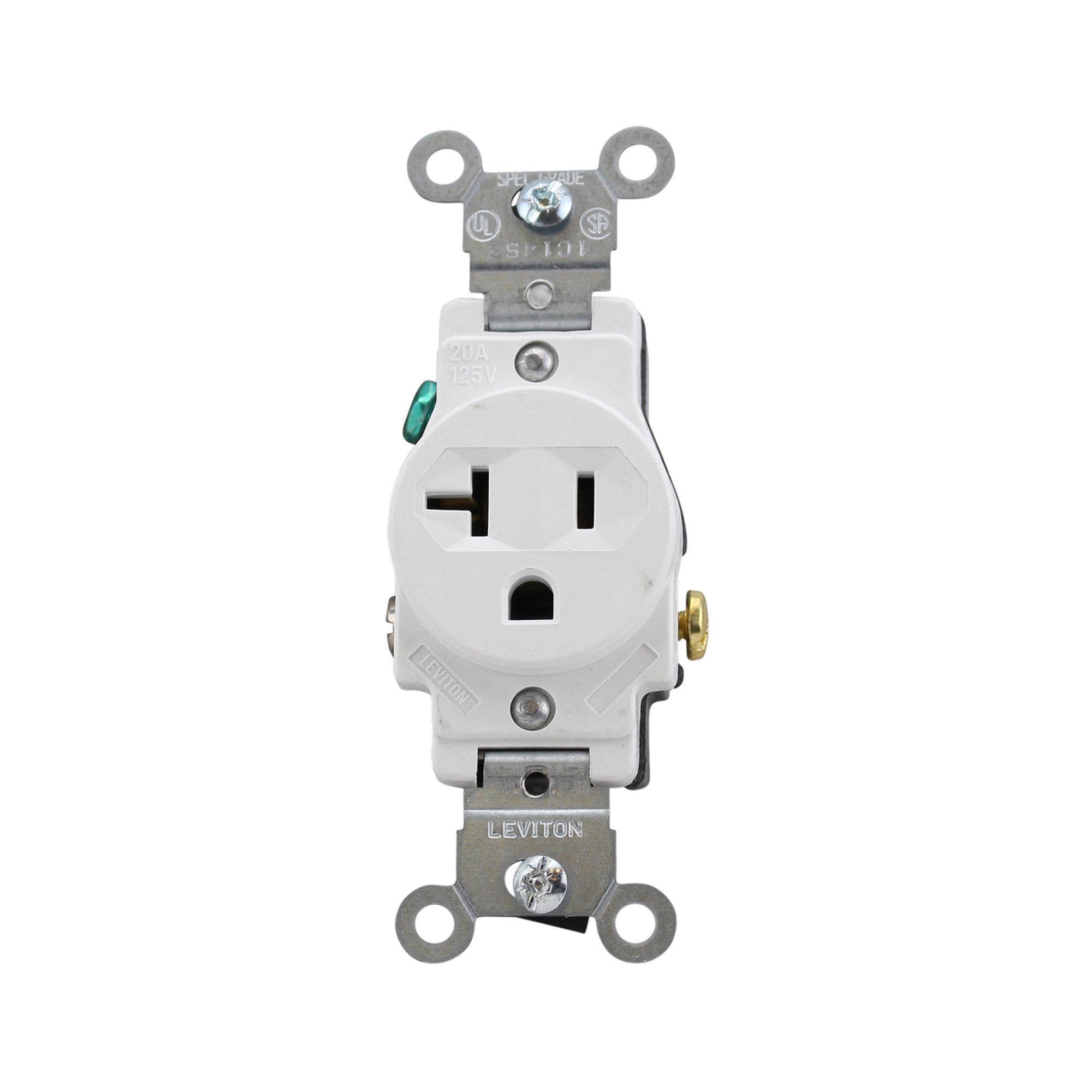
Figure 1: Leviton 5801-W Single Receptacle. This image displays the front of the receptacle, highlighting the NEMA 5-20R configuration with its distinct blade and ground pin layout, designed for 20 Amp, 125 Volt applications.
5. Operation
The Leviton 5801-W Single Receptacle is designed for straightforward operation. Once properly installed and powered, simply insert the plug of your electrical device into the receptacle's slots. Ensure the plug is fully inserted for a secure connection. This receptacle is rated for devices requiring up to 20 Amps at 125 Volts.
6. Maintenance
The Leviton 5801-W receptacle requires minimal maintenance. Periodically inspect the receptacle for any signs of damage, such as cracks, discoloration, or loose connections. If any damage is observed, turn off power at the circuit breaker and replace the receptacle immediately. Clean the surface with a soft, dry cloth; do not use abrasive cleaners or solvents.
7. Troubleshooting
- No Power to Receptacle:
- Check the circuit breaker or fuse. Reset if tripped or replace if blown.
- Ensure all wire connections are secure at the receptacle and in the electrical box.
- Verify that the power supply to the circuit is active.
- Loose Plug Connection:
- If plugs feel loose, the receptacle may be worn. Turn off power and replace the receptacle.
- Overheating:
- If the receptacle feels warm to the touch, immediately unplug devices and turn off power. This could indicate an overload or a faulty connection. Consult a qualified electrician.
8. Specifications
| Feature | Specification |
|---|---|
| Model Number | 5801-W |
| Type | Single Receptacle, Straight Blade, Grounding |
| NEMA Configuration | 5-20R |
| Amperage | 20 Amps |
| Voltage | 125 Volts |
| Color | White |
| Material | Steel (Internal components, housing material not specified but typically thermoplastic) |
| Compatible Devices | All (devices with NEMA 5-20P plugs) |
| Manufacturer | Leviton |
9. Warranty & Support
Leviton products are manufactured to the highest quality standards. For specific warranty information and technical support, please visit the official Leviton website or contact their customer service department. Keep your purchase receipt as proof of purchase.
Leviton Official Website: www.leviton.com


