
Introduction
This manual provides detailed instructions for the safe installation, operation, and maintenance of the Leviton 2460 Locking Blade Receptacle. This industrial-grade receptacle is designed for secure and reliable power connections in demanding environments. Please read this manual thoroughly before installation or use to ensure proper function and safety.
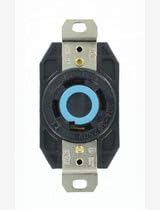
Image: Front view of the Leviton 2460 Locking Blade Receptacle, showcasing its robust black housing and the distinctive blue locking ring for secure plug retention.
Important Safety Information
WARNING: Risk of electric shock or fire. Improper installation or use can lead to serious injury or death. Always follow these safety guidelines:
- Always turn off power at the circuit breaker or fuse box before installing, servicing, or removing the receptacle.
- Verify that power is off using a voltage tester before touching any wires.
- All wiring must comply with national and local electrical codes. If you are unsure about any part of these instructions, consult a qualified electrician.
- Do not use this device with damaged wires or if the housing is cracked or broken.
- Ensure all connections are tight and secure to prevent overheating and fire hazards.
- This receptacle is designed for specific voltage and amperage ratings. Do not exceed these ratings.
Product Features
- Locking Blade Design: Ensures a secure connection, preventing accidental disconnections in high-vibration or critical applications.
- High Voltage/Amperage Rating: Rated for 20A, 347/600V, suitable for industrial and commercial power distribution.
- 3-Phase, 4-Pole, 4-Wire (3PY 4P4W): Configured for specific three-phase electrical systems.
- Non-Grounding: Designed for systems where a separate grounding conductor is not required or provided at the receptacle.
- Durable Construction: Made from robust materials for long-lasting performance in harsh environments.
Installation and Setup
Follow these steps for proper installation of the Leviton 2460 Receptacle:
- Turn Off Power: Locate the circuit breaker or fuse controlling the circuit where the receptacle will be installed. Turn it OFF. Verify power is off with a voltage tester.
- Prepare Wires: Strip approximately 1/2 inch (12-15 mm) of insulation from the ends of the circuit wires. Ensure wires are clean and free of nicks.
- Connect Wires: Connect the circuit wires to the corresponding terminals on the receptacle. This L20-20R receptacle is a 4-wire, 3-phase, non-grounding device. Refer to the wiring diagram provided with your specific electrical system documentation for correct phase connections. Ensure all screws are tightened securely to the manufacturer's specified torque.
- Mount Receptacle: Carefully position the receptacle into the electrical box. Secure it using the mounting screws provided. Ensure no wires are pinched or damaged during mounting.
- Install Faceplate (if applicable): Attach the appropriate faceplate or cover to the electrical box.
- Restore Power: Once installation is complete and all connections are secure, turn the power back ON at the circuit breaker or fuse box.
Operation
To use the Leviton 2460 Locking Blade Receptacle:
- Insert Plug: Align the blades of the mating L20-20P locking plug with the slots on the receptacle.
- Twist to Lock: Insert the plug fully and then twist it clockwise (typically 1/4 turn) until it locks into place. You should feel a positive engagement, and the plug will be securely retained.
- Remove Plug: To remove the plug, twist it counter-clockwise to unlock and then pull it straight out from the receptacle. Do not yank the cord.
Maintenance
Regular maintenance helps ensure the longevity and safe operation of your receptacle:
- Periodic Inspection: Annually inspect the receptacle for any signs of physical damage, such as cracks, discoloration, or loose connections.
- Cleaning: If necessary, clean the exterior of the receptacle with a dry, lint-free cloth. Do not use liquid cleaners or solvents. Ensure power is off before cleaning.
- Tighten Connections: Periodically check and re-tighten terminal screws to ensure secure electrical connections. Turn off power before performing this check.
- Environmental Conditions: Ensure the receptacle is not exposed to conditions beyond its specified operating environment (e.g., excessive moisture, extreme temperatures) unless specifically rated for such conditions.
Troubleshooting
If you encounter issues with your Leviton 2460 Receptacle, refer to the table below:
| Problem | Possible Cause | Solution |
|---|---|---|
| No power at receptacle | Circuit breaker tripped or fuse blown. Loose wiring connection. | Check and reset circuit breaker or replace fuse. Turn off power and check all wiring connections for tightness. |
| Plug does not lock securely | Incorrect plug type. Debris in receptacle slots. Damaged receptacle or plug. | Ensure you are using a compatible L20-20P locking plug. Turn off power and inspect slots for obstructions. Replace damaged components. |
| Receptacle feels warm | Overload on circuit. Loose connections. | Reduce load on the circuit. Turn off power and check all wiring connections for tightness. If problem persists, consult an electrician. |
Technical Specifications
| Feature | Value |
|---|---|
| Model Number | 2460 |
| Brand | Leviton |
| Amperage | 20 Amps |
| Voltage | 347/600V |
| Configuration | L20-20R, 3PY 4P4W, Non-Grounding |
| Color | Black |
| Material | Viton (Note: This material is typically used for seals/gaskets, not the main housing. Assuming 'viton' from input refers to a durable plastic compound used by Leviton.) |
| Compatible Devices | All compatible L20-20P locking plugs |
Warranty and Customer Support
Leviton products are manufactured to the highest quality standards and are backed by a limited warranty. For specific warranty details, including terms and conditions, please refer to the warranty information provided with your product packaging or visit the official Leviton website.
If you require technical assistance, have questions about installation, or need to report a product issue, please contact Leviton Customer Support directly. Contact information can typically be found on the Leviton website or on the product packaging.
Leviton Official Website: www.leviton.com


