
1. Introduction
This manual provides essential information for the safe and efficient installation, operation, and maintenance of your Astralpool Millenium Sand Filter 430. Please read these instructions thoroughly before installation and use, and retain them for future reference.
The Astralpool Millenium Sand Filter 430 is designed for filtering swimming pool water, ensuring cleanliness and clarity. This specific model is supplied without a side-mounted multi-port valve, allowing for flexible integration into existing or custom plumbing systems.
2. Safety Information
WARNING: Failure to follow these instructions can result in serious injury or property damage.
- Always disconnect power to the pump before performing any service or maintenance on the filter system.
- Ensure all plumbing connections are secure and leak-free before operating the filter.
- Do not operate the filter at pressures exceeding its maximum rated pressure.
- Keep children away from the filter system during operation and maintenance.
- Installation and service should be performed by a qualified professional where necessary.
3. Package Contents
Your Astralpool Millenium Sand Filter 430 package should contain the following components:
- Millenium Sand Filter Tank (Diameter 430mm)
- Internal filter components (laterals, standpipe)
- Clamp band for securing the top opening
- Drain plug
- User Manual
Note: This model is supplied without a multi-port valve. A suitable valve must be purchased separately.
4. Setup and Installation
Proper installation is crucial for the filter's performance and longevity. Follow these steps carefully:
- Positioning the Filter: Place the filter on a firm, level surface, preferably concrete, as close to the pool as possible. Ensure adequate space for maintenance and service.
- Adding Filter Media (Sand):
- Remove the top clamp band and lid from the filter tank.
- Cover the standpipe opening with a plastic cap or tape to prevent sand from entering.
- Fill the tank with water to a level just above the laterals. This cushions the laterals when adding sand.
- Carefully add the correct grade and amount of filter sand (typically 0.4-0.8mm silica sand). Refer to the specifications for the required sand quantity.
- Once sand is added, remove the cap/tape from the standpipe.
- Connecting the Multi-Port Valve (Sold Separately):
- Ensure the O-ring is properly seated on the valve flange.
- Carefully place the multi-port valve onto the filter tank, aligning the standpipe with the valve's opening.
- Secure the valve to the tank using the clamp band. Tighten the clamp band evenly.
- Plumbing Connections:
- Connect the pool pump discharge to the "PUMP" port on the multi-port valve.
- Connect the return line to the pool to the "RETURN" port on the multi-port valve.
- Connect a waste line to the "WASTE" port.
- Ensure all connections are sealed with appropriate thread sealant or PVC cement.
- Initial Start-up:
- Ensure the multi-port valve is set to "BACKWASH".
- Open all suction and return valves.
- Prime the pump and start it.
- Backwash for 2-3 minutes or until the water in the sight glass (if present on valve) runs clear.
- Turn off the pump. Set the valve to "RINSE".
- Start the pump and rinse for 30-60 seconds.
- Turn off the pump. Set the valve to "FILTER".
- Start the pump. The filter is now in normal operation.
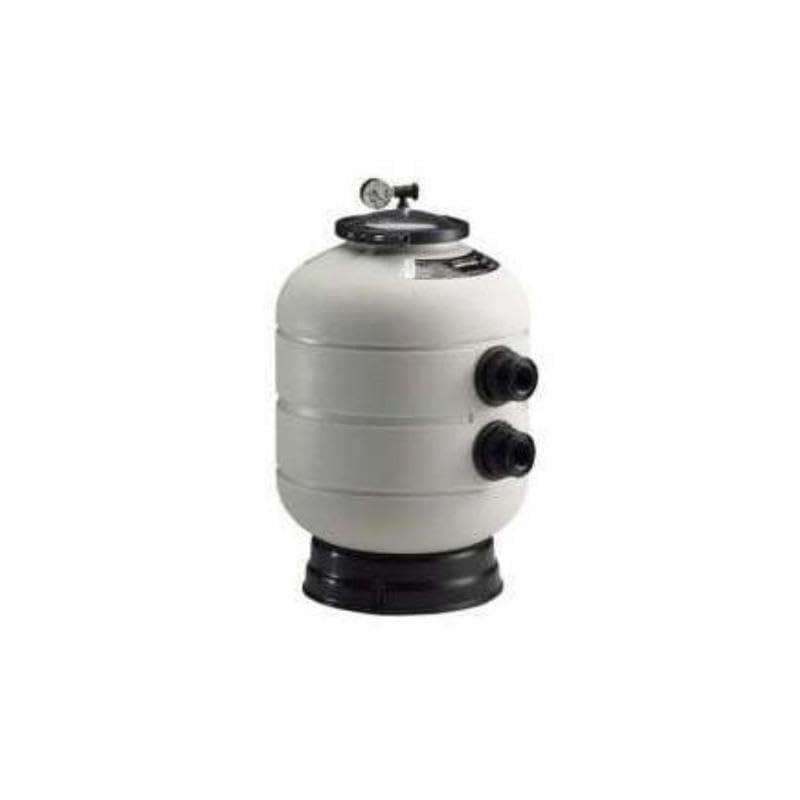
Image 1: Astralpool Millenium Sand Filter 430. This image shows the filter tank with its top opening, ready for sand and valve installation. Note the absence of a pre-installed side valve.
5. Operating Instructions
The operation of your sand filter is controlled by the multi-port valve (sold separately). Always turn off the pump before changing the valve position.
Common valve positions include:
- FILTER: Normal filtering operation. Water flows through the sand bed, trapping debris, and returns to the pool.
- BACKWASH: Cleans the filter sand. Water flows in reverse through the sand bed, dislodging trapped debris, and exits through the waste line.
- RINSE: Used after backwashing to settle the sand bed and flush any remaining dirty water to waste before returning to filter mode.
- WASTE/DRAIN: Bypasses the filter, sending water directly from the pump to the waste line. Useful for vacuuming heavy debris directly to waste or lowering pool water level.
- RECIRCULATE: Bypasses the filter, circulating water directly back to the pool. Useful for chemical mixing without filtering.
- CLOSED: Shuts off all flow to the filter. Use only when the pump is off and for servicing.
Monitor the pressure gauge (if installed on your multi-port valve). When the pressure rises 8-10 PSI (0.5-0.7 bar) above the clean filter pressure, it's time to backwash.
6. Maintenance
Regular maintenance ensures optimal performance and extends the life of your filter.
6.1 Backwashing
- Turn off the pool pump.
- Set the multi-port valve to "BACKWASH".
- Turn on the pool pump. Backwash for 2-3 minutes or until the water in the sight glass runs clear.
- Turn off the pool pump.
- Set the multi-port valve to "RINSE".
- Turn on the pool pump. Rinse for 30-60 seconds.
- Turn off the pool pump.
- Set the multi-port valve to "FILTER".
- Turn on the pool pump to resume normal filtration.
6.2 Sand Replacement
Filter sand typically needs to be replaced every 3-5 years, depending on usage and water chemistry. Consult a pool professional for guidance.
6.3 Winterization
In cold climates, the filter must be drained and winterized to prevent freeze damage. Consult your pool professional for specific winterization procedures for your region.
7. Troubleshooting
| Problem | Possible Cause | Solution |
|---|---|---|
| Poor water clarity / Cloudy water |
|
|
| High pressure gauge reading |
|
|
| Low pressure gauge reading / Low flow |
|
|
| Water leaking from clamp band |
|
|
8. Specifications
| Model | Millenium Sand Filter 430 |
| Manufacturer Part Number | 22497 |
| Brand | Astralpool |
| Filter Diameter | 430 mm |
| Filter Flow Rate | 7 m³/h |
| Connection Diameter | Ø 50 mm |
| Dimensions (L x W x H) | 45 x 45 x 92 cm |
| Weight | 15 kg |
| Multi-port Valve Position | Side (Valve not included) |
| ASIN | B00L4CUILY |
| Spare Parts Availability | Information unavailable |
9. Warranty and Support
For warranty information, please refer to the documentation provided with your purchase or contact your authorized Astralpool dealer. Astralpool products are designed for durability and performance, and support is available through their official channels.
For technical assistance or to inquire about spare parts, please contact Astralpool customer service or your local distributor. When contacting support, please have your model number (22497) and purchase details ready.
You can find more information on the official Astralpool website.


