
ANNKE AU-DW81KD1-V7-58BH-V2-P
ANNKE 3K Lite Wired Security Camera System User Manual
Model: AU-DW81KD1-V7-58BH-V2-P | Brand: ANNKE
1. Product Overview
The ANNKE 3K Lite Wired Security Camera System is a comprehensive surveillance solution designed for both indoor and outdoor use. It features AI-powered human and vehicle detection, H.265+ video compression for efficient storage, and advanced night vision capabilities including full-color night vision. This system is built for reliable 24/7 continuous recording and offers broad compatibility with various camera types.
Key Features:
- AI Motion Detection 2.0: Accurate human and vehicle detection with flexible detection areas and smart searching.
- Versatile Compatibility: Works with TVI, AHD, CVI, CVBS & IP cameras; 8CH 3K lite DVR supports 1080P@30fps or 3K/5MP@20fps cameras.
- 24/7 Continuous Recording: Equipped with a pre-installed 1TB HDD (expandable up to 10TB) and H.265+ compression for efficient storage.
- Smart Dual-Light & Color Night Vision: Offers crisp full-color night vision, IR mode, and flexible switching for enhanced nighttime surveillance up to 66ft in color and 100ft in B&W.
- IP67 Weatherproof Cameras: Wired cameras are rated IP67 for extreme weather resilience, operating from -40°F to 140°F.
- Secure & Professional: Passed UL, CE, FCC, HDMI certifications; ANNKE App conforms to GDPR for secure data. No monthly fees.

Figure 1: Complete ANNKE 3K Lite Security Camera System including DVR and eight cameras.
2. What's in the Box
Verify that all components are present in your package:
- 1 x 8CH 3K Lite DVR with 1TB Security Grade Hard Drive
- 8 x 1080P Wired CCTV Cameras & 60ft BNC Cables
- 3 x 12V adaptors & 2 x 4-to-1 Power Splitters
- 1 x USB Mouse & User Manual
- 1 x HDMI Cable&1 x Ethernet Cable

Figure 2: All components included in the ANNKE 3K Lite Security Camera System package.
3. Setup Guide
3.1 Initial System Connection
Before mounting, connect the DVR and cameras to ensure proper functionality. Connect the cameras to the DVR using the provided BNC cables. Connect the DVR to a monitor via HDMI or VGA, and connect the power adapters to the DVR and cameras. An Ethernet cable can be connected for network access.

Figure 3: Rear panel of the DVR illustrating various connection ports for cameras, monitor, and network.
3.2 Camera Installation
Select appropriate locations for your cameras, ensuring they cover desired areas and are within cable reach. Mount cameras securely using the provided screws. Ensure cables are protected from weather and physical damage. The IP67 rating ensures resilience against extreme temperatures and weather conditions.

Figure 4: Example of a camera mounted on an exterior wall, demonstrating typical installation.
4. Operating Instructions
4.1 Accessing Your System
You can access your security system locally via a connected monitor and mouse, or remotely using the ANNKE mobile application on your smartphone or tablet. Ensure your DVR is connected to the internet for remote access features.

Figure 5: Remote viewing of the security system via the ANNKE mobile application.
4.2 AI Motion Detection 2.0
The system utilizes advanced AI to differentiate between human and vehicle movements, reducing false alarms. You can configure specific detection areas and receive instant push notifications, emails, or buzzer alerts when activity is detected. Smart searching features allow for quick retrieval of relevant footage.

Figure 6: Visual representation of AI human and vehicle detection capabilities.
4.3 Night Vision Modes
The cameras feature Smart Dual-Light technology, offering both infrared (B&W) and full-color night vision. In low-light conditions, the cameras can automatically switch to IR mode. When motion is detected, the integrated white lights can activate to provide full-color imaging and deter intruders. This allows for clear identification even in complete darkness.

Figure 7: Illustrates the difference between traditional black and white night vision and enhanced smart color night vision.
4.4 Switching Analog Channels to IP Channels
Your DVR supports both analog and IP cameras. You can convert analog channels to IP channels to expand your system's capabilities. Note that disabling an analog channel frees up one IP channel. Once an analog channel is switched to IP, its BNC interface will no longer output images.
Video 1: This video demonstrates the process of switching analog channels to IP channels on your ANNKE DVR. It guides you through accessing the DVR menu, navigating to camera settings, and selecting the desired channels for conversion.
5. Maintenance
5.1 Hard Drive Management
The pre-installed 1TB hard drive provides ample storage for 24/7 surveillance. The H.265+ video compression technology significantly reduces file sizes, allowing for longer recording times and smoother playback while saving up to 75% storage space compared to H.264. The DVR supports up to a 10TB HDD for further expansion.

Figure 8: Illustrates the storage efficiency of H.265+ compression compared to H.264.
5.2 Camera Cleaning
Periodically clean the camera lenses and housings to ensure clear image quality. Use a soft, damp cloth to wipe away dust and dirt. Avoid abrasive cleaners or harsh chemicals that could damage the lens or casing.
6. Troubleshooting
This section addresses common issues you might encounter with your ANNKE security system.
| Issue | Possible Cause | Solution |
|---|---|---|
| No video display | Loose cable connections, incorrect input source on monitor, power issue. | Check all video and power cables. Ensure monitor input is set correctly (HDMI/VGA). Verify power supply to DVR and cameras. |
| No recording | Hard drive not initialized, recording schedule not set, hard drive full. | Check DVR settings for hard drive status and initialize if needed. Configure recording schedule. Back up and format hard drive if full. |
| Remote access not working | Network connection issue, incorrect app settings, firewall blocking. | Verify DVR's network connection. Check app settings (UID, password). Ensure router/firewall allows necessary ports. |
| False motion alerts | Environmental factors (trees, shadows), sensitivity too high. | Adjust motion detection sensitivity. Configure specific detection zones to exclude irrelevant areas. |
7. Specifications
| Feature | Detail |
|---|---|
| Brand | ANNKE |
| Model Number | AU-DW81KD1-V7-58BH-V2-P |
| Connectivity Technology | Wired |
| Video Capture Resolution | 1080p (supports up to 3K/5MP cameras) |
| Special Feature | Vehicle Detection, Human Detection |
| Number of Channels | 8 (expandable with IP channels) |
| Memory Storage Capacity | 1 TB (pre-installed, supports up to 10TB) |
| IP Rating | IP67 (cameras) |
| Night Vision Range | 100 Feet (B&W), 66 Feet (Color) |
| Operating Temperature | -40°F to 140°F (-40°C to 60°C) |
| Dimensions (DVR) | 17.32 x 13.39 x 7.09 inches |
| Item Weight | 6.5 pounds |
8. Warranty and Support
The ANNKE 3K Lite Wired Security Camera System has passed rigorous testing and holds UL, CE, FCC, and HDMI certifications, ensuring product quality and safety. The ANNKE App adheres to GDPR standards, securing all data transfers and downloads.
ANNKE is committed to providing professional support. There are no monthly fees associated with the use of this system. For any technical assistance or inquiries, please refer to the official ANNKE support channels or the comprehensive User Guide (PDF).
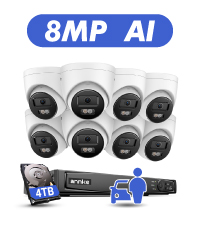
Figure 9: ANNKE's commitment to customer support, including after-sale service and lifetime technical assistance.
Related documentsAU-DW81KD1-V7-58BH-V2-P


Ask a question about this manual
Ask about setup, troubleshooting, compatibility, parts, safety, or missing instructions. Manuals+ will review the question and use this page’s manual context to help answer it.