Important Safety Instructions
Please read this entire instruction manual before installing and using your new heater. Failure to follow these instructions could result in electric shock, fire, or serious injury.
- Always unplug the heater when not in use.
- Do not use the heater in bathrooms, laundry areas, or similar indoor locations where water is present.
- Keep combustible materials, such as furniture, pillows, bedding, papers, clothes, and curtains at least 3 feet (0.9 m) from the front of the heater and away from the sides and rear.
- Do not insert or allow foreign objects to enter any ventilation or exhaust opening as this may cause an electric shock or fire, or damage the heater.
- This heater is hot when in use. To avoid burns, do not let bare skin touch hot surfaces.
- The heater is equipped with a tip-over safety switch and an overheat protection feature. If the heater tips over or overheats, it will automatically shut off.
Package Contents
Carefully remove all components from the packaging and inspect for any damage. Ensure all items listed below are present.
- (1) Homeleader IWH-07 Digital Infrared Quartz Heater
- (1) Remote Control
- (1) Instructions Manual (this document)
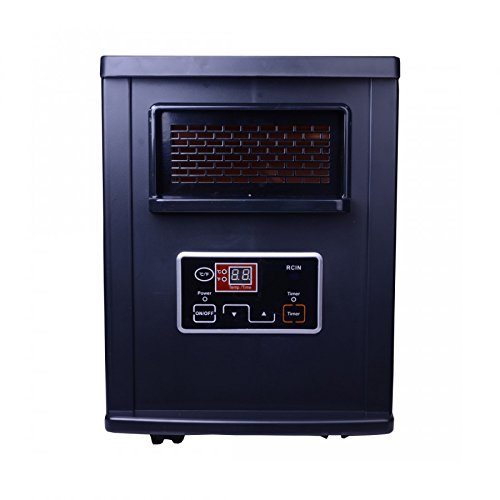
Figure 1: Front view of the Homeleader IWH-07 Digital Infrared Quartz Heater. The heater is black with a front grill and a digital control panel.
Setup and Installation
- Placement: Place the heater on a firm, level surface. Ensure there is at least 3 feet (0.9 m) of clear space around the heater from walls, furniture, and other objects.
- Power Connection: Plug the power cord directly into a 120V AC, 60Hz, 12.5 Amp grounded wall outlet. Do not use extension cords or power strips.
- Initial Power On: Locate the main power switch on the back of the unit (refer to Figure 2). Flip the switch to the 'ON' position. The heater will enter standby mode.
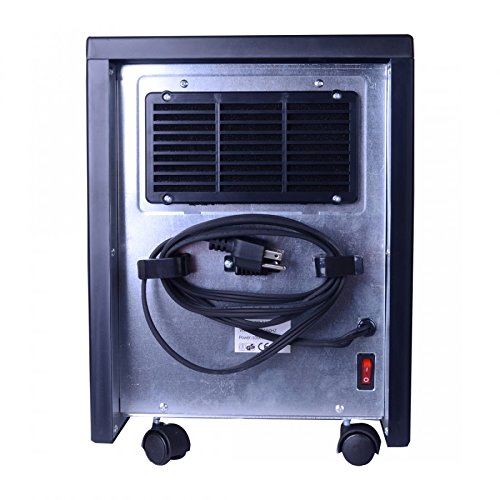
Figure 2: Rear view of the Homeleader IWH-07 heater, showing the power cord management and the main power switch located at the bottom right.
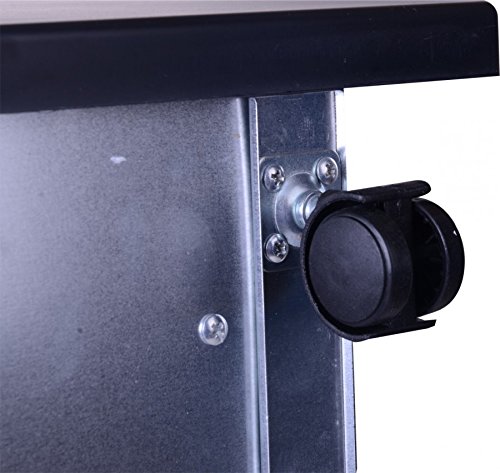
Figure 3: Close-up of one of the caster wheels, indicating the heater's portability for easy movement.
Operating Instructions
The heater can be operated using the control panel on the front of the unit or the included remote control.
Control Panel Overview
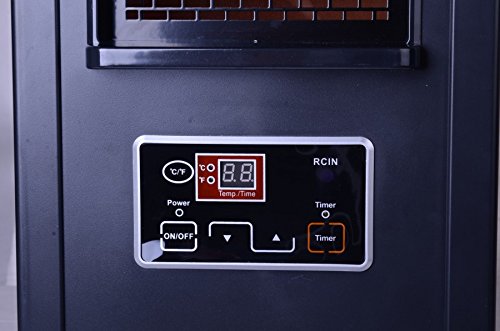
Figure 4: Detailed view of the digital control panel, featuring an LED display, power button, temperature/time adjustment buttons, and a timer button.
- ON/OFF Button: Press to turn the heater on or off.
- C/F Button: Press to switch the temperature display between Celsius and Fahrenheit.
- Up/Down Arrows: Adjust the desired temperature or timer settings.
- Timer Button: Activates and sets the 12-hour auto-on/auto-off timer.
- LED Display: Shows current temperature or timer settings.
Remote Control
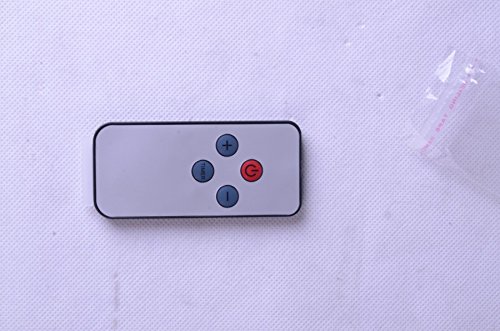
Figure 5: The remote control for the Homeleader IWH-07 heater, featuring power, temperature adjustment, and timer buttons.
The remote control duplicates the functions of the control panel for convenient operation from a distance. Ensure the remote has working batteries (not included, typically 2x AAA).
Basic Operation
- With the main power switch on the back in the 'ON' position, press the ON/OFF button on the control panel or remote. The heater will turn on and display the current room temperature.
- Use the Up and Down arrow buttons to set your desired temperature. The temperature range is 59°F to 86°F (15°C to 30°C). The heater will cycle on and off to maintain the set temperature.
- Press the C/F button to toggle between Fahrenheit and Celsius display.
Timer Function
The 12-hour timer allows you to set the heater to turn on or off automatically after a specified period.
- To set Auto-Off: While the heater is running, press the Timer button. The display will flash "00". Use the Up and Down arrows to set the desired number of hours (1-12) before the heater turns off. Press Timer again to confirm or wait a few seconds for it to set automatically.
- To set Auto-On: While the heater is in standby mode, press the Timer button. The display will flash "00". Use the Up and Down arrows to set the desired number of hours (1-12) before the heater turns on. Press Timer again to confirm or wait a few seconds for it to set automatically.
Maintenance
Regular maintenance ensures optimal performance and longevity of your heater.
Cleaning the Air Filter
The Homeleader IWH-07 features a lifetime washable intake air filter. Clean the filter regularly, especially if the heater's performance decreases or airflow is restricted.
- Ensure the heater is turned off and unplugged from the power outlet. Allow it to cool completely.
- Locate the air intake filter cover, typically on the back or side of the unit.
- Remove the filter cover and carefully slide out the filter.
- Rinse the filter under warm running water until clean. For stubborn dirt, a mild detergent can be used.
- Allow the filter to air dry completely before reinstalling. Do not use the heater without the filter or with a wet filter.
General Cleaning
- Always unplug the heater and allow it to cool before cleaning.
- Use a soft, damp cloth to wipe the exterior surfaces of the heater.
- Do not use abrasive cleaners, waxes, or polishes as these may damage the finish.
- Do not immerse the heater in water or spray water directly onto it.
- Use a vacuum cleaner with a brush attachment to clean dust from the grill and vents.
Troubleshooting
If your heater is not operating correctly, please refer to the following common issues and solutions before contacting support.
| Problem | Possible Cause | Solution |
|---|---|---|
| Heater does not turn on. |
|
|
| Heater blows cold air. |
|
|
| Remote control not working. |
|
|
| Heater makes unusual noise. |
|
|
Specifications
| Feature | Detail |
|---|---|
| Model | IWH-07 |
| Voltage | 120V AC |
| Frequency | 60Hz |
| Watts | 1000W |
| Amperage | 12.5 Amps |
| BTUs | 3400 BTUs |
| Temperature Range | 59°F - 86°F (15°C - 30°C) |
| Timer | 12-hour auto-on/auto-off |
| Display | Backlit LED |
| Filter | Lifetime washable intake air filter |
| Safety Features | Overheat cut-off switch, Tip-over power cut-off switch, Stay-cool exterior case |
| Color | Black |
| Dimensions (approx.) | 48.01 x 42.42 x 34.8 cm (Package Dimensions) |
| Item Weight | 7.57 kg |
Warranty and Support
Specific warranty information is not provided in this manual. For warranty details, product support, or to purchase replacement parts, please contact Homeleader customer service through their official website or the retailer where the product was purchased.
Please retain your purchase receipt as proof of purchase for any warranty claims.


