
Introduction
This manual provides comprehensive instructions for the safe and efficient operation of your TekPower TP1863 Regulated DC Power Supply. The TP1863 is designed to deliver a stable 13.8V DC output with a current capacity of 10-12A, suitable for various electronic devices such as Ham/CB radios and amplifiers. Please read this manual thoroughly before use and retain it for future reference.
Safety Information
WARNING: Failure to follow these safety instructions may result in electric shock, fire, or damage to the product or connected devices.
- Ensure the power supply is connected to a grounded 110V AC 60Hz outlet.
- Do not expose the unit to rain or moisture.
- Do not open the casing; there are no user-serviceable parts inside. Refer all servicing to qualified personnel.
- Ensure proper ventilation around the unit to prevent overheating.
- Disconnect power before making or changing connections to the output terminals.
- Do not exceed the maximum output current of 12A.
Package Contents
Verify that all items are present in the package:
- TekPower TP1863 Power Supply Unit
- User Manual (this document)
- Warranty Registration Card
Product Overview
The TekPower TP1863 features a robust metal enclosure and a straightforward design for reliable power delivery.

Figure 1: Front and Top View of the TP1863 Power Supply. This image displays the main body of the power supply, highlighting its black metal casing and the ventilation grilles on the top surface, designed for heat dissipation.
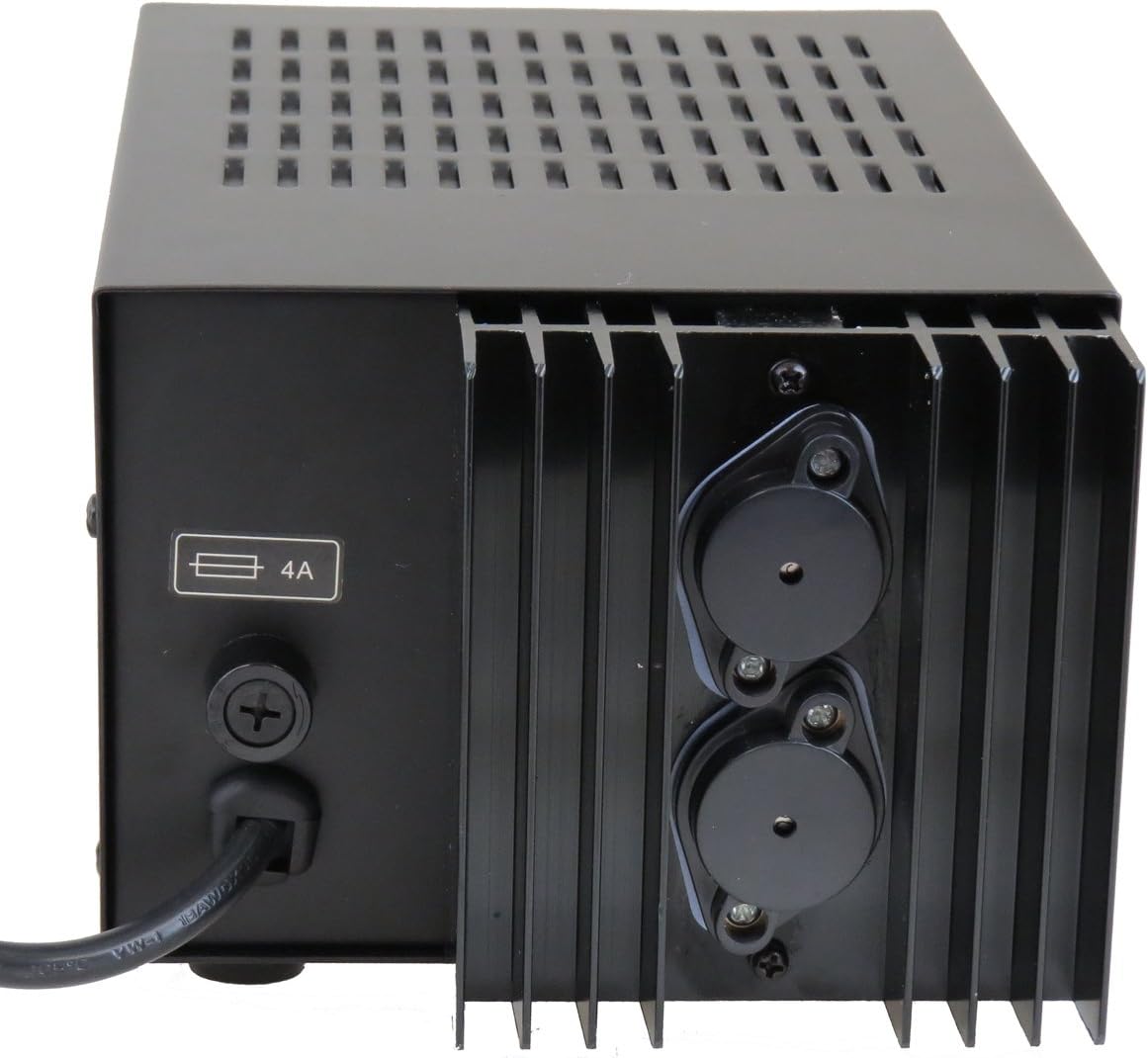
Figure 2: Rear Panel of the TP1863 Power Supply. This view shows the rear of the unit, including the AC power cord input, the fuse holder labeled '4A', and the two large binding posts for DC output connections.

Figure 3: Side View of the TP1863 Power Supply. This image illustrates the side of the power supply, featuring additional ventilation slots and a label indicating its country of manufacture.
Setup
- Placement: Place the power supply on a stable, flat surface, ensuring adequate clearance around all ventilation openings for proper airflow. Avoid placing it near heat sources or in direct sunlight.
- AC Power Connection: Connect the supplied AC power cord to the AC input connector on the rear panel of the TP1863. Plug the other end of the power cord into a standard 110V AC 60Hz grounded wall outlet.
- DC Output Connection:
- Identify the positive (+) and negative (-) output terminals on the rear panel.
- Connect the positive lead from your device to the red (+) terminal and the negative lead to the black (-) terminal. Ensure connections are secure to prevent arcing or poor contact.
- Verify that your device's power requirements do not exceed 13.8V DC and 12A.
Operating Instructions
- Power On: After all connections are made and verified, locate the power switch (typically on the front or rear panel, depending on model revision) and switch it to the 'ON' position. The power indicator light should illuminate.
- Device Operation: Once the power supply is active, you can power on your connected device. The TP1863 will provide a stable 13.8V DC output.
- Power Off: To turn off the power supply, switch the power switch to the 'OFF' position. Disconnect your device from the power supply if it will not be used for an extended period.
Maintenance
- Cleaning: Keep the unit clean by wiping it with a soft, dry cloth. Do not use liquid cleaners or solvents. Ensure ventilation openings are free from dust and debris.
- Fuse Replacement: The TP1863 is equipped with fuse protection. If the unit fails to power on or provide output, the fuse may need replacement.
- Disconnect the power supply from the AC outlet.
- Locate the fuse holder on the rear panel (refer to Figure 2).
- Carefully unscrew the fuse holder cap.
- Remove the old fuse and replace it with a new fuse of the same type and rating (4A, 250V, slow-blow type is typically used for power supplies).
- Securely screw the fuse holder cap back into place.
- Reconnect the power supply to the AC outlet and test. If the fuse blows again, discontinue use and contact support.
Troubleshooting
| Problem | Possible Cause | Solution |
|---|---|---|
| Unit does not power on. | No AC power; Blown fuse; Faulty power cord. | Check AC outlet and power cord connection. Replace fuse if blown (see Maintenance section). Try a different power cord. |
| No DC output. | Loose output connections; Overload; Internal fault. | Ensure output leads are securely connected. Reduce load on the power supply. If problem persists, contact support. |
| Unit overheats. | Insufficient ventilation; Excessive load. | Ensure clear airflow around the unit. Reduce the connected load. |
Specifications
| Input Power | 110V AC 60Hz |
| Output Voltage | DC 13.8V (Fixed) |
| Output Current | 10A - 12A (Max) |
| Ripple Voltage | <= 30mV |
| Fuse Protection | Yes (4A) |
| Dimensions (L x W x H) | 10 x 5.5 x 4.3 inches (approx.) |
| Weight | 9 lbs (approx.) |
| Enclosure Material | Metal |
Warranty Information
The TekPower TP1863 Regulated DC Power Supply comes with a 1 Year USA warranty. This warranty covers defects in materials and workmanship under normal use. Please refer to the Warranty Registration Card included in your package for full terms and conditions, and instructions on how to register your product.
Support
For technical assistance, warranty claims, or further inquiries, please contact TekPower customer support. You may also visit the official TekPower store for additional product information and resources.
TekPower Official Store: Visit TekPower Store