
1. User Guide & Product Overview
The Valcom VC-V-400 is an omni-directional dynamic desktop microphone designed for clear audio capture in various applications. It features a low impedance design and includes a push-to-talk switch with a locking bar for convenient operation. This manual provides essential information for setting up, operating, and maintaining your Valcom VC-V-400 microphone.
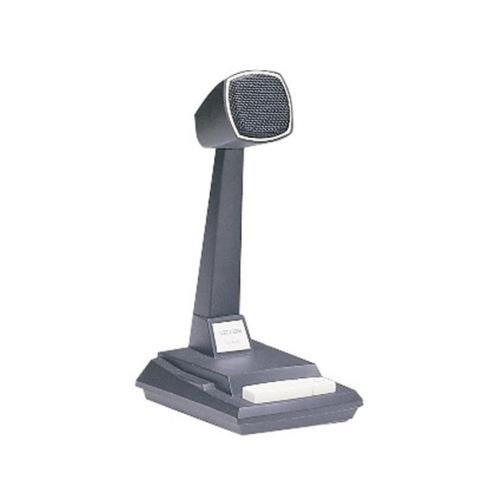
Figure 1: Valcom VC-V-400 Dynamic Desktop Microphone. An image showing the Valcom VC-V-400 Dynamic Desktop Microphone, featuring a dark grey base with a white push-to-talk bar, and a tall stand supporting the microphone head with a metallic grille.
2. Setup Instructions
To ensure proper functionality, the Valcom VC-V-400 microphone requires the Valcom V-9939B Microphone Adapter (sold separately) for connection to your system.
2.1 Unpacking
- Carefully remove the microphone from its packaging.
- Verify that all components are present: Valcom VC-V-400 Microphone.
2.2 Connection
- Ensure your audio system or device is powered off before making connections.
- Connect the XLR connector of the Valcom VC-V-400 microphone to the appropriate input on the Valcom V-9939B Microphone Adapter.
- Connect the Valcom V-9939B Microphone Adapter to your audio system or PC as per the adapter's instructions.
- Once all connections are secure, you may power on your audio system.
3. Operating Instructions
The Valcom VC-V-400 microphone is designed for ease of use with its integrated push-to-talk functionality.
3.1 Push-to-Talk (PTT) Operation
- To activate the microphone for speaking, press and hold the white push-to-talk bar located on the base of the microphone.
- Release the bar to mute the microphone.
3.2 Locking Bar Feature
- For continuous microphone activation, push the white push-to-talk bar down and slide the locking bar (if present and functional on your model) to hold it in the depressed position.
- To disengage, slide the locking bar back and allow the push-to-talk bar to return to its original position.
3.3 Microphone Placement
As an omni-directional microphone, the VC-V-400 picks up sound equally from all directions. Position the microphone centrally within the desired speaking area for optimal audio capture.
4. Maintenance
Proper care and maintenance will extend the life of your Valcom VC-V-400 microphone.
- Cleaning: Use a soft, dry cloth to wipe the exterior of the microphone. Do not use liquid cleaners or abrasive materials.
- Storage: When not in use, store the microphone in a clean, dry environment away from extreme temperatures and humidity.
- Handling: Avoid dropping the microphone or subjecting it to strong impacts, as this can damage internal components.
5. Troubleshooting
If you encounter issues with your Valcom VC-V-400 microphone, refer to the following common problems and solutions:
| Problem | Possible Cause | Solution |
|---|---|---|
| No audio output |
|
|
| Poor audio quality (e.g., static, low volume) |
|
|
6. Specifications
| Feature | Detail |
|---|---|
| Brand | Valcom |
| Model Name | VC-V-400 |
| Microphone Form Factor | Table Array |
| Polar Pattern | Omnidirectional |
| Connectivity Technology | XLR |
| Connector Type | XLR |
| Special Feature | Push-to-talk with locking bar, Lift-to-talk mode |
| Compatible Devices | Personal Computer (requires V-9939B adapter) |
| Color | White (microphone base) |
| Included Components | Microphone |
| Item Weight | 3.4 Pounds (approx. 1.54 kg) |
| Power Source | Corded Electric (via adapter) |
| Signal-to-Noise Ratio | 60 dB |
| Number of Channels | 1 |
| Frequency Response | 15 KHz |
| Manufacturer | VALCOM |
| UPC | 809390045079, 807035655225 |
| Date First Available | June 11, 2014 |
7. Warranty Information
Specific warranty details for the Valcom VC-V-400 Dynamic Desktop Microphone are not provided in this document. Please refer to the product packaging or contact Valcom directly for comprehensive warranty information.
8. Support
For technical assistance, product inquiries, or further support regarding your Valcom VC-V-400 microphone, please contact Valcom customer service. Contact information can typically be found on the manufacturer's official website or product packaging.


