1. Product Overview
The ZOSI 8-Channel 1080P HD-TVI Surveillance DVR System provides comprehensive security monitoring with high-definition video capture. This system includes an 8-channel DVR and four 1080P HD indoor/outdoor weatherproof dome cameras, offering night vision capabilities up to 65 feet. The DVR supports various camera types including Analog, HD-TVI, CVI, and AHD, allowing for system expansion.

Figure 1.1: ZOSI 8-Channel HD-TVI DVR with four 1080P HD Dome Cameras.
2. Setup Guide
2.1 What's in the Box
- 1x H.264 8CH 1080P HD-TVI DVR
- 4 x 1920TVL Dome Cameras
- 4 x 60FT CCTV cable for camera
- 2 x 12V/2A power supply
- 1 x 1 to 4 power splitter cable

Figure 2.1: Included components of the ZOSI security camera system.
2.2 DVR and Camera Connections
The DVR is an 8-channel 4-in-1 unit, supporting Analog, HD-TVI, CVI, and AHD cameras. It features HDMI, VGA, and BNC outputs for monitor connection. Cameras connect via BNC video input. Power adapters are included for the DVR and cameras.

Figure 2.2: Detailed view of the DVR's rear panel with various input and output ports.
2.3 Hard Drive Installation (Not Included)
This system does not include a hard drive. A 3.5-inch SATA hard drive (500GB to 2TB) is necessary for recording. Installation is straightforward: open the DVR casing, connect the SATA data and power cables to the hard drive, and secure it with screws. Videos are available online for detailed instructions.
2.4 Camera Features and Placement
The 1080P HD dome cameras feature a 3.6mm lens for a wider viewing angle, 24 IR LEDs for up to 65ft night vision, and an IR-Cut filter for crisper day and night images. The cameras are weatherproof, suitable for both indoor and outdoor monitoring.

Figure 2.3: Key features of the ZOSI dome camera, including lens, IR LEDs, and IR-Cut filter.

Figure 2.4: Versatile placement options for ZOSI cameras in various environments.
2.5 Mobile Remote Access
Remote access is enabled through the Zosi Smart app. Connect your DVR to your network via an Ethernet cable. Download the Zosi Smart app from your smartphone's app store (available for iPhone and Android) and scan the QR code on your DVR for quick setup. This allows for live viewing and playback from anywhere with an internet connection.
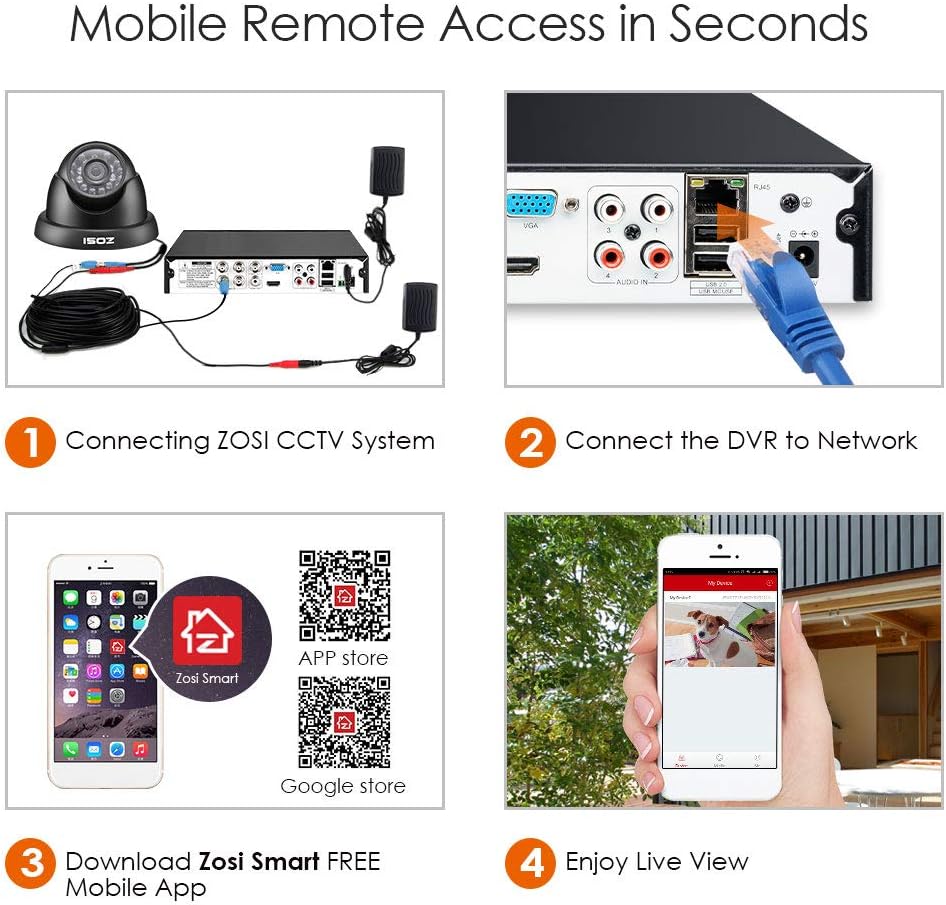
Figure 2.5: Step-by-step guide for connecting your ZOSI system to the Zosi Smart mobile app.
Download the Zosi Smart app: Zosi Smart (iOS)
3. Operating Instructions
3.1 Motion Detection and Alerts
The system supports customizable motion detection zones. When motion is detected, smart notifications with an image can be pushed to your smartphone via the Zosi Smart app. This feature helps minimize false alarms by allowing you to define specific areas for monitoring.

Figure 3.1: Example of a motion detection alert received on a mobile device.
3.2 Recording and Playback
Motion detection recording saves hard disk space by only recording when activity is detected. The DVR can be configured to automatically overwrite the oldest stored footage. Video files can also be transferred to a memory stick or external hard drive via USB. Live view and playback are accessible through the DVR's connected monitor or the Zosi Smart app.

Figure 3.2: Multi-device viewing options for the ZOSI security system.
3.3 Video Resolution
The DVR supports 1080P Full HD HDMI output. When connected to a 1080P camera, the resolution is 1080P. When connected to a 720P camera, the resolution is 720P.

Figure 3.3: DVR display indicating resolution based on connected camera type.
4. Maintenance
4.1 Hard Drive Management
Ensure your hard drive is functioning correctly. The DVR can be set to automatically overwrite older footage to prevent the hard drive from filling up. Regularly back up important video files to an external storage device via the USB port.
4.2 Camera Cleaning
Periodically clean the camera lenses and glass covers to ensure clear image quality. Use a soft, damp cloth to remove dust and debris. Avoid abrasive cleaners that could scratch the lens.
5. Troubleshooting
5.1 Remote Viewing Issues
If remote viewing fails repeatedly with a "Connecting Failed" message, ensure your DVR is properly connected to the internet. Check network cables and router status. Sometimes, a DVR reboot or network maintenance may resolve the issue. Contact ZOSI support if the problem persists.
5.2 Camera Stuck in Night Mode
If a camera displays only black and white even in full sunlight, it may be stuck in night vision mode. This could indicate an issue with the IR-cut filter or light sensor. Check the camera's settings via the DVR interface. If the problem continues, the camera may require servicing.
5.3 Hard Drive Not Detected
Ensure the 3.5-inch SATA hard drive is correctly installed and both data and power cables are securely connected. If the hard drive is new, it may need to be formatted through the DVR's settings menu.
6. Specifications
- Brand: ZOSI
- Connectivity Technology: Wired
- Video Capture Resolution: 1080p
- Special Feature: Motion Sensor, Day-and-Night Camera
- Number of Channels: 8 (DVR), expandable to 16 (cameras)
- Memory Storage Capacity: Supports up to 2 TB (Hard Drive not included)
- Power Source: POE (Power over Ethernet)
- Item Dimensions L x W x H: 11 x 7 x 11 inches
- Operating System: Android (for mobile app)
- Recommended Uses For Product: Indoor/Outdoor
- Compatible Devices: Cameras
- Low Light Technology: Day/Night
- Focal Length Description: F=3.6mm
- Frame Rate: 15 fps
- Recording Mode: Motion Detection
- Hardware Interface: USB
- Video Input: BNC
- Item Weight: 10.38 pounds
- ASIN: B00KWWMYUK
- Item Model Number: FBA_LYSB00KWWMYUK-ELECTRNCS
- Date First Available: June 10, 2014
7. Warranty and Support
7.1 Warranty Information
Specific warranty details are not provided in the product information. Please refer to your purchase documentation or contact ZOSI customer service for warranty terms and conditions.
7.2 Customer Support
For technical assistance, troubleshooting, or any product-related inquiries, please visit the official ZOSI website or contact their customer support. You can also find helpful resources and FAQs on the ZOSI Store page on Amazon.
Visit the ZOSI Store: ZOSI Store on Amazon

Figure 7.1: ZOSI brand logo.
8. Official Product Video
Video 8.1: ZOSI 8-Channel HD-TVI 1080N DVR Security Surveillance System overview by Smart CCTV Store.


