
Introduction
This manual provides essential information for the safe and efficient use of your LG 42LB5600 42-inch 1080p 60Hz LED HDTV. Please read this manual thoroughly before operating your television and retain it for future reference. The LG 42LB5600 delivers a clear 1080p picture with LED backlighting and includes energy-saving features.
Safety Information
Always follow basic safety precautions when using this product to reduce the risk of fire, electric shock, or injury to persons. Keep these instructions in mind:
- Do not block ventilation openings. Ensure adequate space around the television for proper airflow.
- Do not place the television near heat sources such as radiators, heat registers, stoves, or other apparatus (including amplifiers) that produce heat.
- Protect the power cord from being walked on or pinched, particularly at plugs, convenience receptacles, and the point where they exit from the apparatus.
- Only use attachments/accessories specified by the manufacturer.
- Unplug this apparatus during lightning storms or when unused for long periods of time.
- Refer all servicing to qualified service personnel. Servicing is required when the apparatus has been damaged in any way, such as power-supply cord or plug is damaged, liquid has been spilled or objects have fallen into the apparatus, the apparatus has been exposed to rain or moisture, does not operate normally, or has been dropped.
What's in the Box
Upon unpacking your LG 42LB5600 TV, please verify that all components are present and undamaged:
- LG 42LB5600 42-Inch TV Unit
- TV Stand (with necessary screws)
- Remote Control (requires AA batteries, not included)
- Power Cord
- User Manual (this document)

Image: Front view of the LG 42LB5600 42-inch TV, showcasing its slim bezel and display.
Setup
1. Stand Assembly
To attach the stand to your LG 42LB5600 TV:
- Carefully place the TV screen-down on a soft, flat surface to prevent damage.
- Align the stand base with the mounting holes on the bottom of the TV.
- Secure the stand using the provided screws. Ensure the stand is firmly attached before proceeding.

Image: The LG 42LB5600 TV mounted on its included stand, viewed from the front.
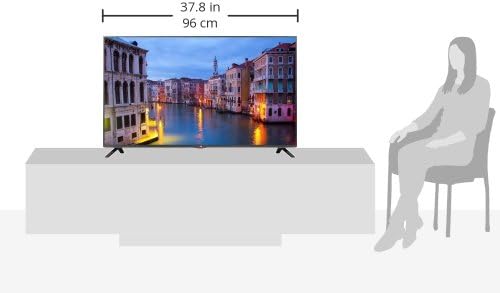
Image: Diagram showing the dimensions of the LG 42LB5600 TV, including its width of 37.8 inches (96 cm).
2. Wall Mounting (Optional)
If you choose to wall mount your TV, ensure you use a VESA-compliant wall mount (400 x 400 mm) and follow the instructions provided with the wall mount kit. Remove the stand before wall mounting.
3. Connecting External Devices
Your LG 42LB5600 TV offers various input ports for connecting external devices such as Blu-ray players, game consoles, and cable/satellite boxes.
- HDMI Ports (2): For high-definition audio and video. Connect your HDMI-enabled devices here.
- USB Port (1): For connecting USB storage devices to view photos or play media.
- Component Input (1): For connecting devices using YPbPr video and L/R audio cables.
- Composite Input (1, shared): For connecting older devices using RCA video and L/R audio cables. This input may share connections with the Component input.
- Digital Audio Out (1): For connecting to an external audio system with digital audio input.

Image: Rear view of the LG 42LB5600 TV, showing the various input and output ports for connecting external devices.
4. Power Connection
After connecting all desired devices, plug the power cord into the TV's power inlet and then into a wall outlet (110 VAC, 60 Hz).
Operating Instructions
1. Initial Power On
Press the Power button on the TV or the remote control. The TV will display the LG logo and then proceed to the initial setup wizard (if it's the first time powering on or after a factory reset).
2. Remote Control
The TV is operated primarily using the supplied remote control. Insert two AA batteries (not included) into the remote control, observing the correct polarity.
- Power Button: Turns the TV on or off.
- Volume Up/Down: Adjusts the sound level.
- Channel Up/Down: Changes TV channels.
- Input/Source Button: Cycles through available input sources (HDMI1, HDMI2, USB, Component, Composite).
- Menu Button: Accesses the TV's main settings menu.
- Navigation Buttons (Up/Down/Left/Right) and OK: Used to navigate menus and confirm selections.
3. Selecting an Input Source
Press the Input or Source button on your remote control to display the list of available input sources. Use the navigation buttons to select your desired source (e.g., HDMI 1 for a Blu-ray player) and press OK.
4. Picture and Sound Settings
Access the TV's menu to adjust picture settings (e.g., brightness, contrast, color, backlight) and sound settings (e.g., sound mode, balance). Refer to the on-screen menu for detailed options.
Maintenance
Proper maintenance ensures the longevity and optimal performance of your LG 42LB5600 TV.
- Cleaning the Screen: Gently wipe the screen with a soft, dry, lint-free cloth. For stubborn marks, lightly dampen the cloth with water or a specialized screen cleaner. Do not spray cleaner directly onto the screen.
- Cleaning the Cabinet: Use a soft, dry cloth to wipe the TV cabinet. Avoid using abrasive cleaners or solvents.
- Ventilation: Ensure that the ventilation openings on the back of the TV are not blocked. Dust accumulation can be removed with a soft brush or vacuum cleaner.
- Power Cord: Periodically check the power cord for any signs of damage. If damaged, discontinue use and contact qualified service personnel.
Troubleshooting
Before contacting service, refer to the following common issues and solutions:
| Problem | Possible Cause / Solution |
|---|---|
| No power |
|
| No picture, but sound is present |
|
| No sound, but picture is present |
|
| Remote control not working |
|
Specifications
| Feature | Detail |
|---|---|
| Model Name | 42LB5600 |
| Screen Size | 42 Inches |
| Display Technology | LED (Direct LED Backlight) |
| Resolution | 1080p (Full HD) |
| Refresh Rate | 60 Hz |
| Motion Clarity Index | 120 |
| Aspect Ratio | 1.77:1 |
| Contrast Ratio | 5,000,000:1 |
| Response Time | 999 Milliseconds |
| Product Dimensions (with stand) | 37.8" W x 24.0" H x 8.6" D |
| Product Dimensions (without stand) | 37.8" W x 22.3" H x 2.2" D |
| Item Weight | 20.9 Pounds |
| Color | BLACK GREY |
| HDMI Inputs | 2 |
| USB Ports | 1 |
| Component Video Inputs | 1 |
| Composite Video Inputs | 1 (Shared) |
| Digital Audio Out | 1 |
| Speaker Description | Basic Built-in Speakers |
| Number of Audio Channels | 2.1 |
| Power Supply | 110 VAC, 60 Hz |
| VESA Mount Standard | 400 x 400 mm |
| Tuner Type | ATSC |
| Control Method | Remote Control |
| Remote Required Battery Size | AA |
| Model Year | 2014 |
Warranty and Support
Your LG 42LB5600 TV comes with a Limited Warranty. Specific terms and conditions of the warranty are typically provided with your purchase documentation or can be found on the official LG website. Please retain your proof of purchase for warranty claims.
While the product is sold as-is, it can be returned within a week of receipt if there are any issues. Additional fees may apply for overnight shipping if chosen during purchase.
For technical support, service inquiries, or to obtain replacement parts, please visit the official LG support website or contact LG customer service directly. You can find contact information on the LG website: www.lg.com/us/support