
ViewHD VHD-PRO4X2i
ViewHD Prosumer Ultra HD HDMI True Matrix 4X2 User Manual
Model: VHD-PRO4X2i

Front view of the ViewHD Prosumer Ultra HD HDMI True Matrix 4X2, showing the power button, input/output indicators, and audio mode selection buttons.
1. Introduction
The ViewHD Prosumer Ultra HD HDMI True Matrix 4X2 (Model VHD-PRO4X2i) is an advanced HDMI matrix switcher designed to manage and distribute high-definition audio and video signals. This device allows you to connect up to four HDMI source devices (such as Blu-ray players, gaming consoles, or set-top boxes) and independently route any of these sources to two separate HDMI displays. It supports Ultra HD / 4K resolutions (up to 4096x2160@24fps or 3820x2160@30fps) and incorporates advanced audio features, including Audio Return Channel (ARC), stereo analog audio output, and TOSLINK optical audio output.
2. Package Contents
Please verify that all items listed below are included in your package:
- One (1) VHD-PRO4X2i Main Unit (Size: 250x27x75mm)
- One (1) 5V2A Universal 100V-240V Power Adapter with US plug
- One (1) Remote Control
- One (1) User Manual (this document)
3. Product Features
- Supports Ultra HD / 4K resolutions (4096x2160@24fps or 3820x2160@30fps) and 3D content.
- Compliant with HDMI v1.4 specifications.
- Supports Consumer Electronics Control (CEC) for integrated control with compatible devices.
- HDMI output A provides additional audio outputs: TOSLINK optical and 3.5mm analog stereo.
- TOSLINK optical audio output supports Audio Return Channel (ARC) for audio from ARC-enabled TVs.
- Three EDID settings for audio applications: 2CH (stereo), TOSLINK 5.1CH, and HDMI advanced audio.
- Full metal jacket construction for enhanced durability and efficient heat dissipation.
4. Product Diagram and Connections
Familiarize yourself with the input and output ports on the VHD-PRO4X2i unit.
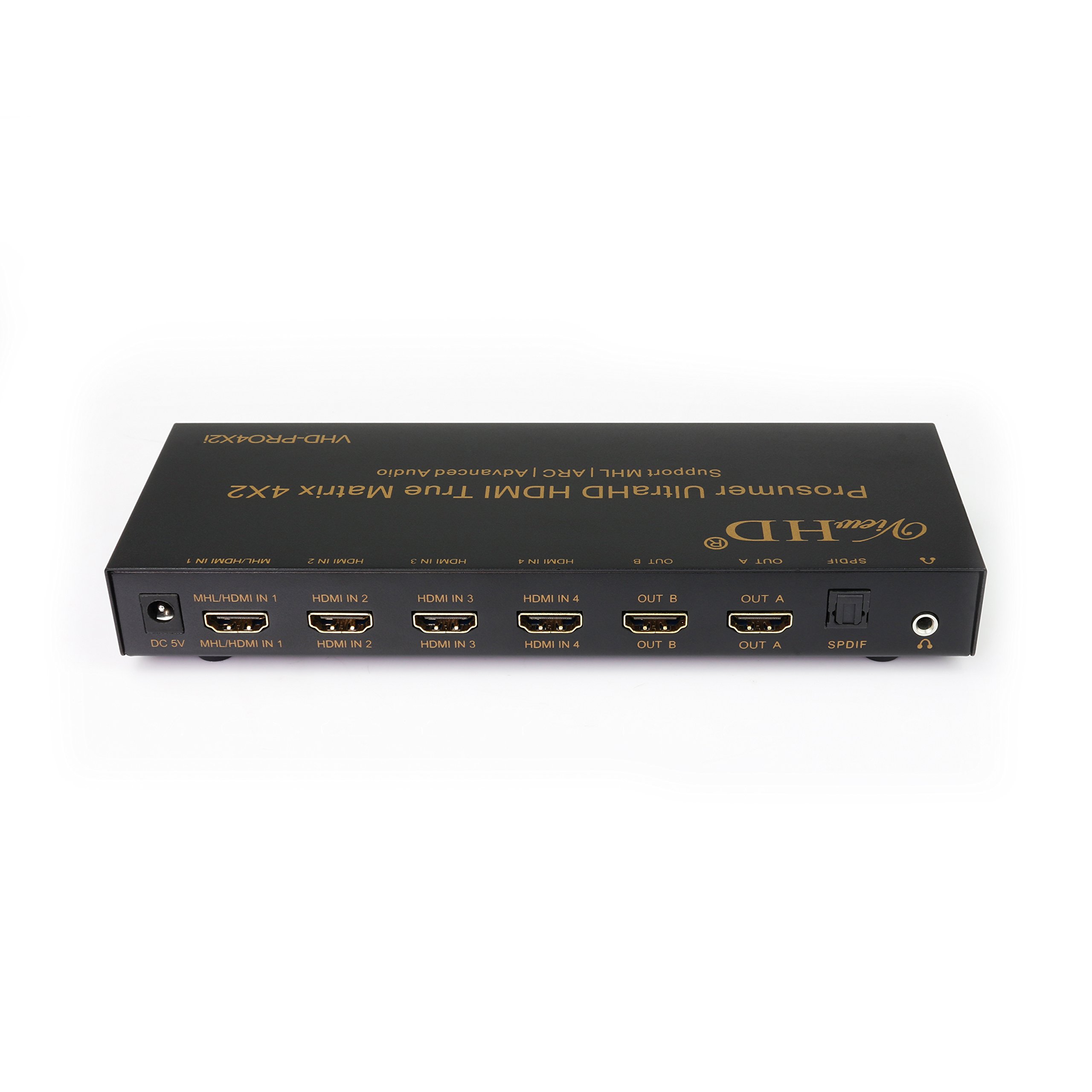
Rear view of the ViewHD Prosumer Ultra HD HDMI True Matrix 4X2, showing all HDMI inputs, HDMI outputs, power input, and audio outputs.
Rear Panel Connections:
- DC 5V: Power input port. Connect the included 5V2A power adapter here.
- MHL/HDMI IN 1: HDMI Input 1, also supports MHL (Mobile High-Definition Link) for compatible devices.
- HDMI IN 2, 3, 4: Standard HDMI Input ports for source devices.
- OUT A, OUT B: HDMI Output ports for connecting to displays (TVs, projectors).
- SPDIF: TOSLINK optical audio output. Provides digital audio from HDMI Output A.
- 3.5mm Audio Out: Analog stereo audio output. Provides analog audio from HDMI Output A.
Front Panel Controls and Indicators:
- PWR ON/OFF: Power button.
- Input/Output Indicators (A1-A4, B1-B4): LEDs indicating which input is routed to which output.
- ARC: Audio Return Channel indicator.
- 2CH, ADV: Audio mode selection buttons/indicators.
- SPDIF/Q, ARC ON/OFF, Audio: Buttons for controlling SPDIF, ARC, and audio output.
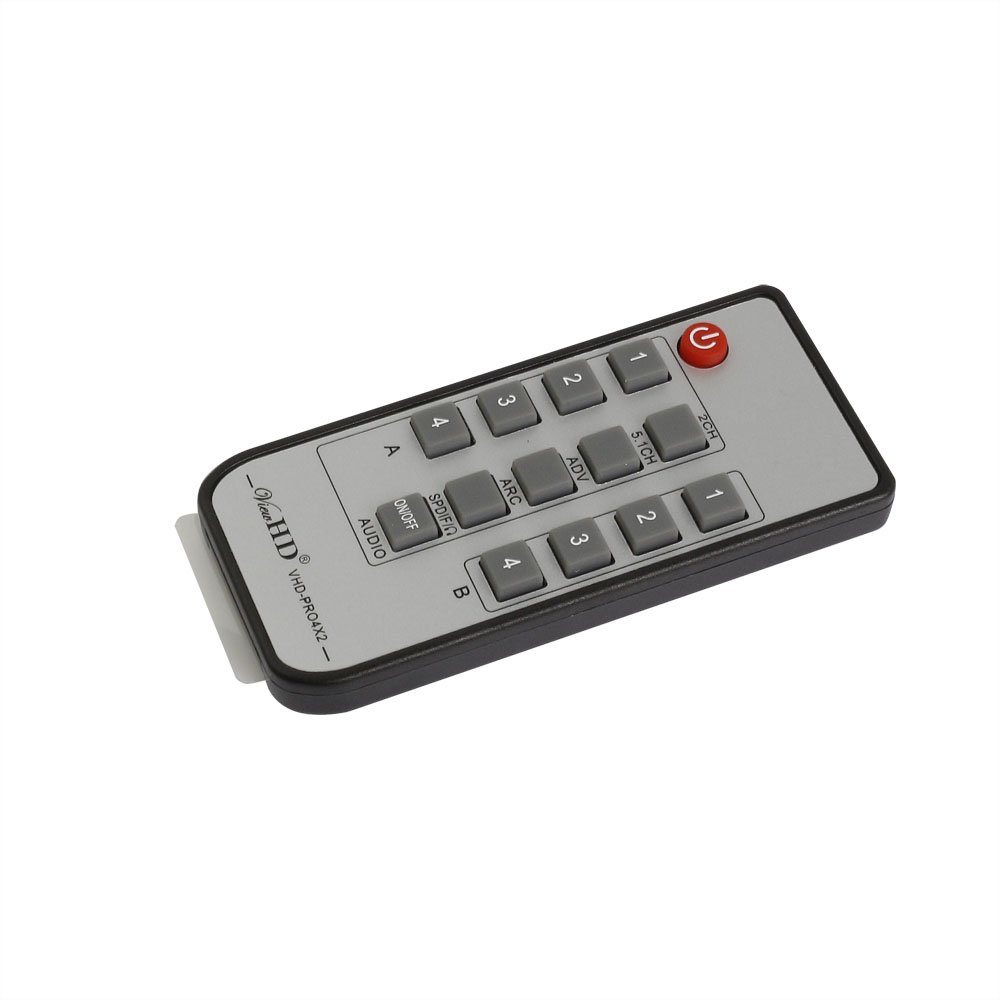
Remote control for the ViewHD Prosumer Ultra HD HDMI True Matrix 4X2, featuring input selection buttons for outputs A and B, and audio control buttons.
5. Setup Instructions
- Power Off All Devices: Before making any connections, ensure all HDMI source devices, displays, and the VHD-PRO4X2i unit are powered off.
- Connect HDMI Sources: Connect your HDMI source devices (e.g., Blu-ray player, cable box, game console) to the HDMI IN 1, 2, 3, or 4 ports on the rear of the VHD-PRO4X2i using high-quality HDMI v1.4 cables. For optimal performance with Ultra HD / 4K, use AWG26 HDMI v1.4 cables up to 5 meters. For 1080P & 3D, cables up to 15 meters are supported.
- Connect HDMI Displays: Connect your HDMI displays (TVs, projectors) to the OUT A and OUT B ports on the rear of the VHD-PRO4X2i using high-quality HDMI v1.4 cables.
- Connect Audio Devices (Optional):
- For digital audio, connect an optical cable from the SPDIF port on the VHD-PRO4X2i to your audio receiver or soundbar.
- For analog stereo audio, connect a 3.5mm audio cable from the 3.5mm Audio Out port to your stereo amplifier or headphones.
- Connect Power: Plug the included 5V2A power adapter into the DC 5V port on the VHD-PRO4X2i, then plug the adapter into a power outlet.
- Power On Devices: Power on the VHD-PRO4X2i unit, then power on your displays, and finally your HDMI source devices.
6. Operating Instructions
Input/Output Switching:
The VHD-PRO4X2i allows independent switching of inputs to outputs. You can control this using the front panel buttons or the included remote control.
- Front Panel: Use the 'A' and 'B' buttons on the front panel to cycle through the inputs (1-4) for Output A and Output B, respectively.
- Remote Control: Use the numbered buttons (1, 2, 3, 4) under 'A' to select the input for Output A, and the numbered buttons (1, 2, 3, 4) under 'B' to select the input for Output B.
Audio Settings:
The VHD-PRO4X2i offers flexible audio management for HDMI Output A's dedicated audio outputs (SPDIF and 3.5mm analog).
- EDID Settings: Use the '2CH', '5.1CH', and 'ADV' buttons on the remote or front panel to set the EDID (Extended Display Identification Data) for audio. This tells the source device what audio formats the matrix can handle.
- 2CH: For stereo audio output (LPCM 2CH) via 3.5mm analog and SPDIF.
- 5.1CH: For Dolby Digital / AC3 5.1CH, DTS 5.1CH, and Dolby Digital Plus via SPDIF.
- ADV (Advanced): For passing through advanced audio formats (Dolby TrueHD, DTS-HD Master Audio, PCM 5.1 / 7.1 and beyond) through the HDMI output. Note that SPDIF and 3.5mm analog outputs will not carry these advanced formats.
- Audio Return Channel (ARC): If your TV connected to HDMI Output A supports ARC and you are using an HDMI v1.4 cable, you can enable ARC to send audio from your TV back to the matrix's SPDIF output. Use the 'ARC ON/OFF' button on the remote or front panel. ARC audio is available from the SPDIF output ONLY.
- SPDIF Output: Supports audio formats up to Dolby Digital / AC3 5.1CH, DTS 5.1CH, and Dolby Digital Plus. It does NOT support formats higher than Dolby Digital Plus, such as TrueHD, DTS-HD MA, PCM 5.1, and beyond.
- 3.5mm Analog Audio Output: Only supports incoming audio format of LPCM 2CH / Stereo. It will NOT have sound if the incoming HDMI audio format is higher than 2CH / Stereo. This output does not support ARC.
7. Maintenance
To ensure the longevity and optimal performance of your ViewHD Prosumer Ultra HD HDMI True Matrix 4X2, follow these simple maintenance guidelines:
- Cleaning: Use a soft, dry cloth to clean the exterior of the unit. Do not use liquid or aerosol cleaners, as they may damage the device.
- Ventilation: Ensure the unit is placed in a well-ventilated area to prevent overheating. Do not block any ventilation openings.
- Environment: Keep the unit away from excessive moisture, heat, and direct sunlight.
- Cable Management: Ensure HDMI cables are not excessively bent or strained, as this can lead to signal degradation.
8. Troubleshooting
If you encounter issues with your VHD-PRO4X2i, please refer to the following common troubleshooting steps:
- No Signal or Black Screen:
- Verify all HDMI cables are securely connected to both the matrix and your source/display devices.
- Try using different HDMI cables, especially for longer runs or 4K signals, as cable quality can significantly impact performance.
- Ensure the correct input is selected on the matrix for the desired output.
- Power cycle all connected devices (matrix, sources, displays) by unplugging them from power for a few seconds and then plugging them back in.
- Check the resolution and refresh rate of your source device. Ensure it is within the supported range of the matrix and your display.
- No Audio or Incorrect Audio Format:
- Ensure the correct audio EDID setting (2CH, 5.1CH, ADV) is selected on the matrix to match your audio receiver's capabilities and the source's audio format.
- Remember that the 3.5mm analog output only supports LPCM 2CH/Stereo. If your source is outputting a higher format (e.g., Dolby Digital), there will be no sound from this output.
- The SPDIF optical output does not support advanced audio formats like Dolby TrueHD, DTS-HD Master Audio, or PCM 5.1/7.1. If your source is sending these, you will need to use the HDMI audio directly to a compatible receiver.
- If using ARC, ensure your TV and HDMI cable (v1.4 or higher) support ARC, and that ARC is enabled on both the TV and the matrix. ARC audio is only available via the SPDIF output.
- Remote Control Not Working:
- Check the battery in the remote control and replace if necessary.
- Ensure there are no obstructions between the remote and the matrix's IR receiver.
9. Specifications
| Feature | Specification |
|---|---|
| Model Number | VHD-PRO4X2i |
| HDMI Version | HDMI v1.4 |
| Supported Resolutions | Up to Ultra HD / 4K (4096x2160@24fps, 3820x2160@30fps), 1080p, 3D |
| HDMI Inputs | 4 (HDMI IN 1 also supports MHL) |
| HDMI Outputs | 2 |
| Audio Outputs (from HDMI Out A) | 1 x TOSLINK Optical (SPDIF), 1 x 3.5mm Analog Stereo |
| ARC Support | Yes, via SPDIF output from HDMI Out A (requires HDMI v1.4 cable) |
| Supported SPDIF Audio Formats | Dolby Digital / AC3 5.1CH, DTS 5.1CH, Dolby Digital Plus |
| Supported 3.5mm Analog Audio Formats | LPCM 2CH / Stereo |
| Max Cable Length (AWG26 HDMI v1.4) | 15 meters @ 1080P & 3D; 5 meters @ Ultra HD / 4K |
| Power Supply | 5V DC, 2A |
| Dimensions (L x W x H) | 250mm x 75mm x 27mm (approx. 9.8 x 3.0 x 1.1 inches) |
| Weight | Approx. 1.5 pounds |
10. Warranty and Support
This ViewHD Prosumer Ultra HD HDMI True Matrix 4X2 (Model VHD-PRO4X2i) comes with a ViewHD One Year Warranty from the date of purchase. This warranty covers defects in materials and workmanship under normal use.
Please note: If this product was purchased as an OpenBox item, it is still covered by the same One Year Warranty as a new unit, provided it is in like-new condition.
For technical support, troubleshooting assistance, or warranty claims, please contact your retailer or the manufacturer directly. Keep your proof of purchase for warranty validation.
Ask a question about this manual
Ask about setup, troubleshooting, compatibility, parts, safety, or missing instructions. Manuals+ will review the question and use this page’s manual context to help answer it.