
New Bright 12.8V Lithium Ion Battery Pack & Charger Combo
New Bright R/C 12.8 Volt Lithium Ion Battery Pack & Charger Combo User Manual
Model: 12.8V Lithium Ion Battery Pack & Charger Combo
Introduction
This user manual provides essential information for the safe and effective use of your New Bright R/C 12.8 Volt Lithium Ion Battery Pack and Charger Combo. Please read this manual thoroughly before initial use and retain it for future reference. This product is designed for use with compatible New Bright R/C vehicles and accessories.
Product Components
- 12.8 Volt Lithium Ion Battery Pack
- 12.8 Volt Battery Charger

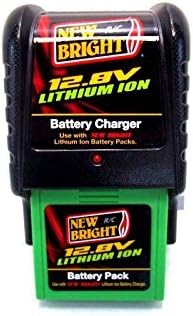
Setup and Charging
- Initial Charge: Before first use, fully charge the battery pack.
- Connect Charger: Plug the battery charger into a standard wall outlet (AC 120V, 60Hz). The red LED on the charger will illuminate, indicating power.
- Insert Battery: Carefully insert the 12.8V Lithium Ion Battery Pack into the charger. Ensure it is securely seated. The red LED will remain lit during charging.
- Charging Time: A full charge typically takes approximately 1.5 to 2 hours. Do not overcharge the battery.
- Charge Completion: The red LED will turn off when the battery is fully charged. Disconnect the battery pack from the charger and unplug the charger from the outlet.
Important Safety Notes:
- Always supervise charging.
- Do not charge damaged or leaking batteries.
- Use only the provided New Bright charger with this battery pack.
- Do not short-circuit the battery terminals.
- Keep batteries away from extreme temperatures and direct sunlight.
Operating the Battery Pack
Once charged, the 12.8V Lithium Ion Battery Pack is ready for use with compatible New Bright R/C products.
- Installation: Refer to your specific New Bright R/C vehicle's instruction manual for proper battery installation. Typically, the battery compartment will be clearly marked.
- Secure Connection: Ensure the battery pack is securely connected within the R/C vehicle to prevent disconnections during operation.
- Usage: Operate your R/C vehicle as per its instructions. The battery life will vary depending on usage intensity and vehicle type.
- Recharging: When the R/C vehicle's performance diminishes, it indicates the battery needs recharging. Follow the "Setup and Charging" instructions.
Maintenance and Storage
- Cleaning: Keep the battery pack and charger clean and free of dust and debris. Use a dry, soft cloth for cleaning. Do not use liquids.
- Storage: Store the battery pack and charger in a cool, dry place away from direct sunlight and extreme temperatures.
- Long-Term Storage: For extended storage periods, it is recommended to charge the battery pack to approximately 50% capacity every 3-6 months to maintain battery health.
- Disposal: Do not dispose of lithium-ion batteries in household waste. Recycle them at an authorized battery recycling facility. Consult local regulations for proper disposal.
Troubleshooting
| Problem | Possible Cause | Solution |
|---|---|---|
| Battery not charging (LED not lit) | Charger not plugged in; Battery not inserted correctly; Faulty outlet. | Ensure charger is securely plugged into a working outlet. Re-insert battery pack firmly. Try a different outlet. |
| Battery not holding charge / Short run time | Battery not fully charged; Battery nearing end of life; Overuse. | Ensure battery is fully charged as per instructions. If battery is old, consider replacement. Allow battery to cool between uses. |
| Charger LED remains lit after extended charging | Battery or charger fault. | Disconnect battery and charger. Allow to cool. Reattempt charging. If issue persists, discontinue use and contact New Bright support. |
Specifications
- Battery Type: Lithium Ion
- Battery Voltage: 12.8 Volts
- Battery Capacity: 500mAh (as per product description)
- Charger Input: AC 120V, 60Hz
- Manufacturer: New Bright
- Recommended Age: 5 years and up
Warranty and Support
This product is manufactured by New Bright. For information regarding warranty coverage, technical support, or replacement parts, please contact New Bright directly. Refer to the packaging or the official New Bright website for the most current contact information.
Note: Warranty terms and conditions may vary and are subject to the manufacturer's policies.
Related documents12.8V Lithium Ion Battery Pack & Charger Combo


Ask a question about this manual
Ask about setup, troubleshooting, compatibility, parts, safety, or missing instructions. Manuals+ will review the question and use this page’s manual context to help answer it.