1. Overview
The SIRUI VA-5 Fluid Video Head is engineered for smooth, quiet, and vibration-free camera operation. Designed for DSLR and system cameras, as well as small camcorders, it supports a maximum load of 3kg. Its sophisticated fluid-damped system ensures precise and intuitive control for both panning and tilting movements. A Safety Lock System is integrated to prevent accidental slipping of the quick release plate. The VA series is compatible with the Arca-Swiss system, offering versatility for various photographic setups. An internal spring-assisted counter-balance mechanism further enhances smooth tilt movements and provides equipment protection.

Figure 1: The SIRUI VA-5 Fluid Video Head, showcasing its compact design and integrated handle.
2. Setup
2.1 Attaching to a Tripod
- Ensure your tripod has a standard 3/8-inch mounting screw.
- Align the base of the VA-5 Fluid Video Head with the tripod's mounting screw.
- Rotate the head clockwise onto the tripod until it is securely tightened. Verify stability before proceeding.

Figure 2: The VA-5 Fluid Video Head securely attached to a tripod, ready for camera mounting.
2.2 Mounting the Quick Release Plate
- Locate the quick release plate (TY-70A) and the camera mounting screw.
- Attach the quick release plate to the bottom of your camera or spotting scope by screwing the mounting screw into the device's tripod socket. Ensure it is tight.
- To insert the plate into the head, loosen the quick release clamp knob on the side of the head.
- Press the red safety lock button located at the rear of the quick release clamp.
- Slide the quick release plate with your camera into the clamp until it clicks into place.
- Tighten the quick release clamp knob to secure the camera firmly.

Figure 3: Top view of the quick release plate (TY-70A) on the VA-5 Fluid Video Head, showing the mounting screws and alignment marks.

Figure 4: The quick release plate secured on the VA-5 Fluid Video Head, highlighting the red safety lock mechanism.
2.3 Adjusting the Pan Handle
- The pan handle can be adjusted for optimal comfort and control.
- Loosen the blue knob on the side of the head where the handle attaches.
- Rotate the handle to your desired position (forward or backward).
- Tighten the blue knob to secure the handle in place.
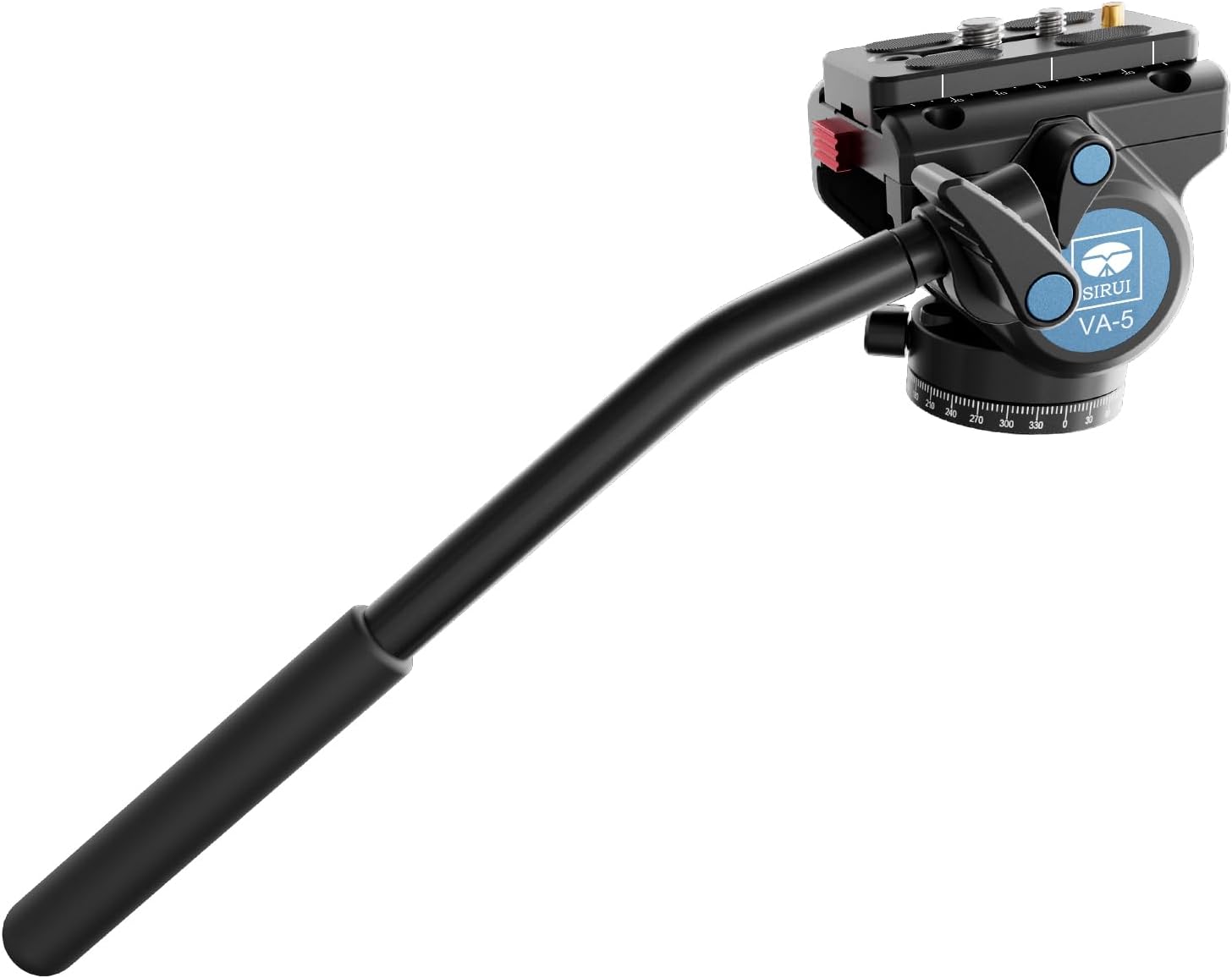
Figure 5: The VA-5 Fluid Video Head with its pan handle extended, demonstrating adjustability for user preference.
3. Operation
3.1 Panning Movement
- To pan horizontally (360°), loosen the pan lock knob located at the base of the fluid head.
- Use the pan handle to smoothly rotate the camera horizontally.
- Tighten the pan lock knob to secure the head in the desired horizontal position.

Figure 6: Side view of the VA-5 Fluid Video Head, showing the pan and tilt lock knobs for precise control.
3.2 Tilting Movement
- To tilt vertically, loosen the tilt lock knob on the side of the fluid head.
- Adjust the camera's vertical angle using the pan handle. The fluid damping system ensures smooth tilting.
- Tighten the tilt lock knob to fix the camera at the desired vertical angle.
- The internal spring-assisted counter-balance mechanism helps prevent the camera from tipping when the tilt lock is disengaged, especially with heavier equipment.
3.3 Using the Spirit Levels
- The VA-5 Fluid Video Head features two spirit levels to assist in achieving a perfectly level setup.
- One spirit level is located on the base for leveling the head on the tripod.
- Another spirit level is on the top plate for leveling the camera itself.
- Adjust your tripod legs and/or the head's base until the bubbles in both spirit levels are centered.
3.4 Official Product Video
Video 1: An official product review by SIRUI USA, demonstrating the features and smooth operation of the SIRUI VA-5 Fluid Video Head, including its panning, tilting, and quick release plate mechanisms.
4. Maintenance
- Cleaning: Use a soft, dry cloth to wipe down the fluid head after each use. For stubborn dirt, a slightly damp cloth can be used, followed by immediate drying. Avoid harsh chemicals or abrasive materials.
- Storage: Store the fluid head in a clean, dry environment, preferably in its protective bag, to prevent dust accumulation and potential damage.
- Lubrication: The fluid damping system is factory-sealed and does not require user lubrication. Attempting to lubricate internal components may void the warranty and damage the head.
- Inspection: Periodically check all knobs, levers, and screws for tightness. Ensure the quick release plate mechanism operates smoothly and securely.
5. Troubleshooting
| Problem | Possible Cause | Solution |
|---|---|---|
| Movement is not smooth (panning/tilting). | Lock knobs are too tight; debris in the mechanism. | Ensure pan and tilt lock knobs are sufficiently loosened. Clean any visible debris. If the issue persists, contact customer support. |
| Quick release plate does not lock securely. | Clamp knob not tightened; safety lock not engaged; plate not fully inserted. | Ensure the plate is fully inserted and the red safety lock button has popped out. Tighten the clamp knob firmly. Check for any obstructions. |
| Camera/scope feels unstable on the head. | Quick release plate not tightened to camera; head not tightened to tripod. | Verify the quick release plate is securely attached to your device. Ensure the fluid head is tightly mounted to the tripod. |
6. Specifications
- Product Dimensions: 11.81 x 3.94 x 3.27 inches (11.81"D x 3.94"W x 3.27"H)
- Item Weight: 1.17 pounds (0.53 Kilograms)
- Model Number: 49506 (VA-5 Fluid Head)
- Brand: Sirui
- Color: Black
- Compatible Devices: Camera
- Manufacturer: Guangdong SIRUI Optical Co., Ltd
- Features: Sophisticated fluid damping system, Safety Lock System, Continuously adjustable friction for tilt, 360° panorama panning, 2 spirit levels.
7. Warranty & Support
For warranty information and customer support, please refer to the documentation included with your product or visit the official Sirui Store or their official website. Keep your purchase receipt as proof of purchase for any warranty claims.


