
1. Introduction
This manual provides essential instructions for the safe operation, maintenance, and care of your Makita DGD800Z 18V LXT Cordless Die Grinder. Please read this manual thoroughly before using the tool to ensure proper and safe usage. Keep this manual accessible for future reference.
The Makita DGD800Z is a powerful 18V Li-ion LXT die grinder designed for various grinding and deburring applications. It features an insulated aluminum casing and overload protection for enhanced durability and safety.
2. General Safety Information
WARNING: Read all safety warnings, instructions, illustrations, and specifications provided with this power tool. Failure to follow all instructions listed below may result in electric shock, fire, and/or serious injury.
2.1 Work Area Safety
- Keep the work area clean and well-lit. Cluttered or dark areas invite accidents.
- Do not operate power tools in explosive atmospheres, such as in the presence of flammable liquids, gases, or dust. Power tools create sparks which may ignite the dust or fumes.
- Keep children and bystanders away while operating a power tool. Distractions can cause you to lose control.
2.2 Electrical Safety
- Power tool plugs must match the outlet. Never modify the plug in any way.
- Do not expose power tools to rain or wet conditions. Water entering a power tool will increase the risk of electric shock.
2.3 Personal Safety
- Always wear eye protection. Use safety glasses, goggles, or a face shield.
- Wear appropriate hearing protection.
- Dress properly. Do not wear loose clothing or jewelry. Keep your hair and clothing away from moving parts.
- Stay alert, watch what you are doing, and use common sense when operating a power tool.
2.4 Power Tool Use and Care
- Do not force the power tool. Use the correct power tool for your application.
- Disconnect the battery pack from the power tool before making any adjustments, changing accessories, or storing power tools.
- Store idle power tools out of the reach of children and do not allow persons unfamiliar with the power tool or these instructions to operate the power tool.
- Maintain power tools and accessories. Check for misalignment or binding of moving parts, breakage of parts, and any other condition that may affect the power tool’s operation.
2.5 Battery Tool Use and Care
- Recharge only with the charger specified by the manufacturer.
- Use power tools only with specifically designated battery packs.
- When the battery pack is not in use, keep it away from other metal objects.
3. Product Overview
Familiarize yourself with the components of your Makita DGD800Z die grinder before operation.

Figure 1: The Makita DGD800Z 18V LXT Cordless Die Grinder, showing its overall design and ergonomic grip.
3.1 Key Features
- Long Grinding Spindle: Designed for optimal handling and access in various applications.
- Restart Lock: Prevents accidental startup after battery replacement, enhancing safety.
- LED Warning System: Indicates decreasing battery voltage and potential overload conditions.
- Removable Plastic Protection: Over the spindle housing, this can serve as an additional handle for improved control.
- Insulated Aluminum Casing: Provides durability and protection.

Figure 2: Close-up view of the die grinder's spindle and textured grip area, highlighting the design for precise control.

Figure 3: Detailed view of the power switch and control area on the Makita DGD800Z, showing its ergonomic placement.
4. Setup
4.1 Battery Installation and Removal
The Makita DGD800Z requires an 18V Lithium-Ion battery (not included). Ensure the battery is fully charged before use.
- To install the battery, align the battery pack with the housing slot on the tool. Slide the battery into the slot until it locks into place with a click.
- To remove the battery, press the release button on the battery pack and slide it out of the tool.
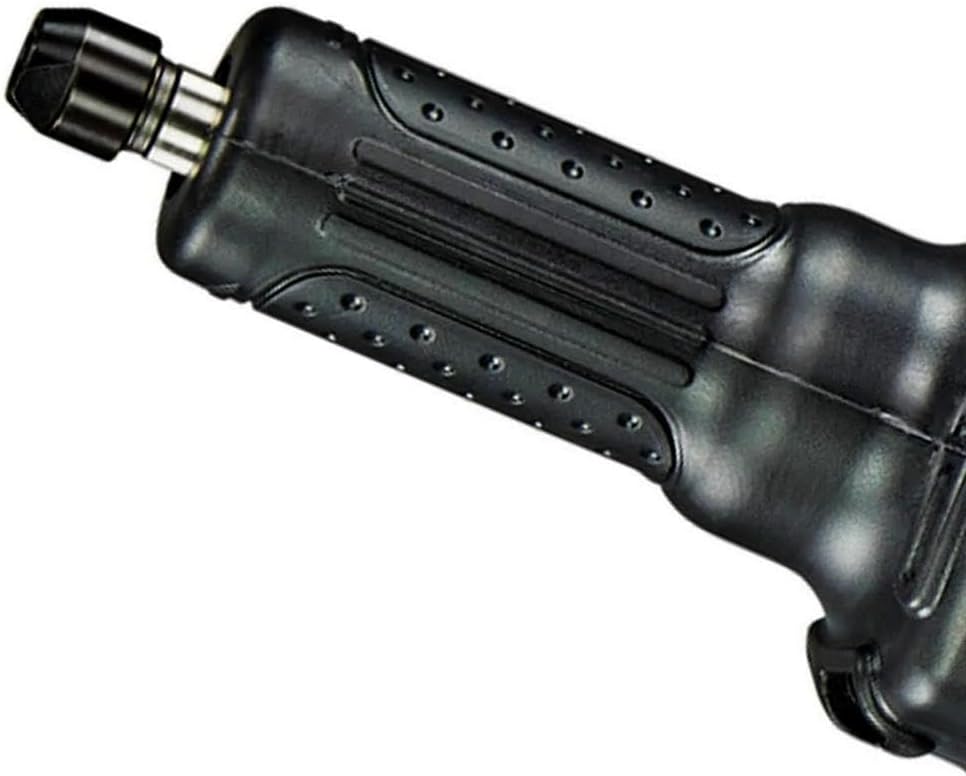
Figure 4: View of the battery compartment on the Makita DGD800Z, indicating where the 18V LXT battery slides in.
4.2 Accessory Attachment
Always ensure the battery is removed before attaching or changing accessories.
- Loosen the collet nut using the appropriate wrench.
- Insert the shank of the grinding accessory (e.g., grinding stone, carbide burr) into the collet. Ensure the accessory is inserted as far as possible without touching the bottom of the collet.
- Tighten the collet nut firmly with the wrench. Do not overtighten.
- Verify the accessory is securely fastened and runs true before operating the tool.
5. Operating Instructions
5.1 Starting and Stopping
- To start the tool, slide the switch to the "ON" position.
- To stop the tool, slide the switch to the "OFF" position.
- The restart lock feature prevents accidental startup if the battery is reinserted while the switch is in the "ON" position. Always ensure the switch is "OFF" before inserting a battery.
5.2 Grinding Operation
- Hold the tool firmly with both hands. The removable plastic protection over the spindle housing can be used as an additional handle for better control.
- Apply light, even pressure to the workpiece. Avoid excessive force, which can lead to tool damage, accessory breakage, or reduced performance.
- Move the grinder smoothly across the work surface.
- The LED indicator will warn of decreasing battery voltage or an overload condition. If the LED illuminates, reduce pressure or allow the tool to cool.

Figure 5: The Makita DGD800Z die grinder being used to grind a metal workpiece, demonstrating typical operation.
6. Maintenance
Regular maintenance ensures optimal performance and extends the life of your tool. Always remove the battery pack before performing any maintenance.
6.1 Cleaning
- Periodically clean the tool's ventilation openings to prevent overheating. Use a soft brush or compressed air.
- Wipe the tool's exterior with a soft, damp cloth. Do not use harsh chemicals or abrasive cleaners.
- Keep the collet and collet nut clean and free of debris to ensure proper accessory gripping.
6.2 Storage
- Store the tool in a dry, secure location out of reach of children.
- Remove the battery pack from the tool before storage, especially for extended periods.
- Store batteries in a cool, dry place, away from direct sunlight and extreme temperatures.
7. Troubleshooting
| Problem | Possible Cause | Solution |
|---|---|---|
| Tool does not start | Battery not inserted correctly Battery discharged Restart lock engaged | Ensure battery is fully seated Charge battery Turn switch OFF, then ON again after battery insertion |
| Reduced power or stops during operation | Battery low Overload protection activated Accessory dull or damaged | Recharge battery Reduce pressure, allow tool to cool Replace accessory |
| Excessive vibration | Accessory not properly secured Damaged or unbalanced accessory | Re-tighten collet nut Replace accessory |
If you encounter issues not listed here or if problems persist, contact Makita customer service or an authorized service center.
8. Specifications
| Feature | Specification |
|---|---|
| Model Number | DGD800Z |
| Brand | Makita |
| Power Source | Battery Powered (18V Li-ion LXT) |
| Voltage | 18 Volts |
| Maximum Rotational Speed | 10,000 RPM |
| Item Weight | 1360 Grams (approx. 3 pounds) |
| Product Dimensions (L x W x H) | 15.83" x 3.23" x 4.65" |
| Material | Rubber (grip) |
| Sound Level | 3 dB (Note: This value seems unusually low for a power tool and might refer to a specific measurement or be an error in the source data. Always use hearing protection.) |
| UPC | 088381670388 |
9. Warranty and Support
For information regarding warranty coverage, service, or technical support, please refer to the official Makita website or contact your local Makita authorized service center. Keep your purchase receipt as proof of purchase for warranty claims.
You can find more information and compatible accessories on the official Makita website: makita.de (Note: This link was provided in the product features and may be region-specific. Please check your local Makita website for relevant information).


