
Motorola TX550
Motorola TX550 Bluetooth Car Kit
User Manual
Introduction
The Motorola TX550 Bluetooth Car Kit, also known as SonicRider, is designed to provide a safe and convenient hands-free communication solution while driving. This device allows you to make and receive calls without holding your phone, enhancing road safety and compliance with hands-free driving laws.
Equipped with advanced echo and noise reduction technology, the TX550 ensures clear audio quality for both you and the person on the other end of the line. Its powerful 2-watt speaker delivers loud and clear sound, even over road noise. The device also features audible voice prompts to keep you informed about its status, such as connection, battery level, and mute status.

Figure 1: Front view of the Motorola TX550 Bluetooth Car Kit, showing the speaker grille and central Motorola logo button.
Package Contents
Your Motorola TX550 Bluetooth Car Kit package typically includes the following items:
- Motorola TX550 Bluetooth Car Kit unit
- USB Charging Cable
- Car Charger Adapter (may vary by region/packaging)
- Visor Clip (pre-attached or separate)
Please inspect all contents upon unboxing. If any items are missing or damaged, contact your retailer or Motorola support.
Product Features
- Hands-Free Calling: Enables safe communication without holding your phone.
- Exceptional Noise Reduction: World-class echo and noise cancellation with a single microphone to minimize road noise.
- Powerful Speaker: Integrated 2-watt speaker for clear audio output.
- Audible Voice Prompts: Provides spoken updates on connection status, battery level, and mute status.
- Multi-Phone Connectivity: Connects to up to two phones simultaneously, allowing multiple passengers to use the speakerphone.
- Extended Battery Life: Offers up to 45 hours of talk time and five months of standby time on a single charge.
- Universal Compatibility: Pairs with various Bluetooth-enabled devices from different brands.
Setup
Charging the Device
Before initial use, fully charge your Motorola TX550. Locate the micro USB charging port on the side of the device.

Figure 2: Side view of the Motorola TX550, highlighting the micro USB charging port and volume slider.
- Connect the small end of the USB charging cable to the micro USB port on the TX550.
- Connect the large end of the USB cable to the car charger adapter or any compatible USB power source.
- The indicator light on the device will illuminate during charging and turn off when fully charged.
Pairing with Your Phone
The TX550 can be paired with up to six different phones, and can actively connect to two phones simultaneously.
- Power On: Press and hold the central Motorola button (M button) for approximately 3 seconds until you hear a voice prompt indicating power on.
- Enter Pairing Mode: If this is the first time using the device, it will automatically enter pairing mode. If not, or to pair a new device, press and hold the M button for about 5 seconds until the indicator light flashes blue and red, and you hear "Ready to pair."
- Enable Bluetooth on Your Phone: Go to your phone's Bluetooth settings and ensure Bluetooth is turned on.
- Search for Devices: Your phone will scan for available Bluetooth devices. Select "Motorola TX550" or "SonicRider" from the list.
- Confirm Pairing: If prompted for a passcode, enter "0000" (four zeros). Once successfully paired, the TX550 will announce "Phone connected."
Operating the Device
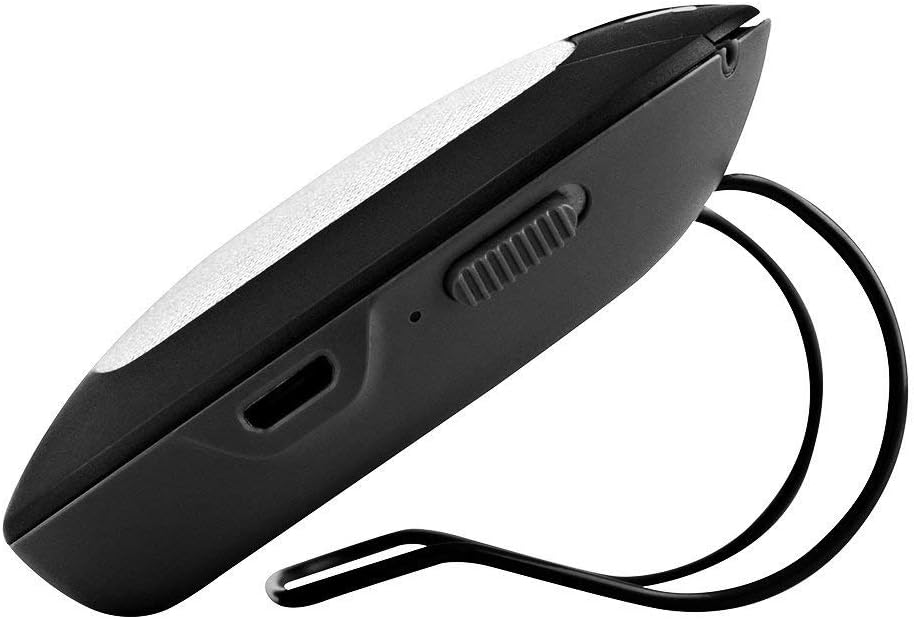
Figure 3: Top view of the Motorola TX550, illustrating the call, volume, and mute buttons.
Power On/Off
- To Power On: Press and hold the central Motorola button (M button) for approximately 3 seconds.
- To Power Off: Press and hold the M button for approximately 3 seconds until you hear a voice prompt indicating power off.
Call Management
- Answer a Call: Press the Call button (phone icon).
- End a Call: Press the Call button again.
- Reject a Call: Press and hold the Call button for 2 seconds.
- Redial Last Number: Double-press the Call button.
- Mute/Unmute Microphone: Press the Mute button (microphone with slash icon). The device will announce "Mute on" or "Mute off."
Volume Control
Adjust the speaker volume using the dedicated volume buttons or slider on the device.
- Increase Volume: Press the + button or slide the volume control up.
- Decrease Volume: Press the - button or slide the volume control down.
Voice Prompts
The TX550 provides audible voice prompts for various statuses:
- "Power on" / "Power off"
- "Ready to pair"
- "Phone connected" / "Phone disconnected"
- "Battery high" / "Battery medium" / "Battery low"
- "Mute on" / "Mute off"
Maintenance
Cleaning
To maintain the appearance and functionality of your TX550, clean it regularly:
- Use a soft, dry, lint-free cloth to wipe the exterior.
- Do not use abrasive cleaners, solvents, or strong chemicals, as they may damage the surface.
- Avoid getting moisture into any openings.
Battery Care
To maximize battery life and performance:
- Charge the device fully before first use.
- Avoid exposing the device to extreme temperatures (hot or cold).
- If storing the device for an extended period, charge it to about 50% before storage and recharge every few months.
Troubleshooting
| Problem | Possible Cause | Solution |
|---|---|---|
| Device does not power on. | Battery is depleted. | Charge the device for at least 30 minutes. |
| Cannot pair with phone. | Device not in pairing mode; Bluetooth off on phone; previously paired. | Ensure TX550 is in pairing mode (flashing blue/red). Turn phone's Bluetooth off and on. Delete previous pairing from phone and try again. |
| Poor audio quality / Echo. | Volume too high; device too far from mouth; environmental noise. | Adjust volume. Ensure device is positioned correctly on visor. Reduce background noise if possible. |
| No voice prompts. | Voice prompt feature disabled (not applicable for this model); software glitch. | Ensure device is powered on and connected. Try powering off and on again. |
| Device disconnects frequently. | Out of range; interference; low battery. | Keep phone within 10 meters (33 feet) of the device. Charge the device. Avoid strong electromagnetic interference. |
Specifications
| Model Name | TX550 |
| Brand | Motorola |
| Material | Metal, Plastic |
| Connectivity Technology | Bluetooth |
| Speaker Output Power | 2 Watts |
| Audio Output Mode | Mono |
| Battery Life (Talk Time) | Up to 45 Hours |
| Battery Type | 1 Lithium Polymer (included) |
| Item Weight | 249 g |
| Product Dimensions | 17.02 x 11.18 x 5.08 cm |
| Color | Silver |
Warranty and Support
For specific warranty information regarding your Motorola TX550 Bluetooth Car Kit, please refer to the documentation included with your purchase or visit the official Motorola support website. Warranty terms and conditions may vary by region and retailer.
If you encounter issues not covered in this manual or require further assistance, please contact Motorola customer support through their official channels. Keep your proof of purchase handy when seeking support.
Related documentsTX550


Ask a question about this manual
Ask about setup, troubleshooting, compatibility, parts, safety, or missing instructions. Manuals+ will review the question and use this page’s manual context to help answer it.