1. Introduction
This manual provides detailed instructions for the safe and efficient use of your Panasonic CZ-10RT3 Standard Wired Remote Control. Please read this manual thoroughly before operating the unit and keep it for future reference.
2. Safety Information
Always observe the following safety precautions to prevent injury or damage to property.
- Do not attempt to disassemble, repair, or modify the remote control. This may cause electric shock or malfunction.
- Keep the remote control away from water or excessive moisture.
- Avoid exposing the remote control to direct sunlight or high temperatures.
- Ensure proper installation by a qualified technician to prevent electrical hazards.
3. Product Overview
The Panasonic CZ-10RT3 is a standard wired remote control designed for use with compatible Panasonic indoor units. It provides essential functions for controlling temperature, operation mode, fan speed, and other settings.

Figure 1: Front view of the Panasonic CZ-10RT3 wired remote control. The display shows current settings, and buttons are arranged below for various functions like temperature, timer, fan speed, and operation mode.
Initial Power-On Notice
Important: When power is first supplied to the unit, the remote control may not accept operations for approximately 10 minutes. Please refer to the instruction manual included with the indoor unit for detailed information regarding initial startup procedures.
4. Setup and Installation
Installation of the wired remote control should be performed by a qualified service technician. Ensure that the remote control is mounted in a location that allows for easy access and clear visibility of the display.
Mounting the Remote Control
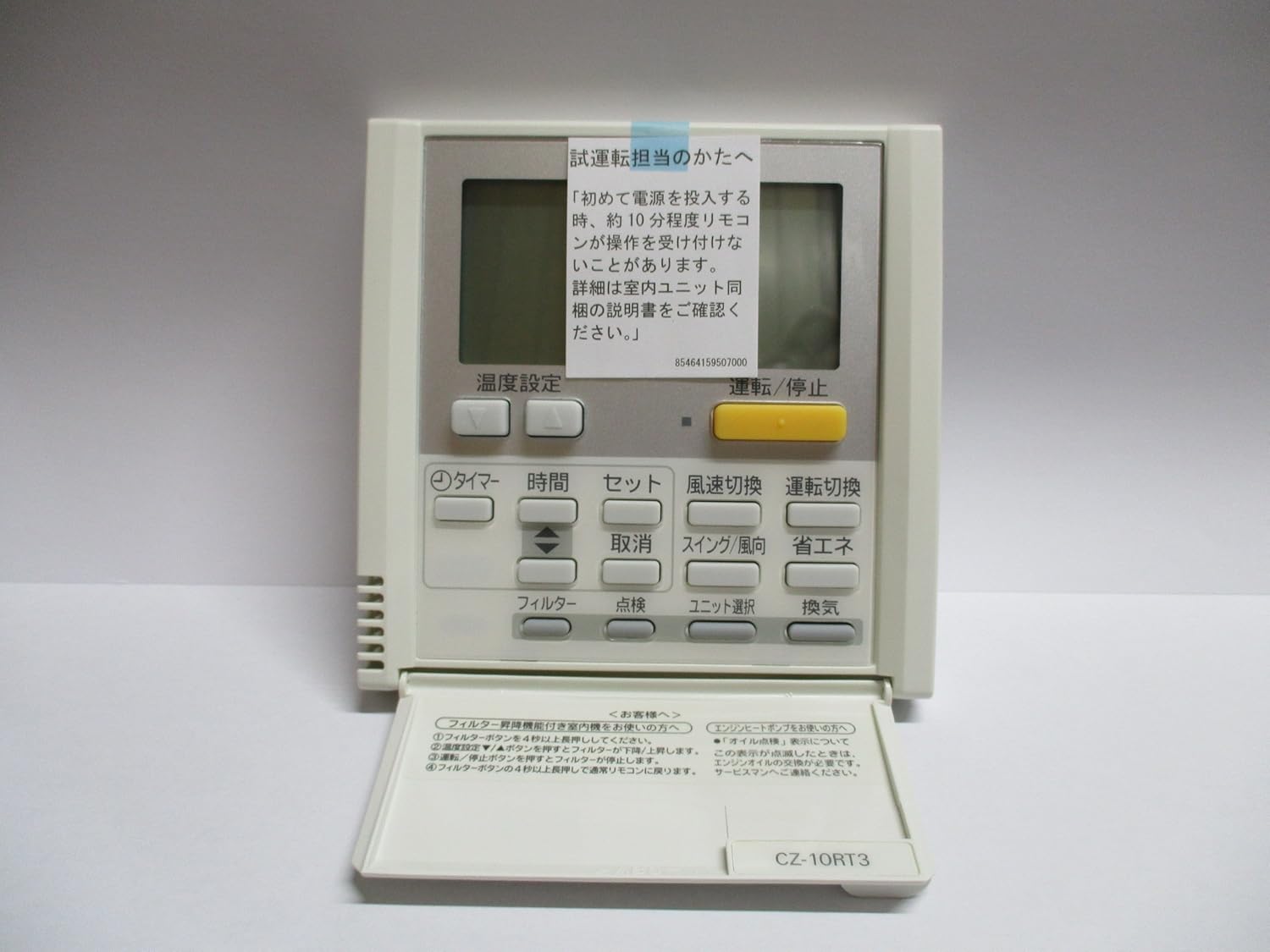
Figure 2: Included mounting screws for securing the remote control to a wall or surface. A protective sheet is attached to the unit at the time of factory shipment and should be removed before use.
The remote control is typically mounted to a wall using the provided screws. Ensure the wiring is correctly connected to the indoor unit according to the indoor unit's installation manual.
5. Operating Instructions
This section details the functions of each button on the CZ-10RT3 remote control.
Button Functions
| Button Name | Function |
|---|---|
| 運転/停止 (Operation/Stop) | Press to start or stop the operation of the indoor unit. |
| 温度設定 (Temperature Setting) | Use the ▼ button to decrease the set temperature by 1°C. Use the ▲ button to increase the set temperature by 1°C. Note: Temperature cannot be set during fan-only operation. |
| タイマー (Timer) | Used to set or adjust the timer functions. |
| 時間 (Time) | Used in conjunction with the Timer button to set the time. |
| セット (Set) | Confirms the selected settings, such as timer settings. |
| 取消 (Cancel) | Cancels the current setting or operation. |
| スイング/風向 (Swing/Air Direction) | Adjusts the air swing function or fixed air direction. When an optional lift grille is connected, this button may be used for lowering/raising the grille. |
| 省エネ (Energy Saving) | Activates or deactivates energy-saving mode. |
| フィルター (Filter) | Used for filter-related functions, including filter cleaning notifications. |
| 点検 (Inspection) | Used for system inspection or diagnostic purposes. |
| ユニット選択 (Unit Selection) | Selects the indoor unit to be controlled in multi-unit installations. |
| 換気 (Ventilation) | Controls the ventilation function. |
| 風速切換 (Fan Speed Switching) | Adjusts the fan speed to your preferred setting. Note: Automatic fan speed is not available during fan-only operation. |
6. Maintenance
Filter Cleaning Function (For Kerosene Heaters)
If your system includes a kerosene heater, follow these steps to activate the filter cleaning function:
- Press and hold the FILTER button for 4 seconds or more.
- "Filter Cleaning" will be displayed on the remote control screen, and the unit's operation will stop.
- Press the OPERATION/STOP button to stop the filter cleaning process.
- The filter lamp will light up, and the unit will return to normal operation mode.
Regular cleaning of the air filters in your indoor unit is crucial for maintaining optimal performance and air quality. Refer to your indoor unit's manual for specific filter cleaning instructions.
7. Troubleshooting
Error Messages and Notifications
The remote control display may show various messages to indicate system status or issues.
- "Oil Out" Notification: If your system is a kerosene heater and runs out of oil, "Oil Out" will be displayed on the screen. This indicates that the engine oil needs to be replaced. Please contact a qualified service technician for assistance.
- For other error codes or unusual behavior, refer to the comprehensive troubleshooting section in your indoor unit's instruction manual or contact Panasonic customer support.
8. Specifications
| Feature | Detail |
|---|---|
| Brand | Panasonic |
| Model Number | CZ-10RT3 |
| Type | Standard Wired Remote Control |
| Color | White |
| Battery Type | Alkaline (Note: This is likely for a backup or internal clock, as it's a wired remote.) |
9. Warranty and Support
For warranty information, technical support, or service requests, please contact Panasonic customer service or your authorized dealer. Keep your purchase receipt as proof of purchase.
You can find more information and support on the official Panasonic website: www.panasonic.com


