
Precision Pro NX7PRO
Precision Pro Golf NX7 Pro Laser Rangefinder User Manual
Model: NX7PRO | Brand: Precision Pro
Introduction
The Precision Pro Golf NX7 Pro Laser Rangefinder is designed to provide accurate distance measurements for golfers, whether on flat or sloped surfaces. Featuring advanced Pro Slope technology, crystal clear optics, and a durable, water-resistant design, this rangefinder assists in precise club selection and enhances your game. This manual provides detailed instructions for setup, operation, maintenance, and troubleshooting to ensure optimal performance of your device.
Package Contents
- Precision Pro Golf NX7 Pro Laser Rangefinder
- Carrying Case
- Cleaning Cloth
- User Manual (this document)
- CR2 Battery (may be pre-installed or included separately)
Setup
1. Battery Installation
The NX7 Pro requires one CR2 battery for operation. To install or replace the battery:
- Locate the battery compartment on the side of the rangefinder.
- Twist the battery cap counter-clockwise to open.
- Insert a new CR2 battery, ensuring the positive (+) end faces outwards.
- Replace the battery cap and twist clockwise to secure it.

Figure 1: Battery installation in the NX7 Pro rangefinder.
2. Initial Power On
Press the power/fire button (usually located on top) to turn on the device. The display will illuminate, indicating it is ready for use.
Operating Instructions
1. Adjusting Focus
To ensure a clear view, rotate the eyepiece (diopter adjustment) until the display and target appear sharp and in focus.
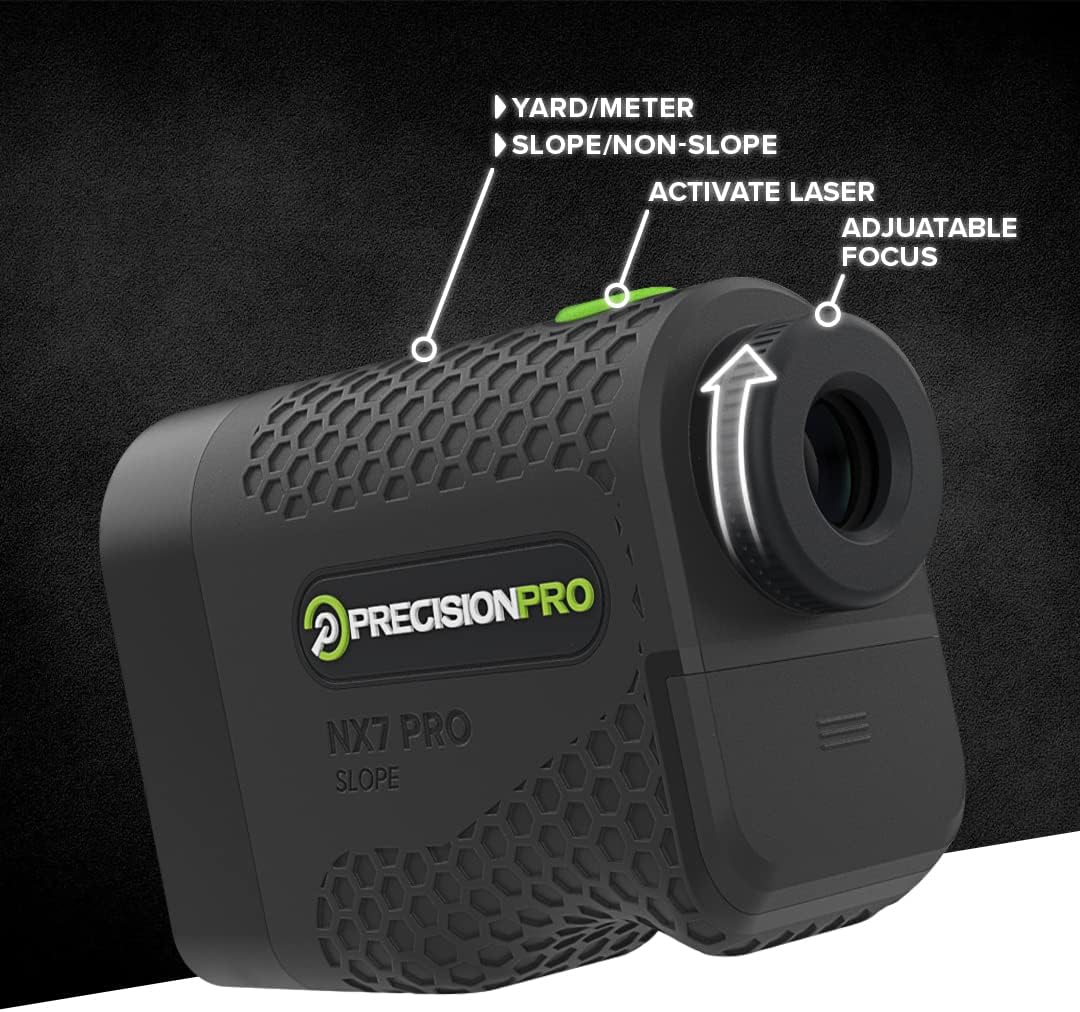
Figure 2: Adjustable focus mechanism.
2. Taking a Measurement
Aim the crosshairs at your desired target and press the power/fire button. The distance will be displayed almost instantly. The device provides a short vibration when it locks onto the target, confirming the measurement.
3. Slope and Non-Slope Modes
The NX7 Pro features adaptive slope technology, which calculates the "play as" distance based on elevation changes. This feature can be easily toggled on or off.
- Slope Mode: Provides the adjusted distance considering uphill or downhill slopes. This mode is ideal for practice and casual play.
- Non-Slope Mode: Provides the direct line-of-sight distance. This mode is legal for tournament play.
To switch between modes, locate the slope switch (often a physical button or slider on the side of the device). Ensure the correct mode is selected for your playing conditions or tournament rules.

Figure 3: Adaptive Slope in use.

Figure 4: Display showing Non-Slope and Slope Adjusted Distances.
4. Switching Units (Yards/Meters)
The NX7 Pro can display distances in either yards or meters. To switch units, press and hold the mode button (or a dedicated unit button) until the unit changes on the display.
Figure 5: Yard/Meter unit selection.
Features
- Professional Golf Rangefinder: Designed for precise distance measurements on both sloped and flat surfaces, aiding in accurate club selection.
- Adaptive Slope Technology: Provides "play as" distances, which can be easily deactivated for tournament legal play.
- Clear, Fast, and Accurate: Equipped with crystal clear optics, 6x magnification, and precise technology for quick distance measurement.
- 400-Yard Range: Capable of measuring distances up to 400 yards (approximately 365 meters), accurate to within 0.9 yards (0.8 meters).
- Water Resistant: Built to withstand various weather conditions on the golf course.
- Target Lock Vibration: Provides a short vibration feedback when the target is successfully acquired.

Figure 6: Key features of the NX7 Pro.
Maintenance
1. Cleaning the Device
To maintain optical clarity and device performance:
- Gently wipe the lenses with the provided cleaning cloth or a soft, lint-free cloth.
- Do not use abrasive materials or chemical cleaners, as they may damage the lens coatings.
- Wipe the body of the rangefinder with a damp cloth as needed.
2. Battery Replacement
Replace the CR2 battery when the low battery indicator appears on the display or if the device fails to power on. Refer to the "Battery Installation" section under Setup for detailed steps.
Precision Pro offers a lifetime battery replacement service upon product registration. Contact customer support for details.
Troubleshooting
| Problem | Possible Cause | Solution |
|---|---|---|
| Device does not power on. | Low or dead battery; incorrectly installed battery. | Replace the CR2 battery; ensure battery is inserted with correct polarity. |
| Inaccurate or inconsistent readings. | Dirty lens; target too far or too small; unstable aiming. | Clean the lenses; ensure target is within range and large enough; hold the device steady. |
| Display is blurry. | Eyepiece not focused. | Rotate the eyepiece to adjust the diopter until the display is clear. |
| Cannot switch between Yards/Meters. | Incorrect button press sequence. | Refer to "Switching Units" section; ensure you are pressing and holding the correct button. |
Specifications
| Feature | Detail |
|---|---|
| Model Number | NX7PRO |
| Range | Up to 400 yards (approx. 365 meters) |
| Accuracy | +/- 0.9 yards (0.8 meters) |
| Magnification | 6x |
| Battery Type | 1 x CR2 Lithium (not included by default, but required) |
| Water Resistance | Water Resistant (IP54) |
| Dimensions (L x W x H) | 15.24 x 20.32 x 10.16 cm (approx. 6 x 8 x 4 inches) |
| Weight | 362.87 grams (approx. 12 ounces) |
| Material | Plastic |
| UPC | 683405595229 |
Warranty and Support
Precision Pro Golf stands behind the quality of its products. The NX7 Pro Laser Rangefinder comes with a 2-year warranty covering manufacturing defects.
Additionally, Precision Pro offers a lifetime battery replacement service for registered products. To register your product and take advantage of this service, please visit the official Precision Pro Golf website or contact their customer support.
For any questions, technical assistance, or warranty claims, please contact Precision Pro Golf customer support. Refer to the product packaging or official website for the most current contact information.
Note: Product registration may be required for certain warranty and support services.
Related documentsNX7PRO


Ask a question about this manual
Ask about setup, troubleshooting, compatibility, parts, safety, or missing instructions. Manuals+ will review the question and use this page’s manual context to help answer it.