
1. Introduction
This manual provides comprehensive instructions for the Adesso AKB-132UY Luminous Large Print Multimedia Desktop USB Keyboard. This keyboard is designed with large, high-contrast keys to enhance readability, particularly for users with visual impairments. It also integrates multimedia controls for convenience.

Figure 1: Adesso AKB-132UY Luminous Large Print Multimedia Desktop USB Keyboard. This image displays the full keyboard with its black frame and bright yellow keys, featuring large black characters.
2. Package Contents
Verify that all items are present in the package:
- Adesso EasyTouch 132 - Florescent Yellow Multimedia Desktop Keyboard
- Quick Start Guide
3. Setup Instructions
3.1 Connecting the Keyboard
- Locate an available USB port on your computer.
- Plug the USB connector of the Adesso AKB-132UY keyboard into the USB port.
- The operating system will automatically detect and install the necessary drivers. No additional software installation is typically required.
The keyboard is powered via the USB connection.
4. Operating the Keyboard
4.1 Key Features
- Fluorescent 4X Large Print Keys: The keyboard features black characters printed in a large 4X size on bright fluorescent yellow keys. This design provides high contrast for improved visibility and readability, particularly beneficial for users with visual impairments.

Figure 2: Close-up view of the keyboard's QWERTY section, highlighting the large black characters on fluorescent yellow keys.
- Multimedia Controls: Dedicated hotkeys allow for one-touch control of media functions. These include:
- Media Player
- Volume Down
- Volume Up
- Mute
- Play/Pause
- Previous Track
- Next Track
- Stop

Figure 3: Close-up view of the numeric keypad and dedicated multimedia control keys located on the upper right side of the keyboard.
- Windows One-Touch Controls: Access common Windows applications directly with dedicated hotkeys:
- My Computer
- Search
- Calculator
- Home (Browser)
- Favorites (Browser)
- Quiet Membrane Key Switches: The keyboard utilizes membrane key switches designed to provide a responsive and quiet typing experience. These switches are rated for a lifespan of up to five million keystrokes.
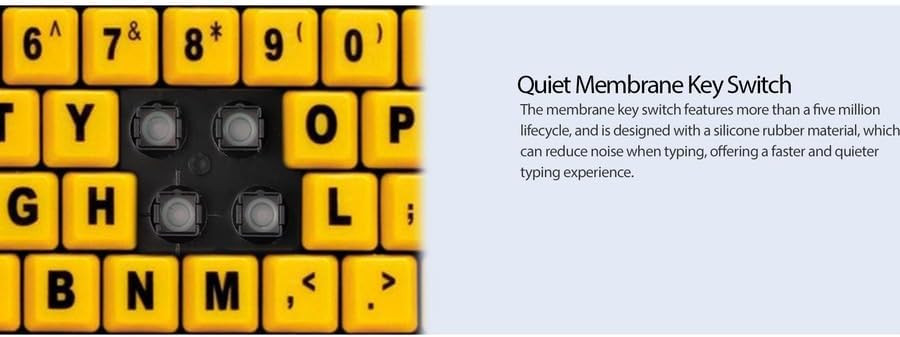
Figure 4: Detailed view showing the internal membrane key switch mechanism beneath a keycap.
- 104-Key US Layout: The keyboard features a standard 104-key US layout, providing a familiar typing experience.
5. Maintenance
5.1 Cleaning the Keyboard
To maintain the keyboard's appearance and functionality:
- Disconnect the keyboard from your computer before cleaning.
- Use a soft, slightly damp cloth to wipe the surface of the keys and the keyboard body.
- For stubborn dirt or debris between keys, use compressed air or a soft brush.
- Avoid using harsh chemicals, abrasive cleaners, or excessive moisture, as these can damage the keyboard's finish or internal components.
6. Troubleshooting
If you encounter issues with your Adesso AKB-132UY keyboard, refer to the following troubleshooting steps:
6.1 Keyboard Not Responding
- Check USB Connection: Ensure the keyboard's USB cable is securely plugged into a functioning USB port on your computer. Try unplugging and re-plugging the cable.
- Try a Different USB Port: Connect the keyboard to another USB port on your computer to rule out a faulty port.
- Restart Computer: Sometimes a simple system restart can resolve connectivity issues.
- Test on Another Computer: If possible, test the keyboard on a different computer to determine if the issue is with the keyboard or your computer's setup.
6.2 Keys Sticking or Not Registering
- Clean Under Keys: Dust, crumbs, or debris can get lodged under keys. Use compressed air to clear any obstructions.
- Avoid Spills: Liquid spills can cause keys to stick or malfunction. If a spill occurs, disconnect the keyboard immediately and allow it to dry completely before reconnecting.
7. Specifications
| Feature | Description |
|---|---|
| Brand | Adesso |
| Model Number | AKB-132UY |
| Model Name | EasyTouch 132 |
| Connectivity Technology | USB |
| Keyboard Description | Membrane |
| Special Feature | Large Print Keys |
| Color | Black Yellow |
| Material | Plastic |
| Number of Keys | 104 |
| Keyboard Layout | QWERTY (US Layout) |
| Power Source | USB power |
| Item Weight | 1.5 Pounds |
| Compatible Devices | PC |
8. Warranty Information
The Adesso AKB-132UY keyboard comes with a 1-year limited warranty from the date of purchase. This warranty covers defects in materials and workmanship under normal use. For specific terms and conditions, please refer to the warranty card included in your package or visit the official Adesso website.
9. Support
For technical support, product registration, or additional information, please visit the official Adesso website at www.adesso.com. You may also find FAQs and driver downloads on their support pages.


