Introduction
The Tripp Lite B126-2A1 1x2 HDMI Over Cat5/Cat6 Extender Kit allows you to extend an HDMI signal from a single source to two separate displays over long distances using cost-effective Cat5e/6 cabling. This kit is ideal for digital signage, schools, churches, retail stores, and trade show presentations where the HDMI source needs to remain hidden and secure. It supports high-definition video resolutions up to 1080p (60 Hz) and offers compatibility with HDCP, 3D, stereo audio, and 7.1 channel surround sound audio.
Key Features:
- Extends HDMI signal to two displays via a single Cat5e/6 cable.
- Supports 1080p (60 Hz) up to 150 feet and 1080i (60 Hz) up to 200 feet.
- Compatible with HDCP, 3D, stereo audio, and 7.1 channel surround sound.
- Features a local HDMI output on the transmitter for a local monitor.
- Receiver unit includes an equalization control for video image adjustment.
- TAA-compliant for GSA Schedule purchases.
Package Contents
Verify that your package contains the following items:
- B126-002-INT 2-Port HDMI over Cat5/Cat6 Extender/Splitter (Transmitter Unit)
- B126-002-INT 2-Port HDMI over Cat5/Cat6 Extender/Splitter (Receiver Unit)
- External power supply with CEE 7/16 Schuko, BS1363 UK and AS2112 Australia plugs (Input: 100–240V, 50/60 Hz, 0.5A; Output: 5V, 2A)
- Mounting hardware
- Owner’s manual

Figure 1: Contents of the Tripp Lite HDMI Extender Kit, showing the transmitter, receiver, power adapters, mounting brackets, screws, and owner's manual.
Setup Instructions
Follow these steps to set up your Tripp Lite B126-2A1 HDMI Extender Kit:
- Connect the Transmitter Unit:
- Connect your HDMI source (e.g., Blu-ray player, computer) to the INPUT HDMI port on the transmitter unit using an HDMI cable (not included).
- If desired, connect a local monitor to the LOCAL HDMI port on the transmitter unit using an HDMI cable (not included). This allows you to view the source content near the transmitter.
- Connect the Receiver Unit:
- Connect your two remote displays (e.g., HDTVs, projectors) to the OUTPUT 1 and OUTPUT 2 HDMI ports on the receiver unit using HDMI cables (not included).
- Connect Transmitter and Receiver with Cat5e/6 Cable:
- Connect the RJ45 port on the transmitter unit to the RJ45 port on the receiver unit using a single Cat5e/6 cable. For optimal performance and to achieve maximum distance and resolution, use 24AWG solid wire Cat5e/6 cable (Tripp Lite's N202-Series recommended).
- Connect Power:
- Connect the included external power supply to the power input on the transmitter unit.
- Plug the power supply into a standard AC outlet.
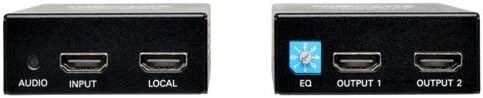
Figure 2: Detailed view of the transmitter (left) with AUDIO, INPUT, and LOCAL HDMI ports, and the receiver (right) with EQ dial, OUTPUT 1, and OUTPUT 2 HDMI ports.
Operating Instructions
Once the setup is complete, the Tripp Lite B126-2A1 Extender Kit operates automatically. The following points detail its operational capabilities:
- Video Transmission: The kit transmits a 1080p (60 Hz) signal up to 150 feet and a 1080i (60 Hz) signal up to 200 feet over a single Cat5e/6 cable. It also supports 3D signals up to 125 feet.
- Audio Support: The extender supports both stereo audio and 7.1 channel surround sound audio (7.1 channel surround sound signal will be Multi-Channel or PCM).
- HDCP Compliance: The kit is HDCP compliant, ensuring compatibility with protected content.
- Equalization Control: The receiver unit features a built-in equalization control (labeled "EQ") which can be adjusted to optimize the video image quality, especially over longer cable runs. Use a small screwdriver to carefully turn the dial until the best picture quality is achieved.
- Plug-and-Play: The system is plug-and-play, requiring no software or drivers for installation.
Maintenance
The Tripp Lite B126-2A1 HDMI Extender Kit requires minimal maintenance. Follow these guidelines to ensure optimal performance and longevity:
- Cleaning: Keep the units clean and free from dust. Use a soft, dry cloth for cleaning. Avoid liquid cleaners or solvents.
- Environmental Conditions: Operate the units within recommended temperature and humidity ranges. Avoid exposing them to extreme temperatures, direct sunlight, or high moisture.
- Cable Management: Ensure all connected cables (HDMI, Cat5e/6, power) are securely fastened and not subjected to excessive bending, kinking, or strain. Proper cable management helps prevent signal degradation and physical damage.
- Ventilation: Ensure adequate airflow around the units to prevent overheating. Do not block ventilation openings.
Troubleshooting
If you encounter issues with your Tripp Lite B126-2A1 HDMI Extender Kit, refer to the following troubleshooting tips:
- No Video or Poor Picture Quality:
- Check Connections: Ensure all HDMI cables are securely connected to the source, displays, transmitter, and receiver. Verify the Cat5e/6 cable is firmly connected between the transmitter and receiver.
- Cable Quality and Length: Confirm that you are using 24AWG solid wire Cat5e/6 cable for the connection between units. Ensure the cable length does not exceed the maximum recommended distances (150 ft for 1080p, 200 ft for 1080i).
- Adjust Equalization: On the receiver unit, carefully adjust the equalization (EQ) control dial. Slowly turn the dial until the best possible picture quality is achieved.
- Power Supply: Verify that the power adapter is correctly connected to the transmitter unit and plugged into a working power outlet.
- Source/Display Settings: Check the resolution and refresh rate settings on your HDMI source and displays to ensure they are compatible with the extender's capabilities.
- No Audio:
- Check HDMI Cables: Ensure all HDMI cables are properly connected, as audio is transmitted through these cables.
- Source/Display Audio Settings: Verify the audio output settings on your HDMI source and the audio input settings on your displays.
- Intermittent Signal or Flickering:
- Cable Integrity: Inspect all cables for damage. Replace any damaged cables.
- Equalization Adjustment: Fine-tune the EQ control on the receiver unit.
- Power Stability: Ensure the power supply is stable and not experiencing fluctuations.
Specifications
| Feature | Specification |
|---|---|
| Brand | TRIPP LITE |
| Model Number | B126-2A1 |
| Connector Type | HDMI |
| Cable Type | Ethernet, HDMI |
| Compatible Devices | Monitor, Projector |
| Color | Black |
| Frequency | 60 Hz |
| Item Weight | 1.6 Pounds |
| Product Dimensions | 2.2 x 6.5 x 8.4 inches |
| UPC | 012302584003, 037332180735 |
| Date First Available | May 29, 2014 |
Official Product Video
Video: Official Tripp Lite informational video demonstrating the features and benefits of the HDMI Over Cat5 Extender Kit.
Warranty and Support
This Tripp Lite B126-2A1 HDMI Extender Kit is covered by a 1-year limited warranty. For detailed warranty terms and conditions, please refer to the documentation included with your product or visit the official Tripp Lite website.
For technical support, product assistance, or warranty claims, please contact Tripp Lite customer service. Contact information can typically be found on the Tripp Lite website or in the owner's manual provided with your product.


