
1. Product Overview
The LiftMaster 41A5021-1HATS Receiver Logic Board is a critical replacement component designed for compatible LiftMaster garage door openers. This logic board serves as the central processing unit for your garage door opener, managing functions such as remote control signals, safety sensor operation, and overall door movement. Replacing a faulty logic board can restore full functionality to your garage door opener, allowing for reliable and safe operation.
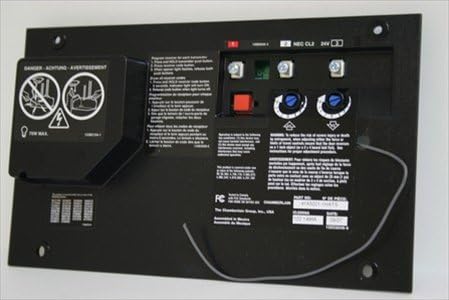
Figure 1: LiftMaster 41A5021-1HATS Receiver Logic Board. This image shows the logic board with its various connections and components, including the red learn button and adjustment screws.
2. Safety Information
WARNING: To prevent serious injury or death, always disconnect power to the garage door opener before attempting any repairs or adjustments. Garage door springs are under extreme tension and can cause severe injury. Do not attempt to adjust, repair, or remove anything connected to the garage door springs or cables. Refer to your garage door opener's main instruction manual for complete safety guidelines.
- Always wear appropriate personal protective equipment (PPE) when working with electrical components.
- Ensure the garage door opener is unplugged or the circuit breaker is off before beginning installation.
- Keep hands and clothing clear of moving parts of the garage door and opener.
- This logic board is designed for specific LiftMaster models. Verify compatibility before installation.
3. Package Contents
Upon opening the package, verify that all components are present and undamaged. The package typically includes:
- One (1) LiftMaster 41A5021-1HATS Receiver Logic Board
- Installation instructions (may be included or available online)
4. Setup and Installation
Installation of the logic board requires basic electrical knowledge and adherence to safety procedures. If you are unsure about any step, it is recommended to consult a qualified garage door technician.
- Disconnect Power: Unplug the garage door opener from the electrical outlet or turn off the circuit breaker supplying power to the opener.
- Access the Control Panel: Locate and open the control panel cover on your garage door opener unit. This usually involves removing a few screws.
- Photograph Wiring: Before disconnecting any wires, take clear photographs of all existing wiring connections to the old logic board. This will serve as a reference for reconnecting wires to the new board.
- Disconnect Wires: Carefully disconnect all wires from the old logic board. Pay attention to the labeling and position of each wire.
- Remove Old Board: Unscrew and remove the old logic board from its mounting brackets.
- Install New Board: Position the new LiftMaster 41A5021-1HATS logic board in place and secure it with the screws.
- Reconnect Wires: Using your photographs as a guide, carefully reconnect all wires to the corresponding terminals on the new logic board. Ensure all connections are secure.
- Restore Power: Close the control panel cover and restore power to the garage door opener by plugging it back in or turning on the circuit breaker.
- Program Remotes: After installing the new logic board, you will need to reprogram all existing remote controls and keypads to the opener. Refer to your garage door opener's main manual for specific programming instructions, typically involving pressing the "Learn" button on the logic board and then a button on your remote.
- Test Operation: Test the garage door opener's functionality using your remotes and wall control. Ensure the safety reversal system is working correctly by placing an object in the door's path.
5. Operating the Logic Board
The logic board operates automatically once installed and programmed. Its primary function is to interpret signals from your remote controls, wall control, and safety sensors to control the garage door's movement. The "Learn" button on the board is used for programming new remote controls and accessories. The force and travel limits may need to be adjusted after installation, which are typically controlled by adjustment screws or buttons on the logic board itself, as detailed in your main garage door opener manual.
6. Maintenance
The LiftMaster 41A5021-1HATS Receiver Logic Board is designed for long-term reliability and typically requires minimal maintenance. However, regular checks of your overall garage door opener system are recommended:
- Keep Clean: Ensure the logic board area within the opener housing is free from dust, debris, and moisture.
- Check Connections: Periodically inspect all wire connections to the logic board to ensure they remain secure and free from corrosion.
- System Checks: Regularly test your garage door opener's safety features, including the safety reversal system and photoelectric sensors, as outlined in your main opener manual.
7. Troubleshooting
If you encounter issues after installing the new logic board, consider the following common troubleshooting steps:
| Problem | Possible Cause | Solution |
|---|---|---|
| Remotes not working after installation. | Remotes need to be reprogrammed to the new logic board. | Press the "Learn" button on the logic board, then activate each remote. Refer to your opener's manual for detailed steps. |
| Garage door does not move. | No power to the opener, safety sensors misaligned, or wiring issue. | Check power supply. Ensure safety sensors are aligned and their indicator lights are on. Verify all wires are securely connected to the logic board. |
| Door opens but won't close with remote. | Often related to safety sensors or force limits. | Check safety sensors for obstructions or misalignment. Adjust closing force limits if necessary (refer to main opener manual). |
For more complex issues, consult the complete troubleshooting guide in your original LiftMaster garage door opener manual or contact LiftMaster customer support.
8. Specifications
| Feature | Detail |
|---|---|
| Model Number | 41A5021-1HATS |
| Manufacturer | The Chamberlain Group |
| Item Weight | 0.01 ounces |
| Batteries Required | No |
| ASIN | B00KIZEQ2A |
| Date First Available | May 26, 2011 |
9. Warranty and Support
This LiftMaster product is covered by the manufacturer's standard warranty. For specific warranty terms and conditions, please refer to the documentation included with your original garage door opener or visit the official LiftMaster website. For technical support, replacement parts, or further assistance, please contact LiftMaster customer service directly.
LiftMaster Official Website: www.liftmaster.com


