
Introduction
This manual provides essential instructions for the safe and efficient use of your Corona CW-IR Air Conditioner Remote Control. Please read this manual thoroughly before operating the device and retain it for future reference.
Product Overview
The Corona CW-IR is an infrared remote control designed for use with compatible Corona air conditioning units. It allows users to conveniently adjust various settings of their air conditioner from a distance.
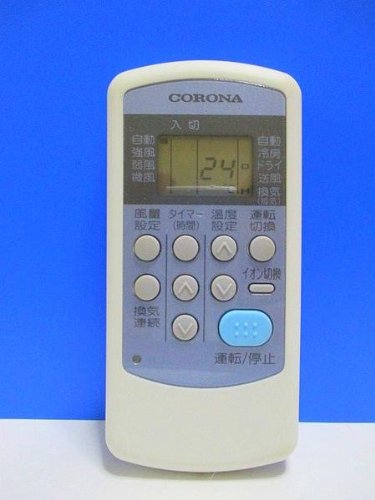
Image: Front view of the Corona CW-IR Air Conditioner Remote Control, showing its display screen and various control buttons.
Setup
1. Battery Installation
- Open the battery compartment cover located on the back of the remote control.
- Insert two new AAA alkaline batteries, ensuring the correct polarity (+ and -) as indicated inside the compartment.
- Close the battery compartment cover securely.
The remote control is now ready for use. No pairing is required as it operates via infrared signals.
Operating Instructions
Point the remote control directly at the air conditioner's receiver when operating. Ensure there are no obstructions between the remote and the air conditioner.
Basic Functions:
- POWER Button: Press to turn the air conditioner ON or OFF.
- MODE Button: Press to cycle through operating modes (e.g., Cool, Heat, Fan, Dry, Auto).
- TEMP ▲/▼ Buttons: Press to increase or decrease the desired temperature setting.
- FAN Button: Press to adjust the fan speed (e.g., Low, Medium, High, Auto).
- TIMER Button: Press to set the ON/OFF timer. Refer to your air conditioner's main manual for detailed timer settings.
- SWING Button: Press to activate or deactivate the air swing function.
Maintenance
Cleaning:
- Wipe the remote control with a soft, dry cloth.
- Do not use liquid cleaners, abrasive cleaners, or chemical sprays, as these may damage the surface or internal components.
Battery Replacement:
- Replace batteries when the remote control's range decreases or if the display becomes dim.
- Always replace both batteries at the same time with new alkaline batteries of the same type (AAA).
- Remove batteries if the remote control will not be used for an extended period to prevent leakage.
Storage:
Store the remote control in a cool, dry place away from direct sunlight and extreme temperatures.
Troubleshooting
| Problem | Possible Cause | Solution |
|---|---|---|
| Remote control not working. | Dead or incorrectly inserted batteries. | Replace batteries with new ones, ensuring correct polarity. |
| Air conditioner does not respond to remote. | Obstruction between remote and AC unit; remote too far away; AC unit power off. | Remove obstructions. Move closer to the AC unit. Ensure AC unit is powered on. |
| Display on remote is dim or blank. | Low battery power. | Replace batteries. |
If problems persist after attempting these solutions, please contact customer support.
Specifications
- Brand: Corona
- Model: CW-IR
- Connectivity Technology: Infrared
- Battery Type: AAA Alkaline (x2)
- Communication Interface: Infrared
Warranty and Support
Warranty information for the Corona CW-IR Air Conditioner Remote Control is not provided within this manual. For details regarding warranty coverage, technical support, or service, please refer to the documentation included with your air conditioner unit or visit the official Corona website. You may also contact Corona customer service directly for assistance.
For further inquiries, please visit the Corona Brand Store on Amazon.