
1. Introduction
The BSIDE EMT01 is a handheld digital wood moisture meter designed for accurate moisture measurement in various wood species. This conductivity moisture meter is an essential tool for professionals and hobbyists in the wood industry, offering reliable performance for assessing timber conditions.
This manual provides detailed instructions for the proper use, setup, and maintenance of your EMT01 meter to ensure years of reliable service.
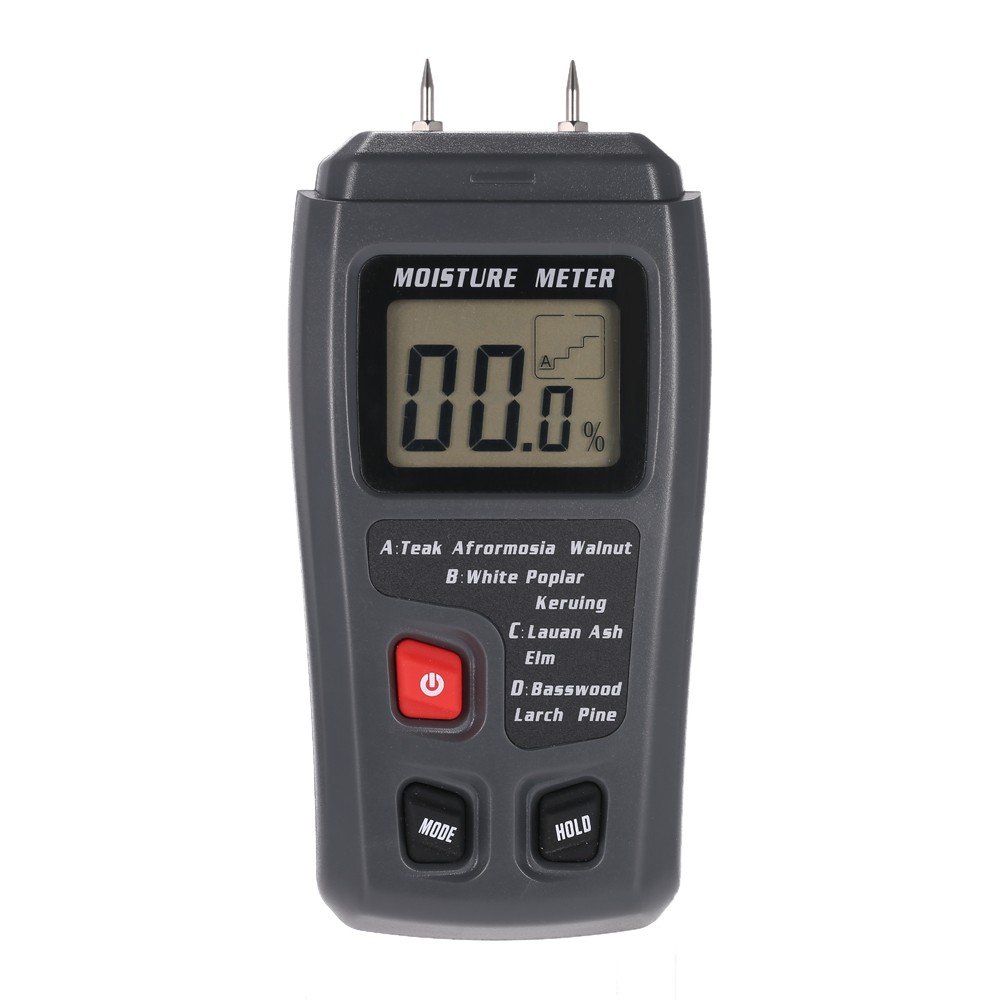
Image 1.1: The BSIDE EMT01 meter being used to measure moisture in a piece of wood.
2. Features
The EMT01 wood moisture meter incorporates several features for efficient and accurate moisture detection:
- Large LCD Display: Clearly shows wood moisture percentage.
- Measurement Range: 0% to 99.9% for wood.
- High Accuracy: Up to ±0.5%.
- Resolution: ±0.1%.
- Versatile Application: Suitable for wood, paper, cardboard, and other materials.
- Wood Group Calibration: Contains 4 wood groups with calibrations for approximately 50 species of wood.
- Data Hold Function: Freezes the displayed measurement for easy reading.
- Auto Power Off: Automatically shuts down after approximately 15 minutes of inactivity to conserve battery life.
- Low Battery Indicator: Displays an icon when the battery needs replacement.
- Integrated Electrode Pins: Durable 10mm (0.4") pins for direct measurement.

Image 2.1: Multiple views of the EMT01 meter, showing its design and integrated pins.
3. Setup
3.1 Battery Installation
The EMT01 meter requires one 9V 6F22 battery for operation. Follow these steps to install or replace the battery:
- Ensure the meter is powered off.
- Locate the battery compartment cover on the back of the meter.
- Slide the cover downwards to open the compartment.
- Connect a new 9V battery to the battery clip, observing correct polarity.
- Place the battery into the compartment and slide the cover back into place until it clicks securely.

Image 3.1: The battery compartment of the EMT01 meter with the cover removed, ready for battery insertion.
3.2 Protective Cap Removal
Before taking measurements, carefully remove the protective cap covering the electrode pins. This cap also serves as a calibration check block.
4. Operating Instructions
4.1 Powering On/Off
- To power on the meter, press the red POWER button. The LCD will display the current moisture reading.
- To power off the meter, press the red POWER button again. The meter will also automatically power off after approximately 15 minutes of inactivity.
4.2 Selecting Wood Group
The EMT01 meter has four pre-calibrated wood groups (A, B, C, D) to ensure accurate readings for different wood species. Refer to the list below and the meter's label to select the appropriate group:
- Group A: Teak, Afromosia, Walnut, Rubber Tree, Imbuia, Kokrodua, Niangon, Bidinkala, Cork
- Group B: White Poplar, Keruing, Beech, Cedar, Tola
- Group C: Lauan, Ash, Elm, Fir, Maple, Padauk, Oak, Cherry
- Group D: Basswood, Larch, Pine, Birch
To select a wood group, press the MODE button repeatedly until the desired group (A, B, C, or D) is displayed on the LCD.
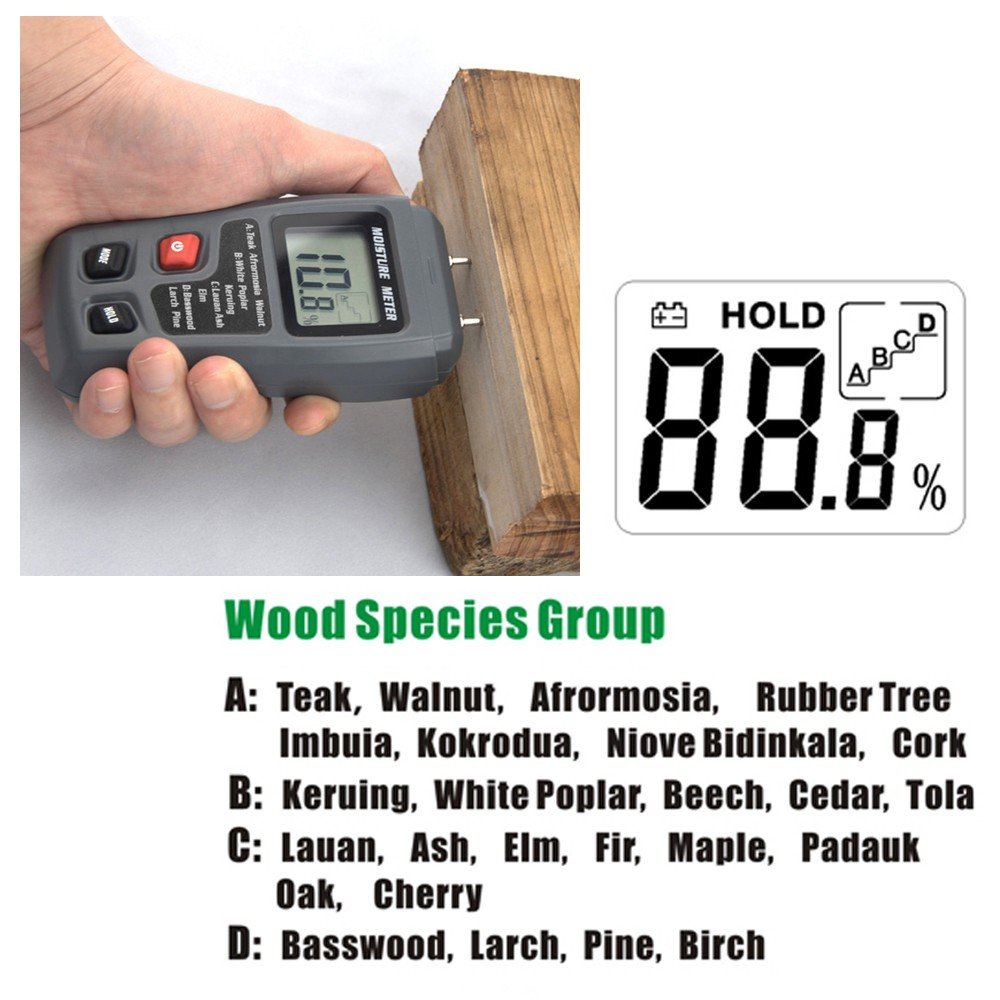
Image 4.1: Detailed breakdown of wood species categorized into groups A, B, C, and D for accurate measurement.
4.3 Taking a Measurement
- Power on the meter and select the correct wood group.
- Carefully push the electrode pins into the wood surface to be measured. Ensure both pins penetrate the material sufficiently for good contact.
- Read the moisture percentage displayed on the LCD.
- To hold the current reading on the display, press the HOLD button. Press it again to release the hold function.
- After measurement, gently pull the pins out of the wood and replace the protective cap.
Note: For best results, take multiple readings in different spots on the material and average them.
5. Maintenance
- Cleaning: Wipe the meter's casing with a dry, soft cloth. Do not use abrasive cleaners or solvents.
- Electrode Pins: Keep the pins clean and free from debris. If pins become dull or damaged, they may need replacement (replacement pins not included with standard package).
- Storage: When not in use, always replace the protective cap over the pins. Store the meter in a cool, dry place, away from direct sunlight and extreme temperatures. Remove the battery if storing for extended periods to prevent leakage.
6. Troubleshooting
| Problem | Possible Cause | Solution |
|---|---|---|
| Meter does not power on. | Dead or incorrectly installed battery. | Check battery installation. Replace with a new 9V battery. |
| Inaccurate readings. | Incorrect wood group selected; pins not fully inserted; pins dirty or damaged. | Ensure correct wood group is selected. Push pins firmly into the material. Clean or replace pins if necessary. |
| Display shows 'Lo' or 'Hi'. | Moisture content is outside the meter's measurement range. | The material is either too dry or too wet for the meter to provide a specific reading. |
| Meter powers off unexpectedly. | Auto power off activated; low battery. | This is normal behavior after 15 minutes of inactivity. If it happens during use, check for low battery indicator and replace battery. |
7. Specifications
| Parameter | Value |
|---|---|
| Display | Large LCD characters display |
| Measurement Principle | Electrical Resistance |
| Range (Wood) | 0% ~ 99.9% |
| Resolution | 0.1% |
| Accuracy | ±0.5% |
| Electrode Pin Length | 10mm (0.4") |
| Electrode Pins | Integrated |
| Auto Power Off | After approx. 15 minutes |
| Power Supply | 1 x 9V 6F22 battery |
| Instrument Enclosures | ABS plastic |
| Operating Temperature | 0°C to 40°C (32°F to 104°F) |
| Operating Humidity | 85% Relative Humidity Maximum |
| Dimensions | 145 x 67 x 32mm (5.7 x 2.6 x 1.3in) |
| Weight | 200g (7.0 oz) |

Image 7.1: Visual summary of the EMT01's key technical specifications.
8. Warranty & Support
This product is covered by a standard manufacturer's warranty. For specific warranty details, please refer to the documentation provided with your purchase or contact BSIDE customer support.
For technical assistance, troubleshooting, or inquiries about replacement parts, please contact BSIDE customer service through their official website or the retailer where the product was purchased.
