
Introduction
Thank you for purchasing the Sansui AU-D607F EXTRA Integrated Amplifier. This manual provides essential information for the proper setup, operation, and maintenance of your amplifier. Please read this manual thoroughly before using the unit to ensure optimal performance and to prevent damage.
The Sansui AU-D607F EXTRA is a high-fidelity integrated amplifier designed to deliver clear and powerful audio reproduction from various sources. Its robust construction and precise engineering ensure a superior listening experience.
Safety Information
To ensure safe operation and to prevent damage to the unit, please observe the following precautions:
- Power Supply: Connect the unit only to an AC power source of the voltage specified on the rear panel.
- Ventilation: Ensure adequate ventilation. Do not block ventilation openings or place the unit on soft surfaces that may impede airflow. Maintain at least 10 cm (4 inches) of clear space around the unit.
- Moisture: Do not expose the unit to rain, moisture, or excessive humidity. Do not place objects filled with liquids, such as vases, on the unit.
- Heat: Keep the unit away from direct sunlight, heat sources, or equipment that produces heat (e.g., other amplifiers, radiators).
- Cleaning: Disconnect the power cord from the wall outlet before cleaning. Use a soft, dry cloth. Do not use liquid cleaners or aerosol cleaners.
- Servicing: Do not attempt to service the unit yourself. Refer all servicing to qualified service personnel.
- Foreign Objects: Do not insert any objects into the openings of the unit.
Product Overview
The Sansui AU-D607F EXTRA features a classic design with a comprehensive set of controls for precise audio management. Below is an image illustrating the front panel of the amplifier:
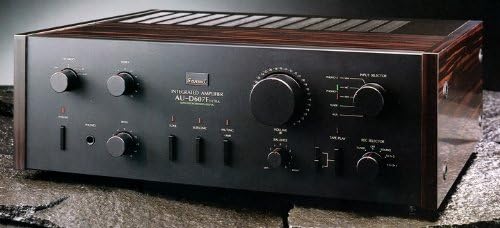
Figure 1: Front panel of the Sansui AU-D607F EXTRA Integrated Amplifier. This image displays the amplifier's black finish, with prominent control knobs for volume, balance, and tone. Input selectors for Phono, Tuner, Tape, and other sources are visible, along with various function buttons and indicator lights. The Sansui logo and model name "AU-D607F EXTRA" are clearly printed on the front.
Key Features:
- Multiple audio inputs (Phono, Tuner, Tape, AUX/CD)
- Precise volume and balance controls
- Tone controls (Bass, Treble) for sound customization
- Speaker output terminals for connecting stereo speakers
- Headphone jack for private listening
Setup
1. Placement:
Place the amplifier on a stable, flat surface with adequate ventilation. Avoid placing it near heat sources or in direct sunlight.
2. Speaker Connection:
- Ensure the amplifier is turned off and unplugged from the power outlet.
- Connect your speakers to the speaker terminals on the rear panel of the amplifier. Pay close attention to polarity: connect the positive (+) terminal of the amplifier to the positive (+) terminal of the speaker, and the negative (-) terminal of the amplifier to the negative (-) terminal of the speaker.
- Use high-quality speaker cables for optimal sound performance.
3. Audio Source Connection:
Connect your audio sources (e.g., CD player, turntable, tuner, tape deck) to the corresponding input jacks on the rear panel using RCA cables.
- CD/AUX: For CD players, digital audio players, or other line-level sources.
- PHONO: For turntables. Ensure your turntable has a built-in pre-amplifier or use an external one if needed.
- TUNER: For radio tuners.
- TAPE PLAY/REC: For tape decks, allowing both playback and recording.
4. Power Connection:
Once all audio and speaker connections are made, plug the amplifier's power cord into a suitable AC wall outlet.
Operating Instructions
1. Power On/Off:
Press the POWER button to turn the amplifier on or off. A slight delay may occur before the unit fully powers up.
2. Input Selection:
Use the INPUT SELECTOR knob or buttons on the front panel to choose the desired audio source (e.g., CD, PHONO, TUNER, TAPE).
3. Volume Control:
Adjust the overall sound level using the large VOLUME knob. Start with a low volume setting and gradually increase it to a comfortable listening level.
4. Balance Control:
The BALANCE knob allows you to adjust the relative volume between the left and right speakers. Set it to the center position for equal output.
5. Tone Controls:
Use the BASS and TREBLE knobs to adjust the low and high frequency response of the audio. Turn clockwise to boost, counter-clockwise to cut. For a flat frequency response, set them to the center (neutral) position.
6. Headphone Output:
Connect headphones to the PHONES jack for private listening. Connecting headphones will typically mute the main speaker outputs.
Maintenance
- Cleaning: Regularly wipe the exterior of the amplifier with a soft, dry, lint-free cloth. Do not use abrasive cleaners, waxes, or solvents.
- Ventilation: Ensure that the ventilation slots on the top and sides of the unit remain clear of dust and obstructions. Periodically use a soft brush or vacuum cleaner to remove accumulated dust.
- Connections: Periodically check all cable connections to ensure they are secure and free from corrosion.
- Storage: If storing the unit for an extended period, unplug it from the power outlet and cover it to protect against dust.
Troubleshooting
If you experience issues with your Sansui AU-D607F EXTRA, refer to the following common problems and solutions:
| Problem | Possible Cause | Solution |
|---|---|---|
| No power | Power cord disconnected; Power outlet faulty; Internal fuse blown | Check power cord connection; Try a different outlet; Contact service personnel (do not replace fuse yourself) |
| No sound from speakers | Incorrect input selected; Speaker cables disconnected/incorrectly connected; Volume too low; Mute function active; Headphones connected | Select correct input; Check speaker connections (polarity); Increase volume; Ensure mute is off; Disconnect headphones |
| Distorted sound | Input level too high; Speaker impedance mismatch; Damaged speaker cables; Faulty audio source | Reduce input level; Ensure speakers match amplifier impedance; Check/replace speaker cables; Test with a different audio source |
| Humming or buzzing noise | Ground loop; Loose connections; Interference from other electronics | Ensure all components are properly grounded; Check all audio cable connections; Move amplifier away from other electronic devices |
If the problem persists after trying these solutions, please contact qualified service personnel.
Specifications
- Brand: Sansui
- Model Number: AU-D607F EXTRA
- Audio Output: 160 Watts
- Manufacturer: Sansui
- Batteries Included: No
- Batteries Required: No
- Package Dimensions: 58.5 x 47.5 x 33 cm
- Item Weight: 600 grams
- ASIN: B00KASGP4M
- First Available Date: May 13, 2014
Warranty and Support
This product is covered by a standard manufacturer's warranty. For specific warranty terms and conditions, please refer to the warranty card included with your purchase or contact Sansui customer support. Keep your proof of purchase for warranty claims.
For technical support, service, or inquiries regarding your Sansui AU-D607F EXTRA Integrated Amplifier, please visit the official Sansui website or contact their authorized service centers.


