
Introduction
Thank you for choosing the Divoom Voombox Rugged Portable Bluetooth Speaker. This manual provides essential information for the safe and efficient operation of your device. Please read it thoroughly before use and retain it for future reference.
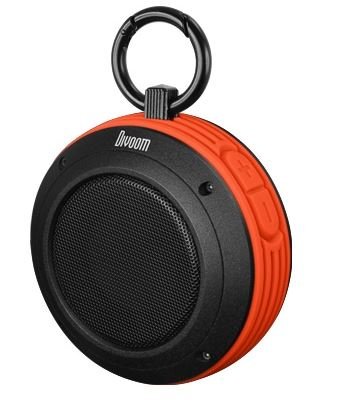
Image: The Divoom Voombox Rugged Portable Bluetooth Speaker in vibrant orange. This image shows the compact, cylindrical design of the speaker, highlighting its robust exterior suitable for outdoor use.
Product Features
- Wireless audio streaming via Bluetooth 4.0.
- Passive radiator for enhanced bass performance.
- Rugged, splash-resistant design for outdoor durability.
- Built-in rechargeable Li-ion battery providing up to 6 hours of playback.
- Integrated microphone for hands-free calls.
Package Contents
Ensure all items are present:
- Divoom Voombox Rugged Portable Bluetooth Speaker
- USB Charging Cable
- Audio Cable (3.5mm AUX)
- User Manual (this document)
Controls and Indicators
Familiarize yourself with the speaker's buttons and indicators:
- Power Button: Press and hold to turn on/off.
- Bluetooth Pairing Button: Press to enter pairing mode.
- Volume Up/Next Track Button: Short press for volume up, long press for next track.
- Volume Down/Previous Track Button: Short press for volume down, long press for previous track.
- Play/Pause/Call Button: Press to play/pause music, answer/end calls.
- LED Indicator: Shows power status, charging status, and Bluetooth pairing status.
- Charging Port: Micro USB port for charging.
- AUX-in Port: 3.5mm audio input for wired connection.
Setup
1. Charging the Speaker
Before first use, fully charge the Voombox speaker.
- Connect the small end of the USB charging cable to the speaker's charging port.
- Connect the large end of the USB charging cable to a USB power adapter (not included) or a computer's USB port.
- The LED indicator will illuminate during charging and turn off when fully charged.
- Charging time is approximately 2-2.5 hours.
2. Powering On/Off
- To power on: Press and hold the Power Button until the LED indicator lights up.
- To power off: Press and hold the Power Button until the LED indicator turns off.
Operating Instructions
Bluetooth Pairing
Pair your Voombox speaker with a Bluetooth-enabled device:
- Ensure the speaker is powered on and within 10 meters (33 feet) of your device.
- The speaker will automatically enter Bluetooth pairing mode, indicated by a flashing LED. If not, press the Bluetooth Pairing Button.
- On your device (smartphone, tablet, etc.), enable Bluetooth and search for available devices.
- Select "Voombox-Travel" from the list of devices.
- Once paired, the LED indicator will stop flashing and remain solid. You will hear an audible confirmation.
- The speaker will automatically reconnect to the last paired device when powered on, if the device is within range and Bluetooth is enabled.
Playing Audio
- Bluetooth Mode: After successful pairing, play audio from your connected device. Use the speaker's Play/Pause button or your device's controls.
- AUX-in Mode: Connect one end of the 3.5mm audio cable to the speaker's AUX-in port and the other end to your audio source's headphone jack. The speaker will automatically switch to AUX mode.
Hands-Free Calling
When paired via Bluetooth, you can manage phone calls:
- Answer Call: Press the Play/Pause/Call Button once.
- End Call: Press the Play/Pause/Call Button once during a call.
- Reject Call: Press and hold the Play/Pause/Call Button for 2 seconds.
Maintenance
- Clean the speaker with a soft, dry cloth. Do not use abrasive cleaners or solvents.
- The speaker is splash-resistant, but not fully waterproof. Do not submerge it in water.
- Store the speaker in a cool, dry place when not in use for extended periods.
- Avoid exposing the speaker to extreme temperatures, direct sunlight, or high humidity.
Troubleshooting
| Problem | Possible Solution |
|---|---|
| Speaker does not turn on. | Ensure the battery is charged. Connect to a power source and try again. |
| Cannot pair with Bluetooth device. |
|
| No sound. |
|
| Poor sound quality. |
|
Specifications
| Feature | Detail |
|---|---|
| Model | Voombox-Travel |
| Dimensions | 3.6 x 3.6 x 1.8 inches (9.14 x 9.14 x 4.57 cm) |
| Driver Size | 2" full range x 2" passive radiator |
| Output Power | 4W |
| Signal to Noise Ratio | ≥75dB |
| Battery Capacity | 550 mAh |
| Battery Voltage | 3.7 V |
| Battery Charge Time | 2-2.5 hours |
| Playback Time | Up to 6 hours |
| Wireless Range | Up to 10 meters (33 feet) |
| Bluetooth Version | V4.0 |
| Bluetooth Profile Support | A2DP Stereo |
| Microphone Sensitivity | -40 dB |
| Special Features | Splash Resistant, Hands-free Calling |
| Item Weight | 12 ounces (0.34 kg) |
Warranty and Support
For warranty information and customer support, please refer to the Divoom official website or contact your local distributor. Keep your purchase receipt as proof of purchase.
Divoom Official Website: www.divoom.com


