
PWR+ 742-PWR57-54725
Instruction Manual for HQ8505 Norelco Charger Cord
Brand: PWR+
Model: 742-PWR57-54725
1. Product Overview
This manual provides essential information for the safe and effective use of your PWR+ HQ8505 Norelco Charger Cord. This charger is designed to provide reliable power to a wide range of Philips Norelco shavers, razors, and trimmers.
Key Features:
- Input Voltage Range: AC 100V - 240V
- Output: 15V 360mA (8V Compatible)
- Extra Long 6.5 Ft Power Cord for extended reach
- Steel-Reinforced Tip for enhanced durability
- Built-in Safety Protections: Short Circuit Protection (SCP), Over Current Protection (OCP), Over Voltage Protection (OVP), Over Temperature Protection (OPT)

Image 1.1: The PWR+ HQ8505 Norelco Charger Cord, featuring its compact design and integrated cable management strap.
2. Setup
Before using the charger, ensure your device is compatible with the HQ8505 charger cord. This charger is specifically designed for Philips Norelco devices requiring the HQ8505 power specification.
2.1. Compatibility Check
Verify the charging port on your Philips Norelco shaver or trimmer matches the connector type of this charger. The charger features a proprietary connector designed for specific Philips Norelco models.
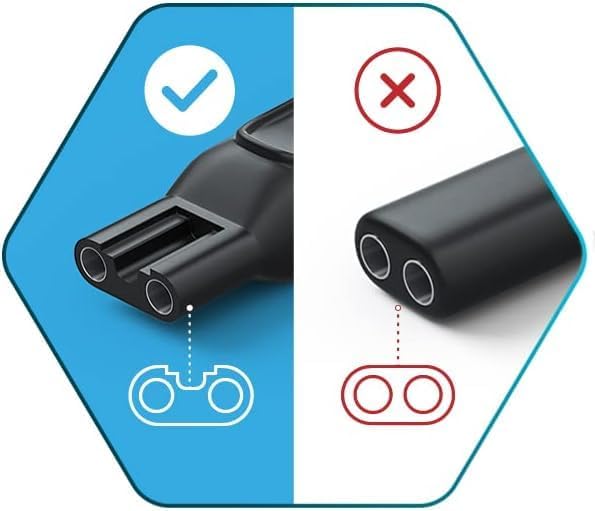
Image 2.1: Visual guide illustrating the correct (left) and incorrect (right) connector types for compatibility.
Compatible Models Include (but are not limited to):
- Philips Norelco 3000 Series: 3100, 3500
- Philips Norelco 5000 Series: 5100, 5200, 5500, 5600, 5700
- Philips Norelco 7000 Series: 7100, 7200, 7300, 7400, 7500, 7600, 7700
- Philips Norelco 4000 Series: 4100, 4200, 4500
- Philips Norelco 9000 Series: 9300, 9700
- Philips Norelco Bodygroom: 7100, 5000, 5100, 3100, 3000
- Philips Norelco BeardTrimmer: 7300, BT3210/41
- Philips Norelco Multigroom Pro All-in-One Grooming Trimmer: QG3200, QG3300 Series (e.g., MG3750, MG5750/49, MG5760/40, MG7750/49, MG7770/49)
- SensoTouch models: 1150X, 1250X, 1280X, 1290X, RQ1150, RQ1250, RQ1280, RQ1290
- SmartTouch-XL & Speed-XL shavers: 8240XL, 8140XL, 9160XL, 8250XL, 8150XL, 8170XL, 9190XL, 8270XL, 8175XL, 8151XL, 9195XL, 9170XL, 8260XL, 8251XL, 8171XL, 8270XLCC, 8160XLCC
- Precision models: 7310XL, 7340XL, 7110X, 7380XL, 7140XL, 7345XL, 7180XL, 7325XL, 7315XL, HQ7320, HQ7340, HQ7360, HQ7380, HQ7290, HQ7200
- Arcitec models: 1060X, 1050X, 1050CC, 1090X, RQ1051, RQ1075, RQ1085, RQ1095, RQ1090, RQ1060, RQ1050
- Cool Skin models: 7735X, 6701X, 7775X, 6737X, 6735X, 6705X, 7737X, HS8420
2.2. Connecting the Charger
- Insert the charger's proprietary connector firmly into the charging port of your Philips Norelco device.
- Plug the charger's AC adapter into a standard wall outlet (100V-240V).

Image 2.2: A detailed view of the charger's proprietary connector, designed for a secure fit with compatible devices.
3. Operating Instructions
Once connected, the charger will begin supplying power to your device. Most Philips Norelco devices will indicate charging status via an LED light on the device itself.
Important Note: Some shaver models might not function while being charged. This is a normal operational characteristic for certain devices to ensure optimal charging and battery health.

Image 3.1: Illustration of the charger's built-in safety protections, including Short Circuit, Over Current, Over Voltage, and Over Temperature Protection.
4. Maintenance
Proper care and maintenance will extend the lifespan of your charger cord.
4.1. Cleaning
- Disconnect the charger from the power outlet and your device before cleaning.
- Wipe the charger and cord with a soft, dry cloth.
- Do not use liquid cleaners, aerosols, or abrasive materials.
4.2. Storage and Handling
- Store the charger in a cool, dry place away from direct sunlight and moisture.
- Avoid bending or crimping the cord excessively, especially near the connectors. The steel-reinforced tip and reinforced stress points are designed for durability, but extreme bending can still cause damage.
- Use the included cable management strap to keep the cord neatly coiled when not in use.

Image 4.1: Depiction of the charger's reinforced stress points and the internal construction of the cable, highlighting high-grade copper and protective shielding.
5. Troubleshooting
If you encounter issues with your charger, refer to the following common problems and solutions.
| Problem | Possible Cause | Solution |
|---|---|---|
| Device not charging | Loose connection | Ensure the charger connector is fully inserted into the device and the AC plug is firmly in the wall outlet. |
| Device not charging | Incompatible device | Refer to the compatibility list in Section 2.1 to confirm your device model is supported. |
| Device not charging | Faulty power outlet | Try plugging the charger into a different working power outlet. |
| Charger feels warm | Normal operation | It is normal for the charger to feel slightly warm during operation. If it becomes excessively hot, disconnect it immediately and contact support. |
6. Specifications
| Specification | Detail |
|---|---|
| Brand | PWR+ |
| Model Number | 742-PWR57-54725 |
| Input Voltage | AC 100V - 240V |
| Output | 15V 360mA (8V Compatible) |
| Power Source | AC |
| Cord Length | 6.5 Ft (approx. 1.98 meters) |
| Item Weight | 4.6 ounces (approx. 130 grams) |
| Package Dimensions | 5.24 x 3.5 x 2.72 inches |
| Country of Origin | Taiwan |
| Safety Certification | UL Listed |

Image 6.1: The UL Listed certification mark, indicating the product meets specific safety standards.
7. Warranty
The PWR+ HQ8505 Norelco Charger Cord comes with a comprehensive warranty:
- 30 Days Refund: Full refund available within 30 days of purchase.
- 24 Months Exchange: Product exchange available for up to 24 months from the date of purchase for manufacturing defects.

Image 7.1: A stamp indicating the 2-year warranty period for the product.
8. Support
PWR+ is a company based in Washington, USA, committed to providing reliable products and friendly customer support.
For any inquiries, technical assistance, or warranty claims, please contact our customer support team. You can find more information and contact details on the official PWR+ store page:
Ask a question about this manual
Ask about setup, troubleshooting, compatibility, parts, safety, or missing instructions. Manuals+ will review the question and use this page’s manual context to help answer it.