
1. Introduction
This manual provides detailed instructions for the installation, operation, and maintenance of your Jensen HD1BT AM/FM/WB/USB/SiriusXM Ready/Bluetooth Heavy Duty Radio. Designed for durability and performance, this unit offers a comprehensive audio solution for compatible Harley-Davidson motorcycles. Please read this manual thoroughly before using the product to ensure proper function and safety.
2. Key Features
- Power Output: 200 watts maximum power (50W x 4).
- Waterproof Design: Unit face (IPX6) and rear chassis (IPX5) are waterproof for heavy-duty use.
- Bluetooth Connectivity: Supports streaming audio (A2DP/AVRCP).
- USB Input: Rear USB input for iPod/iPhone control and charging.
- SiriusXM Ready: Compatible with SiriusXM (tuner and antenna sold separately).
- Auxiliary Input: Rear auxiliary input for external audio devices.
- Handlebar Control Compatibility: Works seamlessly with factory Harley-Davidson handlebar controls.
- Tuner: Multi-preset AM/FM tuner (US/Euro) with Weatherband and S.A.M.E weather alert.
- Advanced Tuning: Features auto-store, seek tuning, and RBDS.
- Compatibility: Designed for 1998-2013 Electra Glide and Street Glide models.
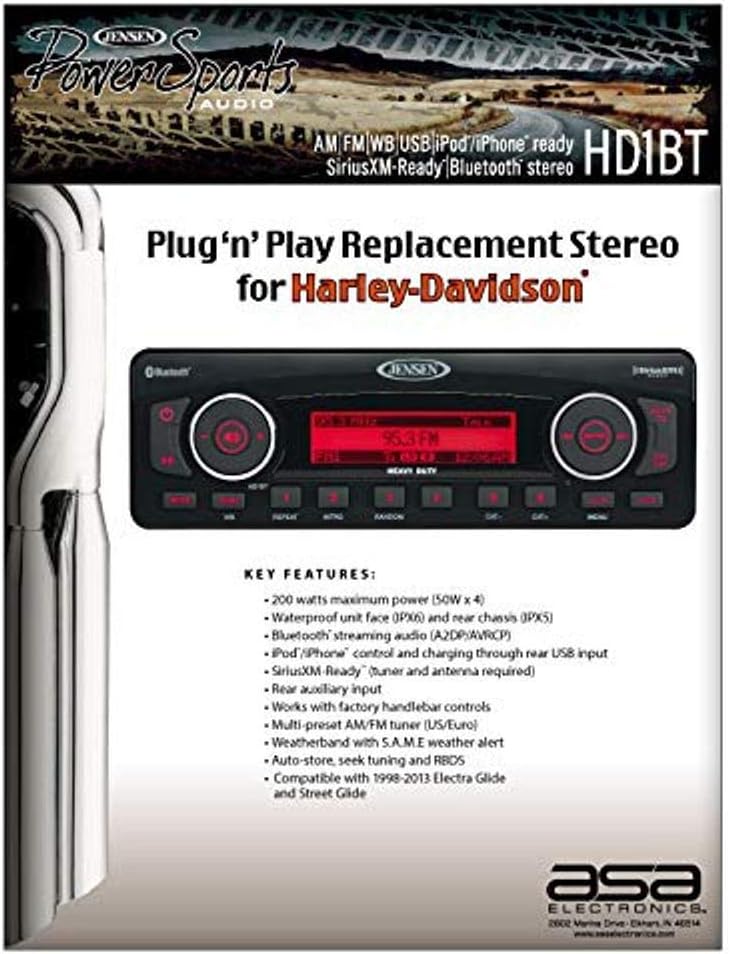
Figure 2.1: Overview of the Jensen HD1BT's key features and design.
3. Safety Information
WARNING: This product can expose you to chemicals which are known to the State of California to cause cancer, birth defects or other reproductive harm. For more information, please visit P65Warnings.ca.gov.
Always ensure proper installation and wiring to prevent electrical hazards. Consult a qualified technician if you are unsure about any installation steps. Do not operate the radio in a manner that distracts you from safe vehicle operation.
4. Setup and Installation
The Jensen HD1BT is designed for "Plug 'n Play" replacement in compatible Harley-Davidson motorcycles, specifically 1998-2013 Electra Glide and Street Glide models. Its design ensures direct compatibility with the factory harness and mounting points.
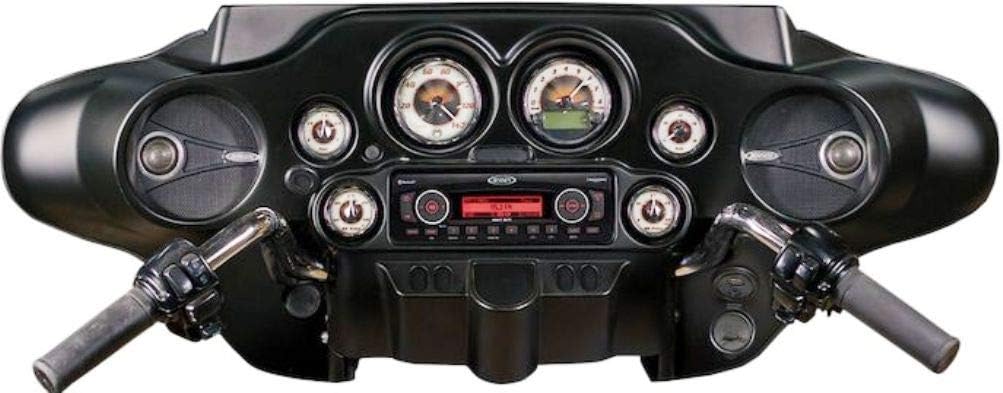
Figure 4.1: The Jensen HD1BT seamlessly integrated into a motorcycle fairing.
4.1. Installation Steps Overview
- Preparation: Ensure the motorcycle's power is off and the battery is disconnected before beginning installation.
- Remove Old Unit: Carefully remove the existing stereo unit from the fairing.
- Connect Harness: The HD1BT features an exact receptacle for the Harley-Davidson harness plug. Connect the factory harness directly to the new unit.
- Mounting: The mounting points on the HD1BT chassis are identical to the factory stereo, allowing for simple installation into the fairing. Secure the unit using the original hardware.
- External Connections: Connect any optional accessories such as the SiriusXM tuner/antenna or external auxiliary devices to the rear USB and auxiliary inputs.
- Power On: Reconnect the battery and turn on the motorcycle's power to test the unit.

Figure 4.2: Visual representation of the HD1BT's plug-and-play compatibility with Harley-Davidson harness and mounting.
5. Operating Instructions
The Jensen HD1BT is designed for intuitive operation, including compatibility with your motorcycle's factory handlebar controls.

Figure 5.1: Front panel controls of the Jensen HD1BT.
5.1. Basic Controls
- Power Button: Press to turn the unit on or off.
- Volume Control: Use the rotary knob (left side) to adjust the volume level.
- Mode Button: Cycles through available audio sources (AM, FM, WB, USB, Bluetooth, AUX, SiriusXM).
- Band Button: Selects between AM, FM1, FM2, FM3 bands.
- Tune/Seek Buttons: Use the left rotary knob's outer ring or dedicated buttons for tuning radio stations or navigating tracks.
- Preset Buttons (1-6): Store and recall your favorite radio stations.
- Audio Button: Accesses audio settings like Bass, Treble, Balance, Fader, and Loudness.
- Menu Button: Accesses system settings and advanced options.
5.2. Radio Operation (AM/FM/WB)
- Press the MODE button to select AM, FM, or WB (Weatherband).
- Press the BAND button to switch between FM1, FM2, FM3, or AM bands.
- Use the TUNE/SEEK buttons to manually tune or automatically seek stations.
- To store a preset, tune to the desired station, then press and hold one of the numeric preset buttons (1-6) until you hear a beep.
- The Weatherband feature includes S.A.M.E (Specific Area Message Encoding) weather alerts.
5.3. Bluetooth Operation
- Press the MODE button to select Bluetooth audio.
- On your mobile device, search for Bluetooth devices and select "Jensen HD1BT" to pair.
- Once paired, you can stream audio from your device to the radio. Use the radio's controls or your device to play/pause, skip tracks, and adjust volume.
5.4. USB/iPod/iPhone Operation
- Connect your iPod or iPhone to the rear USB input. The unit will automatically switch to USB mode and begin playback.
- The USB connection also provides charging for your device.
- Use the radio's controls to navigate through tracks, albums, and playlists.
5.5. SiriusXM Operation
- A SiriusXM Connect Vehicle Tuner and antenna (sold separately) are required for SiriusXM functionality.
- Once installed and activated, press the MODE button to select SiriusXM.
- Tune to channels using the rotary knob or seek functions.
6. Maintenance
- Cleaning: Use a soft, damp cloth to clean the unit's face. Avoid abrasive cleaners or solvents.
- Water Exposure: While the unit is waterproof, avoid prolonged submersion. Ensure all connections are secure to maintain water resistance.
- Firmware Updates: Check the Jensen website periodically for any available firmware updates to ensure optimal performance and compatibility.
7. Troubleshooting
| Problem | Possible Cause | Solution |
|---|---|---|
| No Power | Blown fuse; improper wiring; vehicle battery issues. | Check and replace fuse; verify all wiring connections; check vehicle battery charge. |
| No Sound | Volume too low; Mute activated; speaker wiring issues; incorrect audio source. | Increase volume; deactivate Mute; check speaker connections; select correct audio source. |
| Bluetooth Pairing Issues | Device not in pairing mode; unit not in Bluetooth mode; interference. | Ensure device is discoverable; switch unit to Bluetooth mode; move closer to unit; restart both devices. |
| Poor Radio Reception | Antenna not connected or damaged; weak signal area. | Check antenna connection; try tuning to a stronger station; consider an antenna upgrade. |
| Sound Distortion at High Volume | Volume too high for speakers; EQ settings not optimized. | Reduce volume; adjust EQ settings (Bass, Treble); ensure Loudness is set appropriately. An external amplifier may be needed for higher volume levels with certain speakers. |
| Unit Cycles Through Sources Randomly | Internal malfunction or software issue. | Perform a factory reset (refer to full manual if available); contact Jensen customer support if problem persists. |
8. Specifications
- Model Number: HD1BT
- Product Dimensions: 12 x 12 x 6 inches
- Item Weight: 4.04 pounds
- Power Output: 200W (50W x 4 channels)
- Waterproof Rating: IPX6 (face), IPX5 (chassis)
- Connectivity: Bluetooth, USB, 3.5mm Jack
- Supported Audio Encoding: Windows Media Audio (WMA)
- Audio Output Mode: Stereo
- Color: Black
- Manufacturer: Jensen
- First Available Date: May 7, 2014
9. Warranty and Support
For warranty information and technical support, please refer to the documentation included with your product or visit the official Jensen website. Customer service can assist with product inquiries, troubleshooting, and service requests.
Manufacturer: Jensen


