
MSI Computer Z97 PC MATE
MSI Z97 PC MATE Motherboard Instruction Manual
Model: Z97 PC MATE | Brand: MSI Computer
Introduction
This manual provides detailed instructions for the installation, operation, and maintenance of your MSI Z97 PC MATE ATX Motherboard. Please read this manual thoroughly before beginning installation to ensure proper setup and optimal performance.
The MSI Z97 PC MATE is an ATX motherboard designed for Intel LGA 1150 processors, featuring the Intel Z97 chipset. It supports DDR3 memory, SATA 6Gb/s, USB 3.0, and multiple PCI-E slots for expansion.
What's Included
- MSI Z97 PC MATE ATX Motherboard
- Software CD/DVD
Setup and Installation
Proper installation is crucial for the stability and performance of your system. Follow these steps carefully.
1. Prepare the Chassis
Ensure your computer chassis is ready for motherboard installation. This includes installing standoffs in the correct positions for an ATX motherboard. Most ATX motherboards require 9 standoffs.

Image: Top-down view of the MSI Z97 PC MATE motherboard, highlighting the layout of components and screw holes.
2. Install the Motherboard
Carefully align the motherboard with the standoffs in the chassis. Ensure the I/O shield aligns correctly with the rear ports. Once aligned, secure the motherboard using the appropriate screws. Do not overtighten the screws to avoid damaging the board.
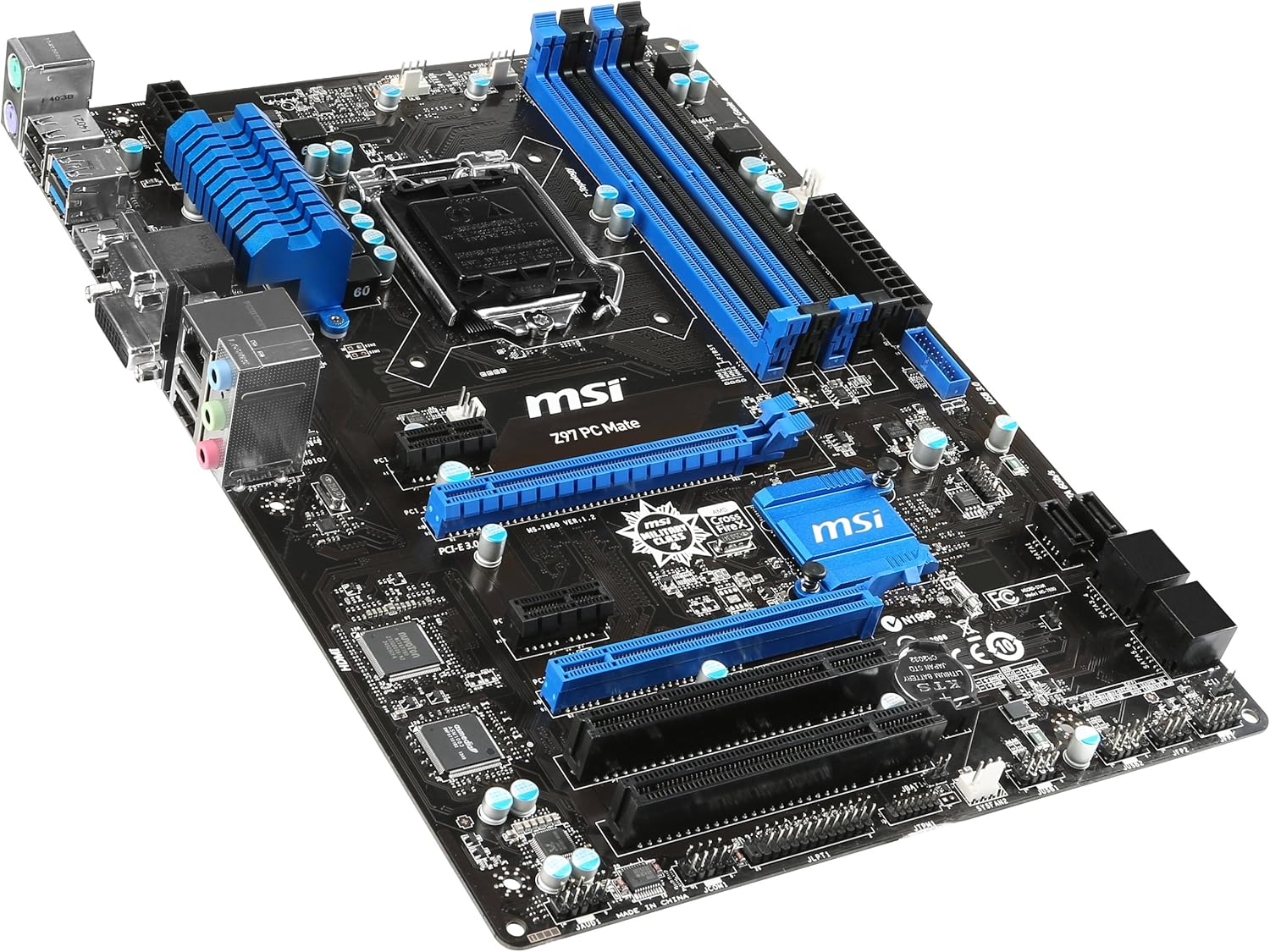
Image: Angled view of the MSI Z97 PC MATE motherboard, illustrating its form factor and key components.
3. Connect Power Supply
Connect the 24-pin ATX main power connector and the 8-pin CPU power connector from your power supply to the corresponding ports on the motherboard. Ensure all connections are firm.
4. Install CPU and Cooler
Refer to your CPU and CPU cooler manuals for specific installation instructions. Carefully place the CPU into the LGA 1150 socket, ensuring correct orientation. Install the CPU cooler securely.
5. Install RAM
Insert DDR3 memory modules into the DIMM slots. Ensure the modules are properly seated by pressing down firmly on both ends until the clips snap into place.
6. Connect Storage Devices
Connect your SATA 6Gb/s storage devices (HDDs, SSDs) to the SATA ports on the motherboard using SATA data cables. Connect power from the power supply to these devices.
7. Install Expansion Cards
Install any necessary PCI-E x16 3.0, PCI-E x1, or PCI expansion cards (e.g., graphics cards, sound cards) into their respective slots. Secure them with screws to the chassis.
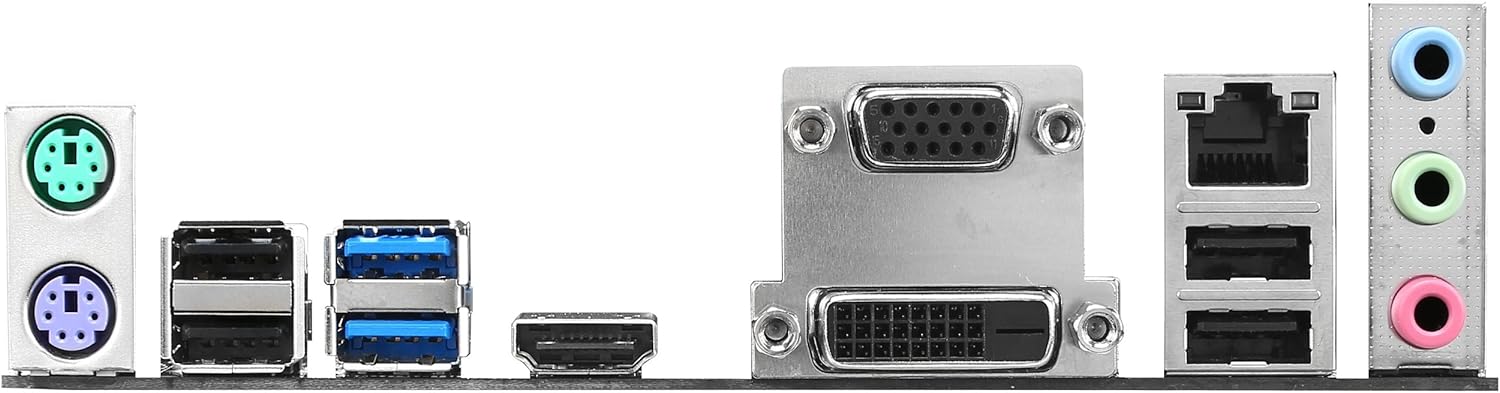
Image: Close-up of the motherboard's rear I/O panel, detailing the available connectivity options.
8. Connect Front Panel Cables
Connect the front panel cables from your chassis (power button, reset button, USB ports, audio jacks, LED indicators) to the corresponding headers on the motherboard. Refer to the motherboard manual for exact pin layouts.
Operating Instructions
1. Initial Boot-up
After all components are installed and connected, close your chassis. Connect your monitor, keyboard, and mouse. Power on your system. The system should boot to the BIOS/UEFI interface or begin the operating system installation process.
2. BIOS/UEFI Configuration
Access the BIOS/UEFI setup by pressing the designated key during boot-up (commonly DEL or F2). Here you can configure boot order, system time, and advanced settings. Ensure your storage devices are recognized and set up for OS installation.
3. Operating System Installation
Insert your operating system installation media (USB drive or DVD) and follow the on-screen prompts to install your preferred OS.
4. Driver Installation
After OS installation, install all necessary drivers from the provided software CD/DVD or download the latest versions from the MSI website. This includes chipset, audio, LAN, and graphics drivers for optimal performance.
Maintenance
Regular maintenance helps prolong the life of your motherboard and system components.
- Dust Removal: Periodically clean dust from inside your PC case, especially from fans and heatsinks, using compressed air. Ensure the system is powered off and unplugged before cleaning.
- BIOS/UEFI Updates: Check the MSI website for the latest BIOS/UEFI updates. Updates can improve stability, compatibility, and performance. Follow the update instructions carefully to avoid system damage.
- Driver Updates: Keep your drivers updated to ensure compatibility and optimal performance with new software and hardware.
- Cable Management: Ensure internal cables are neatly organized to improve airflow and prevent interference.
Troubleshooting
If you encounter issues, refer to the following common troubleshooting steps:
| Problem | Possible Cause | Solution |
|---|---|---|
| System does not power on | Loose power connections, faulty power supply, incorrect front panel wiring. | Check all power cables (24-pin ATX, 8-pin CPU), ensure power supply switch is on, verify front panel connections. |
| No display on monitor | Incorrect monitor connection, faulty graphics card, improperly seated RAM. | Ensure monitor cable is connected to the graphics card (or motherboard if using integrated graphics), reseat RAM modules, test with a different graphics card if available. |
| System reboots unexpectedly | Overheating, unstable power, faulty components. | Check CPU and case fan operation, ensure proper thermal paste application, test power supply, run memory diagnostic. |
| Operating system not found | Incorrect boot order, unformatted drive, corrupted OS installation. | Check BIOS/UEFI boot order, ensure storage drive is detected, attempt OS reinstallation. |
For more advanced troubleshooting, consult the full user manual available on the MSI website or contact MSI support.
Specifications
- CPU Socket: LGA 1150
- Chipset: Intel Z97
- RAM Type: DDR3
- Memory Clock Speed: 1600 MHz (Max 32 GB)
- Expansion Slots: 2 x PCI-E x16 3.0, 2 x PCI-E x1, 2 x PCI
- Storage: SATA 6Gb/s
- USB Ports: USB 3.0, USB 2.0
- Video Outputs: VGA, DVI, HDMI
- LAN: Gigabit LAN
- Form Factor: ATX
- Dimensions: 11.6 x 8.7 x 2.2 inches
- Weight: 2.6 pounds
Warranty and Support
For warranty information, technical support, or service requests, please visit the official MSI Computer website or refer to the warranty card included with your product.
You can also find the full User Manual (PDF) here.
Related Documents - Z97 PC MATE
 |
MSI Z97 PC Mate & H97 PC Mate Motherboard Manual - Preface and Getting Started Comprehensive guide for MSI Z97 PC Mate and H97 PC Mate motherboards, covering preface, safety instructions, specifications, installation procedures, and BIOS setup for optimal system performance. |
 |
MACHINIST H81M-PRO-S1 Motherboard User's Manual Comprehensive user's manual for the MACHINST H81M-PRO-S1 motherboard. This guide covers detailed specifications, component installation procedures for CPU, RAM, and expansion cards, explanations of rear and internal connectors, and instructions for BIOS setup and resetting. It is designed for users needing to assemble or configure their PC with this motherboard. |
 |
MACHINIST H81M-PRO-S1 User's Manual - Motherboard Installation and Setup Guide Comprehensive user manual for the MACHINIST H81M-PRO-S1 motherboard, detailing specifications, component installation (CPU, RAM, expansion cards), connector descriptions, BIOS setup, and troubleshooting. |
 |
MSI 7797 Motherboard User Manual: Getting Started and Installation Guide This document provides a comprehensive guide for the MSI 7797 Micro-ATX motherboard, covering essential information for installation and setup. It includes assembly precautions, detailed specifications, CPU and memory installation procedures, connector descriptions, expansion slot details, and jumper configurations. |
 |
MSI H170A PC MATE / B150 PC MATE Motherboard User Manual User manual for MSI H170A PC MATE and B150 PC MATE motherboards, covering installation, safety, BIOS setup, and specifications. Learn how to build and configure your PC with MSI hardware. |
 |
Scythe Mugen 6 CPU Cooler Installation Guide Comprehensive installation guide for the Scythe Mugen 6 CPU Cooler (SCMG-6000), covering Intel and AMD socket compatibility, component lists, and step-by-step assembly instructions. |