
Overview
The KNA VV-3 Portable Piezo Pickup is designed to capture the natural acoustic sound of your violin or viola. This lightweight, bridge-mounted sensor offers easy installation without permanent instrument modification, providing a standard 1/4" output for connection to amplifiers, pedals, and audio interfaces. Handcrafted in Europe, the VV-3 ensures durability and premium sound reproduction.
Product Features
- Natural Sound: Captures the true tone of your violin or viola with clarity and balance.
- Lightweight and Discreet: Wooden sensor casing installs easily in the eye of the bridge.
- Secure Fit: Ebony, cork-lined jack housing clamps firmly with an adjustable mount.
- Professional Sound: Requires little to no instrument modification.
- Detachable and Versatile: Remove when not in use or keep installed.
- Standard 1/4" Output: Compatible with 1/4" jack instrument cables for easy connection to amps, pedals, and audio interfaces.
- Handcrafted in Europe: Built for durability and premium sound.
Installation Guide
Step 1: Prepare the Sensor
The wooden piezo sensor is designed to fit snugly into the eye of your instrument's bridge. Ensure the bridge slot is wide enough to accommodate the sensor without forcing it. If necessary, a small amount of material can be carefully removed from the bridge slot using fine-grit sandpaper (400-grit recommended) to achieve a perfect fit. Protect the instrument's varnish with cardboard during this process.
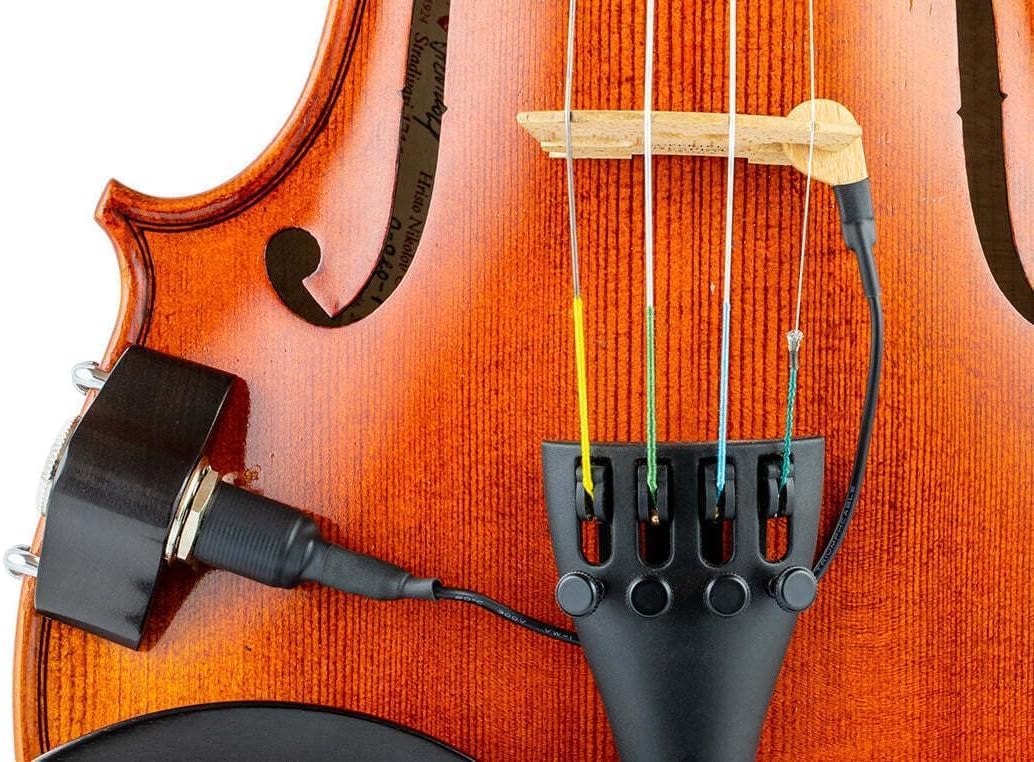
Image: Close-up of the KNA VV-3 piezo sensor being carefully inserted into the eye of a violin bridge.
Step 2: Attach the Jack Housing
The ebony, cork-lined jack housing attaches to the side of your instrument. Loosen the adjustable barrel clamps on the jack housing. Position the housing below the waist of the 4th (G) string side of the violin/viola. Gently tighten the barrel clamps until the housing is securely fastened to the instrument's body. The cork lining protects the instrument's finish.

Image: A hand carefully tightening the adjustable barrel clamps of the KNA VV-3 jack housing to secure it to the side of a violin.

Image: The KNA VV-3 jack housing is shown securely attached to the side of a violin, with the sensor cable plugged in.
Step 3: Connect the Sensor to the Jack Housing
Carefully route the thin cable from the piezo sensor to the input jack on the housing. Plug the sensor's mini-jack into the designated input on the jack housing. Ensure the cable is not under tension and does not interfere with playing.

Image: A close-up view illustrating the connection of the piezo sensor's cable to the jack housing, which is mounted on the violin.
Operation
Once the VV-3 pickup is installed, connect a standard 1/4" instrument cable from the jack housing to your amplifier, audio interface, or effects pedals. The pickup is passive and does not require batteries for operation. Adjust the volume and tone settings on your connected equipment to achieve your desired sound.
Maintenance
- Keep the pickup clean by gently wiping it with a soft, dry cloth.
- Avoid exposing the pickup to extreme temperatures or humidity.
- Regularly check the tightness of the jack housing clamps to ensure a secure fit.
- If removing the pickup, store it in a protective case to prevent damage.
Troubleshooting
- No Sound: Ensure all cable connections are secure and the instrument cable is functioning correctly. Check the volume settings on your amplifier or audio interface.
- Weak Signal: Verify the sensor is properly seated in the bridge and the jack housing clamps are tight. A loose connection can result in a weak signal.
- Distorted Sound: Check the input gain settings on your amplifier or audio interface. Excessive gain can cause distortion.
- Unwanted Noise/Hum: Ensure all cables are properly shielded and away from power sources. Try a different instrument cable or amplifier.
Specifications
| Model Name | VV-3 |
| Item Weight | 1.76 ounces |
| Product Dimensions | 2 x 2 x 4.5 inches |
| Body Material | Birch Wood |
| Top Material | Ebony |
| Back Material | Ebony |
| Material Type | Birch, Ebony Wood |
| Finish Type | Varnished |
| Color | Natural |
| Connector Type | 1/4" Jack |
| Manufacturer | KNA Pickups |
| UPC | 617353858129 |
Warranty and Support
For warranty information or technical support, please contact KNA Pickups directly. Refer to the official KNA website or your purchase documentation for specific warranty terms and contact details.