
1. Safety Instructions
Please read these safety instructions carefully before using the device. Failure to follow these instructions may result in electric shock, fire, or other hazards.
- This device is designed for indoor use only (IP20). Do not expose it to moisture or extreme temperatures.
- Ensure the power supply voltage matches the device's rating (230V).
- Do not exceed the maximum load capacity of 1200W for ohmic loads or 800W for inductive/LED loads.
- Do not open or modify the device. Repairs should only be performed by qualified personnel.
- Keep out of reach of children.
- Ensure proper grounding if your electrical system requires it. Note: Some users have reported compatibility issues with specific grounding systems (e.g., central grounding in Belgium).
- Unplug the device from the power outlet before cleaning or if it is not in use for an extended period.
2. Product Overview
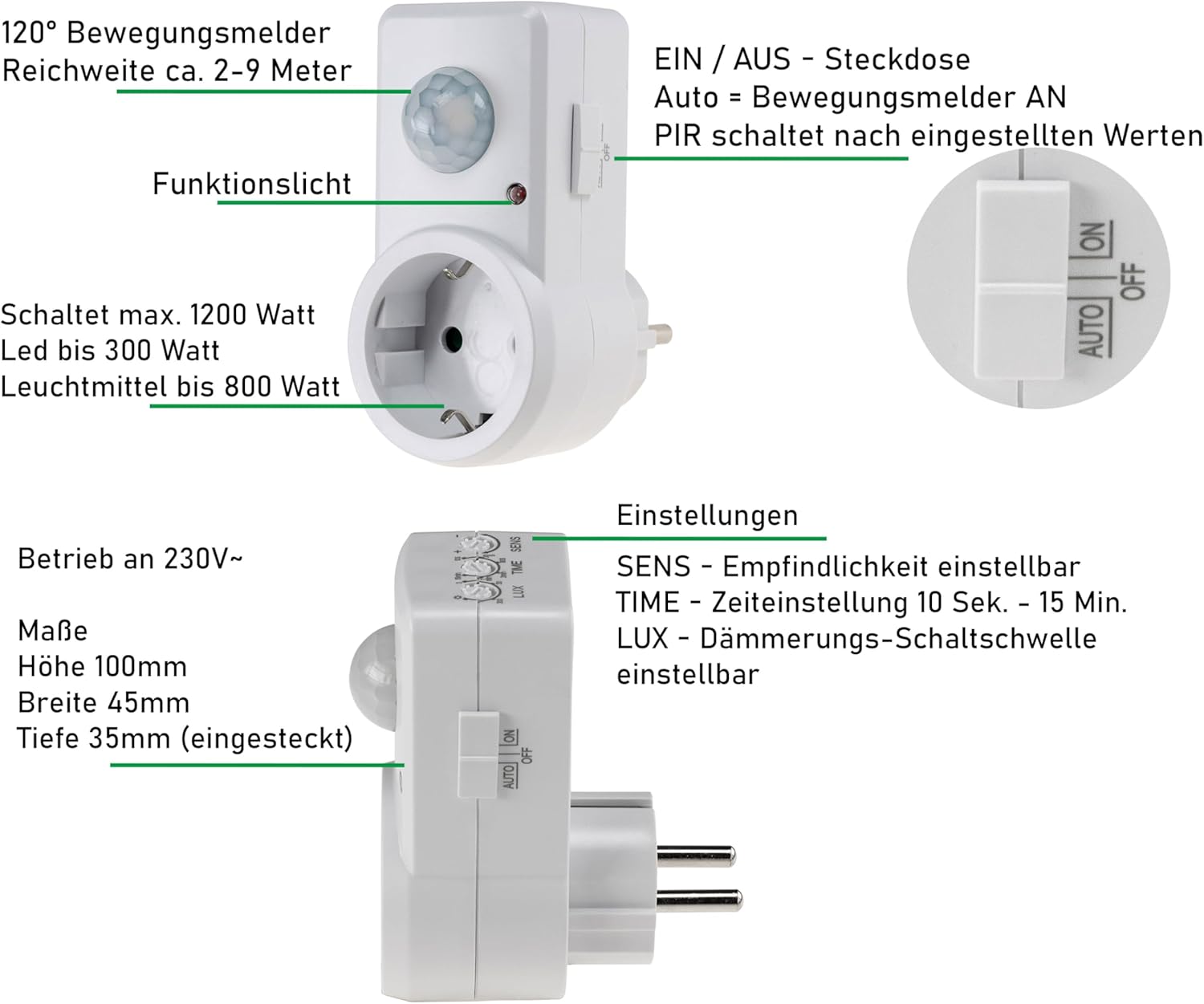
The ChiliTec Motion Sensor Plug is an intermediate plug with an integrated infrared motion detector. It automatically switches connected electrical devices based on detected movement and ambient light conditions.

Key Features:
- Integrated infrared motion detector.
- Detection angle: 120 degrees.
- Detection range: Approximately 2 to 9 meters.
- Adjustable switching time: 10 seconds to 15 minutes.
- Adjustable light sensitivity (twilight switch).
- Maximum load: 1200W (resistive load), 800W (LED/inductive load).
- Operating modes: AUTO (motion detection), ON (always on), OFF (always off).
- Standard 230V operation with protective contact socket.
3. Setup
Follow these steps to set up your motion sensor plug:
- Unpack the Device: Carefully remove the motion sensor plug from its packaging.
- Choose a Location: Select a standard 230V wall outlet or power strip where you want to use the motion sensor. Consider the desired detection area and ensure the sensor's field of view (120°) is not obstructed. The optimal mounting height is between 0.3m and 1.2m.

Diagram illustrating the 120° detection angle and recommended mounting height (0.3m to 1.2m) for optimal motion detection, with a maximum range of 9m. - Plug in the Sensor: Insert the ChiliTec Motion Sensor Plug into the chosen wall outlet.
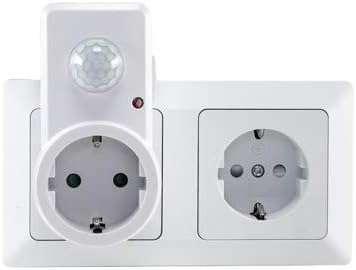
The motion sensor plug inserted into a standard wall outlet, demonstrating its compact design and how it fits alongside another outlet. - Connect Your Device: Plug the electrical device you wish to control (e.g., a lamp) into the socket on the motion sensor plug. Ensure the device's power consumption does not exceed the maximum load limits.
4. Operating Instructions
The motion sensor plug has three main operating modes and three adjustable settings.
4.1. Operating Modes (AUTO/ON/OFF Switch)
Use the side switch to select the desired mode:
- AUTO: In this mode, the connected device will switch on automatically when motion is detected and the ambient light level is below the set LUX threshold. It will switch off after the set TIME duration if no further motion is detected.
- ON: The connected device will remain continuously on, regardless of motion detection or ambient light.
- OFF: The connected device will remain continuously off.
4.2. Adjustable Settings (Rotary Dials)
The three rotary dials on the top of the device allow you to fine-tune its operation:
- LUX (Light Sensitivity): This dial adjusts the ambient light threshold at which the motion sensor becomes active.
- Turn towards "Sun" symbol: The sensor will activate even in bright conditions (daylight).
- Turn towards "Moon" symbol: The sensor will only activate in dark conditions (night).
Tip: To test the sensor during the day, set the LUX to the "Sun" symbol. For normal operation, adjust it to the "Moon" symbol or a suitable intermediate setting for twilight activation.
- TIME (Delay Time): This dial sets how long the connected device remains on after the last detected motion.
- Adjustable from approximately 10 seconds to 15 minutes.
- Turn clockwise to increase the delay time, counter-clockwise to decrease it.
Note: The timer resets with each new motion detection.
- SENS (Sensitivity): This dial adjusts the sensitivity of the motion detector.
- Turn clockwise for higher sensitivity (detects smaller movements or movements at greater distances).
- Turn counter-clockwise for lower sensitivity (requires more significant movement or closer proximity).
Tip: If the sensor triggers too easily or not enough, adjust the SENS dial.

5. Maintenance
The ChiliTec Motion Sensor Plug requires minimal maintenance.
- Cleaning: Disconnect the device from the power outlet before cleaning. Wipe the surface with a soft, dry cloth. Do not use abrasive cleaners, solvents, or excessive moisture, as these can damage the device.
- Inspection: Periodically check the device and its connected cables for any signs of damage, such as cracks, frayed wires, or loose connections. If any damage is found, discontinue use and replace the device.
- Storage: If storing the device for an extended period, keep it in a cool, dry place away from direct sunlight and extreme temperatures.
6. Troubleshooting
If you encounter issues with your motion sensor plug, refer to the following table:
| Problem | Possible Cause | Solution |
|---|---|---|
| Device does not switch on. |
|
|
| Device switches on too frequently or without apparent motion. |
|
|
| Device switches off too quickly or too slowly. |
|
|
| Device does not detect motion in bright conditions. |
|
|
7. Specifications
| Feature | Detail |
|---|---|
| Model Number | 21055_SML |
| Brand | ChiliTec |
| Operating Voltage | 230 V |
| Max. Ohmic Load | 1200 W |
| Max. Inductive/LED Load | 800 W |
| Detection Angle | 120° |
| Detection Range | 2 - 9 meters |
| Adjustable Time Delay | 10 seconds - 15 minutes |
| Adjustable Light Sensitivity | Yes (Twilight switch) |
| Operating Modes | AUTO / ON / OFF |
| Protection Class | IP20 (Indoor use only) |
| Color | White |
| Dimensions (H x W x D) | Approx. 100 x 45 x 35 mm (plugged in depth) |
| Standby Power Consumption | Approx. 0.5 W |
| Operating Temperature | 10°C to 35°C |
8. Warranty and Support
For warranty information and customer support, please refer to the retailer where you purchased the ChiliTec Motion Sensor Plug or visit the official ChiliTec website. Keep your proof of purchase for warranty claims.
Note: Information regarding spare parts availability is not provided.