
1. Introduction
Thank you for choosing the MAUL 16115 90 Pocket Letter Scale. This portable digital scale is designed for precise weighing of letters, small parcels, and other small items up to 500 grams. Its compact design and included protective case make it ideal for both office and on-the-go use. Please read this manual carefully to ensure proper operation and maintenance of your device.
2. Safety Information
- Do not overload the scale beyond its maximum capacity of 500g.
- Avoid dropping the scale or subjecting it to strong impacts, as this may damage the internal sensors.
- Keep the scale away from extreme temperatures, humidity, and direct sunlight.
- Do not immerse the scale in water or other liquids. Clean with a damp cloth only.
- Use the scale on a stable, flat, and level surface to ensure accurate readings.
- Keep out of reach of children.
3. Package Contents
Please check the package contents upon unpacking. If any items are missing or damaged, contact your retailer.
- MAUL 16115 90 Pocket Letter Scale
- Protective artificial leather case
- User Manual (this document)
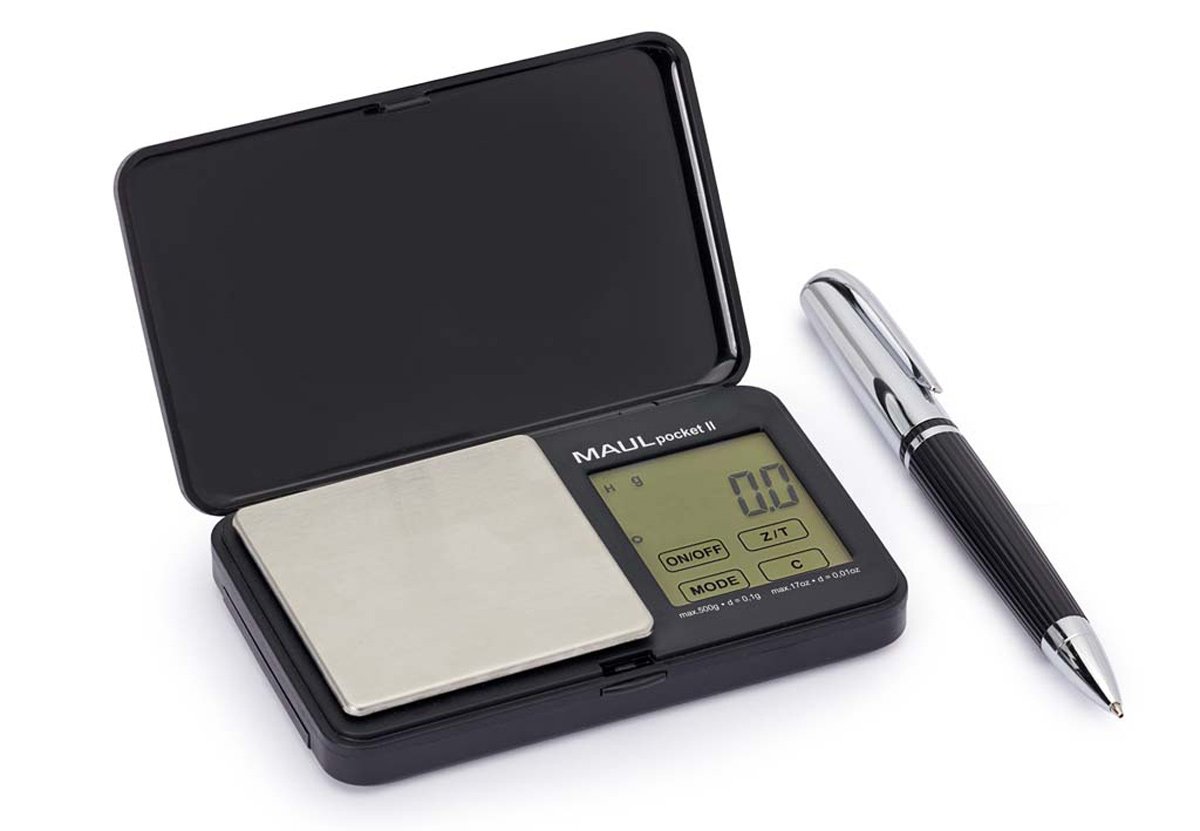
Image 1: The MAUL 16115 90 Pocket Letter Scale, shown in black, accompanied by its artificial leather protective case. The scale features a digital LCD display and a weighing platform.
4. Setup
4.1. Battery Installation
The MAUL 16115 90 scale typically uses standard AAA batteries (not always included, check packaging). To install or replace batteries:
- Locate the battery compartment on the underside of the scale.
- Open the battery compartment cover.
- Insert the batteries, ensuring correct polarity (+/-) as indicated inside the compartment.
- Close the battery compartment cover securely.
4.2. Initial Placement
Place the scale on a hard, flat, and stable surface, free from vibrations or drafts, to ensure accurate measurements.
5. Operating Instructions
5.1. Turning On/Off
- To turn on: Press the ON/OFF button. The display will light up and show "0.0g" when ready.
- To turn off: Press and hold the ON/OFF button for a few seconds, or the scale will automatically shut off after a period of inactivity to conserve battery life.
5.2. Weighing Items
- Ensure the scale is on a stable surface and turned on. The display should show "0.0g".
- Gently place the item to be weighed onto the center of the weighing platform.
- Read the weight displayed on the LCD screen.
- Remove the item from the platform.
5.3. Tare Function (Zeroing)
The tare function allows you to weigh items in a container by subtracting the container's weight.
- Place an empty container on the weighing platform. The display will show its weight.
- Press the TARE button (or equivalent, often labeled "T"). The display will reset to "0.0g".
- Place the items to be weighed into the container. The display will now show only the net weight of the items.
- To clear the tare, remove all items and the container, then press the TARE button again, or turn the scale off and on.
5.4. Unit Conversion
If your scale supports multiple units (e.g., grams, ounces), press the UNIT button (or equivalent, often labeled "M" for Mode) to cycle through the available units.
6. Maintenance
6.1. Cleaning
- Wipe the scale with a soft, slightly damp cloth. Do not use abrasive cleaners or immerse in water.
- Ensure the scale is completely dry before storage or next use.
6.2. Storage
- Store the scale in its protective artificial leather case when not in use to prevent scratches and damage.
- Store in a cool, dry place, away from direct sunlight and extreme temperatures.
- If storing for an extended period, remove the batteries to prevent leakage.
7. Troubleshooting
| Problem | Possible Cause | Solution |
|---|---|---|
| Scale does not turn on. | Dead or incorrectly installed batteries. | Check battery polarity. Replace batteries if necessary. |
| Inaccurate readings. | Unstable surface, overloaded scale, or calibration needed. | Place on a flat, stable surface. Do not exceed 500g. If issues persist, consult manufacturer for calibration instructions (if applicable). |
| Display shows "Lo" or "Err". | Low battery or overload error. | Replace batteries. Remove excess weight from the platform. |
8. Specifications
| Feature | Detail |
|---|---|
| Model Number | 1611590 |
| Brand | MAUL |
| Capacity | 500 g |
| Graduation | 0.1 g |
| Display Type | LCD |
| Color | Black |
| Material | Unbreakable plastic housing, Stainless steel platform |
| Special Features | Protective artificial leather case included, Foldable cover (Klappdec) |
| Recommended Use | Letters, small parts, food, post |
9. Warranty and Support
MAUL products are manufactured to high-quality standards. For information regarding warranty terms, technical support, or service, please refer to the documentation provided with your purchase or visit the official MAUL website. Keep your proof of purchase for any warranty claims.
For further assistance, please contact your retailer or MAUL customer service directly.


