
1. Introduction
The Smittybilt XRC Gen 2 series winches are engineered for enhanced performance and durability, providing a reliable recovery system for challenging situations. This manual provides essential information for the safe and effective use of your 9500lb XRC Gen 2 winch. Please read all instructions carefully before installation and operation to ensure safety and optimal performance.
2. What's in the Box
Your Smittybilt XRC Gen 2 9500lb Winch package includes the following components:
- Smittybilt XRC Gen 2 9500lb Winch with Steel Cable
- Wired Remote Control with 12-inch lead
- 4-Way Roller Fairlead
- Control Box
- Clevis Hook
- Ground Wire
- All necessary wiring for installation
- Instruction Manual
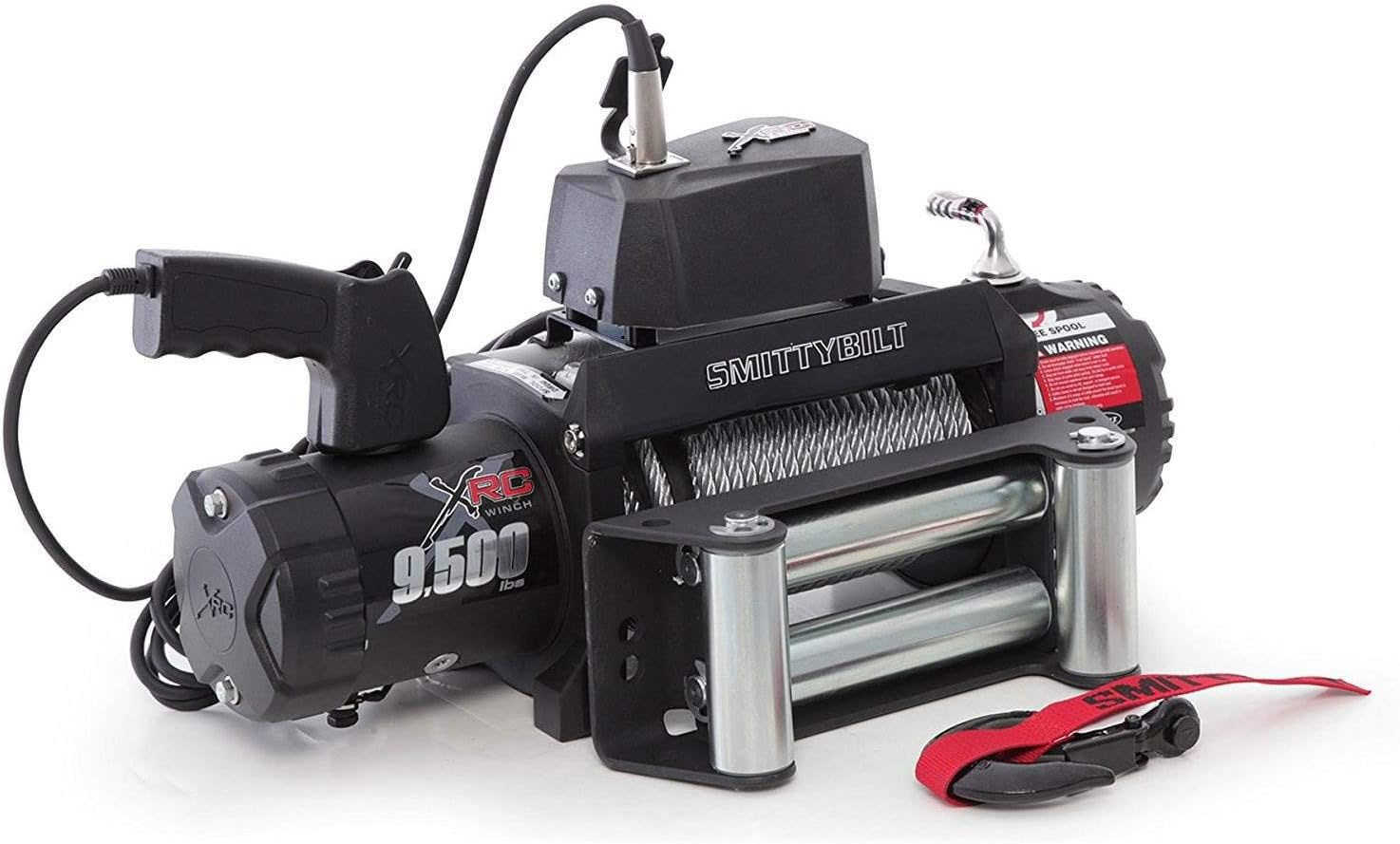
Figure 1: Smittybilt XRC Gen 2 9500lb Winch and included components.
3. Specifications
| Model Number | 97495 |
| Load Capacity | 9,500 lbs. |
| Motor | 6.6 hp |
| Gear Train | 3-Stage Planetary |
| Cable Type | Steel Wire Rope (Length: 93.5 ft) |
| Fairlead | 4-Way Roller |
| Control Lead Length | 12 inches |
| Voltage | 12 Volts |
| Product Dimensions (L x W x H) | 22.3” x 5.4” x 9.4” |
| Product Weight | 78 lbs. |
4. Safety Information
Always prioritize safety when operating a winch. Failure to follow these guidelines can result in serious injury or property damage.
- Read the Manual: Familiarize yourself with all instructions and warnings before use.
- Wear Protective Gear: Always wear heavy-duty gloves and eye protection when handling the winch cable.
- Clear the Area: Ensure all bystanders are at a safe distance from the winch and cable during operation.
- Never Exceed Load Capacity: Do not attempt to pull loads exceeding the winch's rated capacity of 9,500 lbs.
- Inspect Before Use: Check the winch cable, hook, and all connections for damage or wear before each operation.
- Avoid Shock Loads: Apply tension smoothly. Sudden jerks can damage the winch or cause cable failure.
- Proper Anchoring: Securely anchor the vehicle or object being winched to a stable point.
- Keep Hands Clear: Never guide the cable with your hands while the winch is operating. Use the provided clevis hook strap.
- Waterproof Solenoid: The state-of-the-art 500AMP solenoid is completely waterproof, enhancing reliability in various conditions.

Figure 2: Always maintain a safe distance and use proper technique when handling the winch cable, especially in wet conditions.
5. Setup and Installation
The Smittybilt XRC Gen 2 winch is designed for straightforward installation. The kit includes all necessary wiring. Smittybilt recommends using the supplied wiring for optimal performance and safety.
5.1 Mounting the Winch
Mount the winch securely to a winch-ready bumper or mounting plate using appropriate hardware. Ensure the mounting surface can support the full rated load of the winch.
5.2 Electrical Connections
Connect the winch to your vehicle's 12-volt electrical system. Refer to the detailed wiring diagram provided in your manual for specific connections. Ensure all connections are tight and corrosion-free. The control box should be mounted in a location that allows easy access for the remote control.
5.3 Fairlead Installation
Install the 4-way roller fairlead to the winch mounting plate. The fairlead guides the winch cable and reduces wear, especially during angled pulls.
6. Operating Instructions
Follow these steps for safe and effective winch operation:
- Prepare the Winch: Ensure the winch is properly mounted and wired. Inspect the cable for any damage.
- Free Spooling: To quickly unspool the cable, disengage the clutch by rotating the clutch lever. Pull the cable out to the anchor point.
- Engage Clutch: Once the cable is at the desired length and attached to the anchor, engage the clutch by rotating the clutch lever back to the 'Engaged' position.
- Connect Remote: Plug the wired remote control into the control box.
- Winching: Use the 'IN' button on the remote to retract the cable and 'OUT' to extend it. Apply tension gradually.
- Monitor Operation: Continuously monitor the winching process, ensuring the cable spools evenly and there are no obstructions.
- After Winching: Disconnect the remote, clean the winch and cable, and spool the cable neatly back onto the drum under light tension.

Figure 3: Preparing the winch cable for attachment to a recovery point.

Figure 4: Operating the wired remote control to manage the winch cable.

Figure 5: Demonstrating vehicle recovery using the Smittybilt XRC Gen 2 winch.
6.1 Official Product Video: Winch Demonstration
Video 1: A demonstration of the Smittybilt XRC Gen 2 9500lb Winch in action, showcasing its capabilities and operation.
7. Maintenance
Regular maintenance ensures the longevity and reliable performance of your Smittybilt winch.
- Cable Inspection: Regularly inspect the steel cable for kinks, fraying, or broken strands. Replace damaged cables immediately.
- Cleanliness: Keep the winch and cable clean from mud, dirt, and debris. Rinse with fresh water after use in harsh conditions.
- Lubrication: Cycle the winch at least once a month (spool out and in) to keep internal components properly lubricated and prevent moisture buildup.
- Electrical Connections: Check all electrical connections periodically for tightness and corrosion.
8. Troubleshooting
If you encounter issues with your winch, refer to the following common troubleshooting steps:
- Winch Not Operating:
- Check battery connections for tightness and corrosion.
- Ensure the vehicle battery is fully charged.
- Verify all wiring connections to the winch and control box are secure.
- Inspect the main power fuse or circuit breaker for the winch.
- Remote Control Not Responding:
- Check the connection of the remote control to the control box.
- Inspect the internal 2-amp glass fuse within the control box, as this can sometimes blow and prevent remote operation. Replace if necessary.
- Cable Issues (Kinking/Fraying):
- If the cable is kinking or fraying, it may be due to improper spooling under tension or damage during use. Replace the cable if it shows significant wear.
9. Warranty and Support
Smittybilt stands behind the quality of its products with comprehensive warranty coverage:
- Limited Lifetime Mechanical Warranty: Applies to the original purchaser for replacement on stainless steel products.
- 5-Year or 100,000-Mile Electrical Warranty: Covers dual-stage, powder-coated electrical components, whichever comes first.
For warranty claims, technical support, or replacement parts, please contact Smittybilt customer service directly. Refer to the contact information provided in your product packaging or on the official Smittybilt website.