
Introduction
This manual provides detailed instructions for the installation, operation, and maintenance of your PowerBass PX-BP12 2-Channel Amplifier and 12-Inch Subwoofer Package. Please read this manual thoroughly before attempting installation or operation to ensure proper use and to maximize the performance and longevity of your system.
Important Safety Information
Always observe the following safety precautions:
- Professional Installation Recommended: Due to the complexity of car audio systems and the potential for electrical hazards, professional installation by a qualified technician is highly recommended.
- Disconnect Battery: Before beginning any installation, disconnect the vehicle's negative battery terminal to prevent electrical shorts and damage.
- Proper Wiring: Ensure all wiring is correctly connected, insulated, and secured to prevent shorts, overheating, and potential fire hazards. Use appropriate gauge wiring for power and ground connections.
- Ventilation: Install the amplifier in a location that allows for adequate ventilation to prevent overheating. Do not cover the amplifier's heat sinks.
- Secure Mounting: Securely mount all components to prevent them from becoming projectiles in the event of a sudden stop or accident.
- Volume Levels: Prolonged exposure to high volume levels can cause permanent hearing damage. Adjust volume to a safe level.
- Water and Moisture: Keep all components away from water and excessive moisture.
Package Contents
The PowerBass PX-BP12 package includes the following components:
- 1 x PowerBass PX-2.300 2-Channel Amplifier
- 2 x PowerBass PX-128 12-inch 8-ohm Subwoofers
- 1 x Detailed instruction manual (this document)
- Enclosure Dimensions (provided within the manual for subwoofer installation)
Product Features
The PowerBass PX-BP12 package offers the following key features:
- Amplifier: MOSFET Amplifier (500 watts Peak Music Power)
- Amplifier Power Output: 250W x 1 Bridged Mono (4-ohm) RMS Power
- Inputs: High / Low Level Inputs
- Filter: 80Hz Low Pass Filter
- Subwoofer Voice Coil: 2-inch Single 8-ohm Voice Coil
Setup and Installation
Proper installation is crucial for optimal performance and safety. It is highly recommended that installation be performed by a qualified professional.
1. Planning the Installation
Before starting, plan the layout of your amplifier and subwoofers. Consider the following:
- Amplifier Location: Choose a location that provides good ventilation, is protected from moisture, and allows for short wiring runs. Avoid mounting on carpet or in enclosed spaces without airflow.
- Subwoofer Enclosure: The PX-128 subwoofers require a suitable enclosure. Refer to the enclosure dimensions provided in this manual for optimal performance.
- Wiring Paths: Plan routes for power, ground, remote turn-on, and signal cables. Keep power cables separate from signal cables to prevent noise.
2. Power and Ground Wiring
Important: Disconnect the vehicle's negative battery terminal before proceeding.
- Power Cable: Run a suitable gauge power cable directly from the positive terminal of the vehicle's battery to the amplifier's BATT+ terminal. Install an in-line fuse holder within 18 inches (45 cm) of the battery.
- Ground Cable: Connect a short, heavy-gauge ground cable from the amplifier's GND terminal to a clean, unpainted metal surface on the vehicle's chassis. Ensure a solid electrical connection.
- Remote Turn-On: Connect a remote turn-on wire from your head unit's remote output to the amplifier's REM terminal.

Figure 1: Rear view of the PowerBass PX-2.300 amplifier, illustrating the power (BATT+), ground (GND), remote (REM), and speaker output terminals. Ensure correct and secure wiring connections.
3. Signal Input Connections
The PX-2.300 amplifier supports both high-level (speaker level) and low-level (RCA) inputs.
- Low-Level Input (RCA): Connect RCA cables from your head unit's pre-amp outputs to the amplifier's LOW INPUT RCA jacks.
- High-Level Input: If your head unit does not have RCA outputs, use the high-level input. Connect the speaker wires from your head unit to the amplifier's HIGH INPUT terminal block.

Figure 2: Front view of the PowerBass PX-2.300 amplifier, highlighting the low-level (RCA) and high-level input options, gain control knob, and crossover frequency switch.
4. Subwoofer Wiring and Enclosure
The PX-BP12 package includes two PX-128 12-inch 8-ohm subwoofers. These subwoofers are designed for use in a sealed or ported enclosure. Refer to the provided enclosure dimensions for optimal performance.
- Wiring: Connect the subwoofers to the amplifier's speaker output terminals. For bridged mono operation (250W x 1 at 4-ohm), ensure the subwoofers are wired in series to present a 4-ohm load to the amplifier. Consult a wiring diagram for series connections.
- Enclosure: Construct or acquire an enclosure that matches the recommended specifications for the PX-128 subwoofers. Proper enclosure design is critical for bass response.

Figure 3: Two PowerBass PX-128 12-inch subwoofers. One is shown from the front, displaying the cone, while the other is inverted, revealing the magnet structure and speaker terminals for wiring.

Figure 4: Front view of a single PowerBass PX-128 12-inch subwoofer, showcasing its cone and surround.
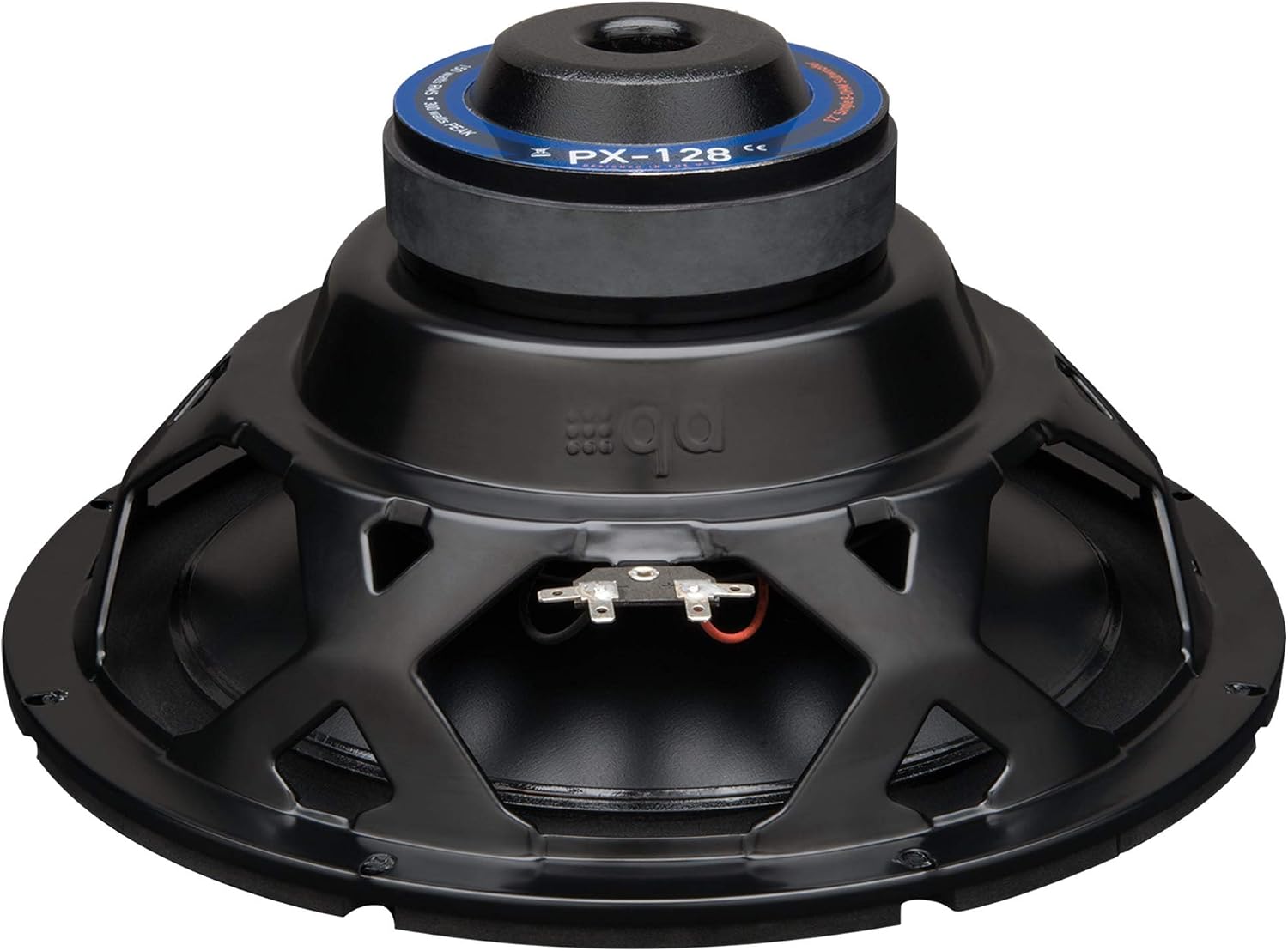
Figure 5: Rear view of a single PowerBass PX-128 12-inch subwoofer, detailing the magnet assembly and speaker wire terminals.
5. Initial Power-Up and Adjustment
- Reconnect Battery: Once all connections are secure, reconnect the vehicle's negative battery terminal.
- Head Unit Settings: Set your head unit's volume to a low level.
- Amplifier Gain: Turn the amplifier's GAIN control to its minimum (fully counter-clockwise) position. Gradually increase the gain until the desired volume is achieved without distortion. Avoid setting the gain too high, as this can cause clipping and damage to your speakers.
- Crossover: Set the X-OVER switch to LPF (Low Pass Filter) for subwoofer operation. The PX-2.300 has an 80Hz LPF. This ensures only low frequencies are sent to the subwoofers.
Operating Instructions
Once installed and configured, operating your PowerBass PX-BP12 system is straightforward:
- Power On/Off: The amplifier will automatically turn on and off with your head unit via the remote turn-on wire.
- Volume Control: Adjust the overall system volume using your head unit's volume control.
- Bass Adjustment: Fine-tune the bass level using the amplifier's gain control or your head unit's subwoofer level control (if available).
- Listening Levels: Always listen at comfortable volume levels. Prolonged exposure to high volumes can cause hearing damage.
Maintenance
Your PowerBass PX-BP12 system requires minimal maintenance to ensure long-lasting performance:
- Cleaning: Periodically clean the amplifier and subwoofer surfaces with a soft, dry cloth. Do not use harsh chemicals or abrasive cleaners.
- Ventilation: Ensure the amplifier's heat sinks remain clear of obstructions to allow for proper cooling.
- Connections: Occasionally check all wiring connections for tightness and corrosion. Loose connections can lead to poor performance or damage.
- Fuse Replacement: If the amplifier's fuse blows, replace it only with a fuse of the same type and rating (25A). Using an incorrect fuse can cause damage or fire.
Troubleshooting
If you experience issues with your PowerBass PX-BP12 system, refer to the following common problems and solutions:
| Problem | Possible Cause | Solution |
|---|---|---|
| No Sound |
|
|
| Distorted Sound |
|
|
| Amplifier Overheating |
|
|
| Noise (Hiss, Whine) |
|
|
Specifications
Detailed specifications for the PowerBass PX-BP12 package components:
PowerBass PX-2.300 2-Channel Amplifier
- Output Power: 500 Watts (Peak Music Power)
- RMS Power: 250W x 1 Bridged Mono (4-ohm)
- Number of Channels: 2
- Amplifier Type: Regulated 2 Ohm Stable Bridgeable MOSFET Amplifier
- Filter: 80Hz Low Pass Filter
- Inputs: High / Low Level Inputs
- Fuse: 25A
- Item Dimensions (L x W x H): Approximately 15 x 15 x 21 inches (Note: This dimension seems to be for the overall package or a different item, amplifier dimensions are typically smaller. Please refer to product packaging for exact amplifier dimensions.)
- Item Weight: 25 Pounds (Note: This weight likely refers to the entire package, not just the amplifier.)
PowerBass PX-128 12-Inch Subwoofer
- Size: 12-inch
- Voice Coil: 2-inch Single 8-ohm Voice Coil
General Package Information
- Brand: PowerBass
- Model: PX-BP12
- Mounting Type: Surface Mount (for amplifier)
- GTIN/UPC: 823871005475
- ASIN: B00JVI6L4G
Warranty and Support
PowerBass products are designed for reliability and performance. For specific warranty information, please refer to the warranty card included with your product or visit the official PowerBass website. For technical support or service inquiries, please contact PowerBass customer service directly.
Manufacturer: PowerBass
Website: www.powerbassusa.com (Example link, actual link may vary)


