
ABB DB42
ABB DB42 TF42 Panel Mount Kit Instruction Manual
Model: DB42
1. Introduction
The ABB DB42 TF42 Panel Mount Kit is designed to facilitate the secure and efficient mounting of a TF42 thermal overload relay onto a control panel. This kit ensures proper integration and stable operation within industrial electrical systems. Please read this manual thoroughly before installation and use to ensure correct procedures and optimal performance.
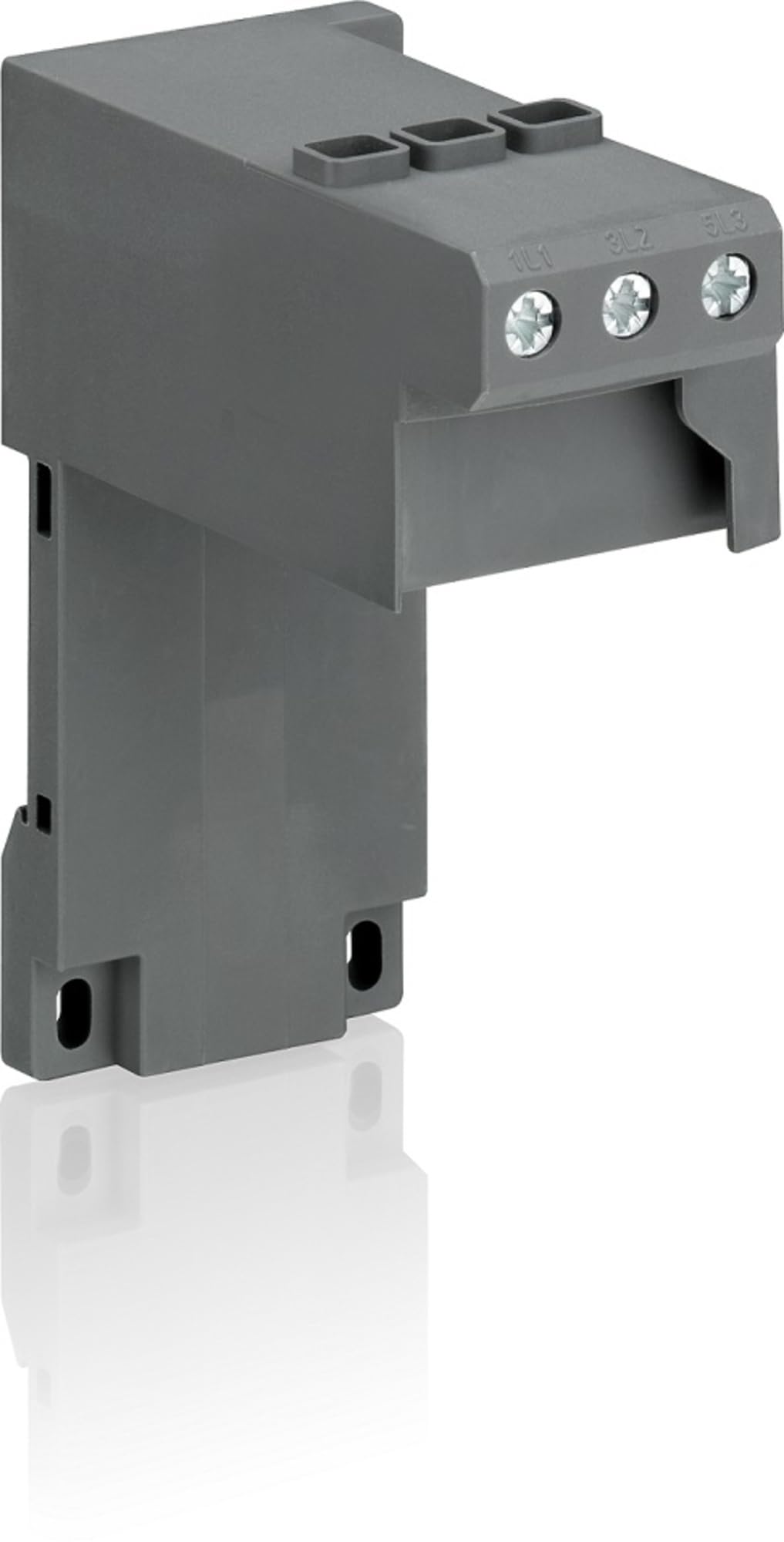
Figure 1: The ABB DB42 TF42 Panel Mount Kit. This image displays the gray plastic housing of the mount kit, featuring three screw terminals labeled 1L1, 3L2, and 5L3 on the top surface, indicating connection points for electrical wiring. The kit is designed for panel integration, with mounting slots visible on its lower section.
2. Safety Information
Always observe the following safety precautions to prevent injury and damage to the equipment:
- Ensure all power is disconnected before installing or servicing the kit or any connected components.
- Installation should only be performed by qualified personnel familiar with electrical systems and safety standards.
- Wear appropriate personal protective equipment (PPE), such as safety glasses and insulated gloves.
- Verify that the mounting surface is stable and capable of supporting the combined weight of the kit and the thermal overload relay.
- Do not modify the kit or use it for purposes other than its intended design.
3. Package Contents
The ABB DB42 TF42 Panel Mount Kit package typically includes:
- 1 x ABB DB42 TF42 Panel Mount Kit
- (Additional mounting hardware, if applicable, may be included but is not specified.)
4. Installation Instructions
Follow these steps to properly install the ABB DB42 TF42 Panel Mount Kit:
- Preparation: Ensure the control panel where the kit will be mounted is clean, dry, and free from obstructions. Verify that all power to the panel is disconnected and locked out.
- Positioning: Identify the desired mounting location on the panel. The kit is designed to securely hold a TF42 thermal overload relay.
- Mounting:
- Align the mounting holes on the DB42 kit with the corresponding points on the panel.
- Secure the kit to the panel using appropriate screws or fasteners (not typically included with the kit, refer to your TF42 relay manual for specific mounting hardware requirements).
- Ensure the kit is firmly attached and does not wobble.
- Relay Integration: Once the DB42 kit is mounted, carefully attach the TF42 thermal overload relay to the kit according to the relay's specific instructions. The DB42 provides the mechanical interface for panel mounting.
- Wiring: After the relay is secured, proceed with wiring the TF42 thermal overload relay as per its own instruction manual and relevant electrical codes. The terminals on the DB42 kit (1L1, 3L2, 5L3) are typically pass-through connections for the relay.
- Final Check: Before restoring power, visually inspect all connections and mounting points to ensure everything is secure and correctly installed.
5. Operation
The ABB DB42 TF42 Panel Mount Kit is a passive component designed to provide a stable mounting solution for the TF42 thermal overload relay. It does not have active operational functions. Its primary role is to ensure the secure physical integration of the TF42 relay into a control panel, allowing the relay to perform its protective functions effectively.
For operational details, settings, and functionality of the thermal overload relay, please refer to the specific instruction manual provided with your ABB TF42 thermal overload relay.
6. Maintenance
The DB42 TF42 Panel Mount Kit requires minimal maintenance. Regular inspections are recommended to ensure its continued integrity:
- Visual Inspection: Periodically check the kit for any signs of physical damage, cracks, or discoloration.
- Mounting Security: Ensure all mounting screws or fasteners remain tight and secure. Vibrations in industrial environments can sometimes loosen connections.
- Cleanliness: Keep the kit and surrounding area free from dust, dirt, and moisture. Use a dry, soft cloth for cleaning. Do not use abrasive cleaners or solvents.
- Environmental Conditions: Verify that the operating environment remains within the specified conditions for the TF42 relay and associated components.
If any damage is observed, replace the kit immediately to maintain system integrity and safety.
7. Troubleshooting
This section addresses common issues related to the installation and physical integrity of the panel mount kit.
| Problem | Possible Cause | Solution |
|---|---|---|
| Kit does not fit the panel. | Incorrect panel dimensions or mounting hole alignment. | Verify panel cut-out and mounting hole dimensions against the kit's specifications. Ensure correct model is being used. |
| Kit feels loose after mounting. | Mounting screws are not tightened sufficiently or are incorrect type. | Ensure appropriate fasteners are used and tightened securely. Avoid over-tightening to prevent damage. |
| TF42 relay does not attach securely to the kit. | Improper alignment or incompatible relay model. | Ensure the TF42 relay is correctly aligned with the kit's attachment points. Verify that the relay model is compatible with the DB42 kit. |
For issues related to the electrical functionality or protection features of the TF42 thermal overload relay, consult the relay's dedicated instruction manual.
8. Technical Specifications
| Attribute | Detail |
|---|---|
| Manufacturer | ABB |
| Part Number | DB42 |
| Item Model Number | DB42 |
| Compatible Relay Series | TF42 Thermal Overload Relays |
| Product Dimensions | 1 x 2 x 2.7 inches |
| Item Weight | 4.2 ounces |
| Item Package Quantity | 1 |
| Batteries Included | No |
| Batteries Required | No |
| Familystyle | AF-Line |
9. Warranty Information
ABB products are manufactured to high-quality standards. This product is covered by ABB's standard manufacturer's warranty. For specific terms, conditions, and duration of the warranty applicable to the DB42 TF42 Panel Mount Kit, please refer to the official ABB warranty documentation available on the ABB website or contact ABB customer support.
Keep your proof of purchase for warranty claims.
10. Customer Support
For technical assistance, product inquiries, or support regarding the ABB DB42 TF42 Panel Mount Kit, please contact ABB customer service:
- Website: Visit the official ABB website for product information, FAQs, and support resources.
- Contact Information: Refer to the "Contact Us" section on the ABB website for regional phone numbers and email addresses.
- Online Resources: Explore ABB's online documentation and support portals for additional guides and troubleshooting tips.
When contacting support, please have your product model number (DB42) and any relevant purchase details ready.
Related documentsDB42


Ask a question about this manual
Ask about setup, troubleshooting, compatibility, parts, safety, or missing instructions. Manuals+ will review the question and use this page’s manual context to help answer it.