
EdenPURE Comfort Air
EdenPURE Comfort Air Bladeless Fan User Manual
Model: Comfort Air | Brand: EdenPURE
Introduction
The EdenPURE Comfort Air Bladeless Fan is an advanced appliance designed to provide efficient air circulation using Vortex Air Flow Cooling Technology. This unit is engineered to move air effectively, contributing to a more comfortable indoor environment without traditional rotating blades.
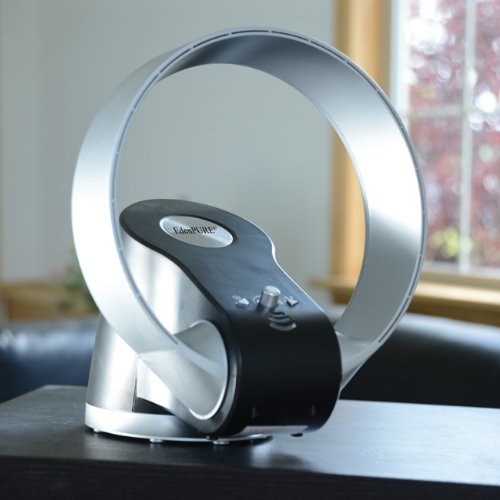
Image of the EdenPURE Comfort Air Bladeless Fan, showcasing its modern design with a silver loop and a black base containing controls.
Important Safety Instructions
To reduce the risk of fire, electric shock, or injury, please read all instructions before operating this appliance. Keep this manual for future reference.
- Always unplug the fan from the electrical outlet before cleaning, servicing, or when not in use.
- Do not operate any fan with a damaged cord or plug. If the cord or plug is damaged, contact qualified service personnel.
- Do not run cord under carpeting. Do not cover cord with throw rugs, runners, or similar coverings. Arrange cord away from traffic area and where it will not be tripped over.
- This fan is intended for household use only. Do not use outdoors.
- Do not immerse the fan in water or other liquids.
- Do not insert fingers or foreign objects into any openings on the fan.
- Place the fan on a stable, level surface to prevent tipping.
- Close supervision is necessary when any appliance is used by or near children.
Package Contents
Verify that all items are present in the package:
- 1 x EdenPURE Comfort Air Bladeless Fan Unit
- 1 x Power Cord
- 1 x User Manual (this document)
Setup
- Unpacking: Carefully remove the EdenPURE Comfort Air Bladeless Fan and all packaging materials from the box. Retain packaging for future storage or transport.
- Placement: Position the fan on a firm, level, and stable surface. Ensure there is adequate space around the unit for unrestricted airflow. Avoid placing it near curtains or other objects that could obstruct air intake or output.
- Power Connection: Insert the power cord into the power inlet located at the back or base of the fan. Then, plug the power cord into a standard, grounded electrical outlet.
Operating Instructions
Follow these steps to operate your EdenPURE Comfort Air Bladeless Fan:
- Power On/Off: Locate the push button switch on the unit. Press the button once to turn the fan ON. Press the button again to turn the fan OFF.
- Adjusting Airflow: The fan features a control knob for adjusting airflow intensity. Rotate the knob clockwise to increase the airflow and counter-clockwise to decrease it.
Maintenance
Regular maintenance ensures optimal performance and longevity of your fan.
- Cleaning: Always unplug the fan before cleaning. Use a soft, damp cloth to wipe the exterior surfaces of the fan. Do not use abrasive cleaners, waxes, or solvents as they may damage the finish. Ensure no water enters the internal components.
- Storage: When not in use for extended periods, unplug the fan and store it in a cool, dry place, preferably in its original packaging, away from direct sunlight and extreme temperatures.
Troubleshooting
| Problem | Possible Cause | Solution |
|---|---|---|
| Fan does not turn on. | No power supply. | Ensure the power cord is securely plugged into both the fan and a functional electrical outlet. Check the circuit breaker. |
| Weak or no airflow. | Air intake/output obstructed or unit is dirty. | Ensure there are no obstructions around the fan's air intake or output. Clean the exterior surfaces as per maintenance instructions. |
| Unusual noise during operation. | Fan not on a stable surface or internal issue. | Place the fan on a firm, level surface. If noise persists, discontinue use and contact customer support. |
Specifications
| Brand | EdenPURE |
| Model | Comfort Air Bladeless Fan |
| Power Source | Corded Electric |
| Special Feature | Bladeless |
| Switch Type | Push Button |
| Blade Material | Plastic |
| Included Components | Cord |
| UPC | 827463001784 |
| ASIN | B00JRGFKVC |
| Manufacturer | EdenPURE |
Warranty and Support
For warranty information, technical support, or service inquiries, please contact EdenPURE customer service. Refer to the product packaging or the official EdenPURE website for the most current contact details.
Please have your model number (Comfort Air) and UPC (827463001784) available when contacting support.
Related documentsComfort Air

Ask a question about this manual
Ask about setup, troubleshooting, compatibility, parts, safety, or missing instructions. Manuals+ will review the question and use this page’s manual context to help answer it.