
Introduction
This manual provides detailed instructions for the assembly, operation, maintenance, and specifications of your WorkPro Quantum 9000 Series Ergonomic Mid-Back Mesh Office Chair. Designed for professional use, this chair offers extensive adjustability and a breathable mesh design to enhance comfort during extended periods of sitting. Please read these instructions carefully before assembly and use to ensure proper function and longevity of your chair.
Assembly Instructions
Assembly of the WorkPro Quantum 9000 Series chair is straightforward and typically takes less than 15 minutes. All necessary tools, including an Allen wrench, are provided. Spare bolts are also included. Follow the steps below for proper assembly:
- Unpack all components and verify against the parts list.
- Attach the five casters to the chair base. Ensure they are securely inserted.
- Insert the gas lift cylinder into the center hole of the chair base.
- Attach the armrests to the seat frame using the provided bolts.
- Secure the backrest to the seat frame. The design incorporates a tongue-in-groove technique with four bolts for stability.
- Carefully place the assembled seat and backrest onto the gas lift cylinder.
- Ensure all bolts are tightened using the provided Allen wrench. Do not overtighten.

This image displays the fully assembled WorkPro Quantum 9000 Series Ergonomic Mid-Back Mesh Office Chair, showcasing its overall design and mesh construction.

This image illustrates the key dimensions of the WorkPro Quantum 9000 Series chair, including height, width, and depth, to assist with placement and fit.
Operating Adjustments
The WorkPro Quantum 9000 Series chair offers multiple adjustment options to customize your seating experience for optimal comfort and ergonomic support.
1. Seat Height Adjustment
To adjust the seat height, locate the lever on the right side beneath the seat. While seated, pull the lever up to raise the seat. To lower the seat, pull the lever up while applying slight body weight. Release the lever at the desired height.
2. Seat Depth Adjustment
The seat depth can be adjusted to ensure proper leg support. Locate the lever on the left side beneath the seat. Pull the lever and slide the seat forward or backward to achieve a comfortable distance from the backrest. Release the lever to lock the seat in position.
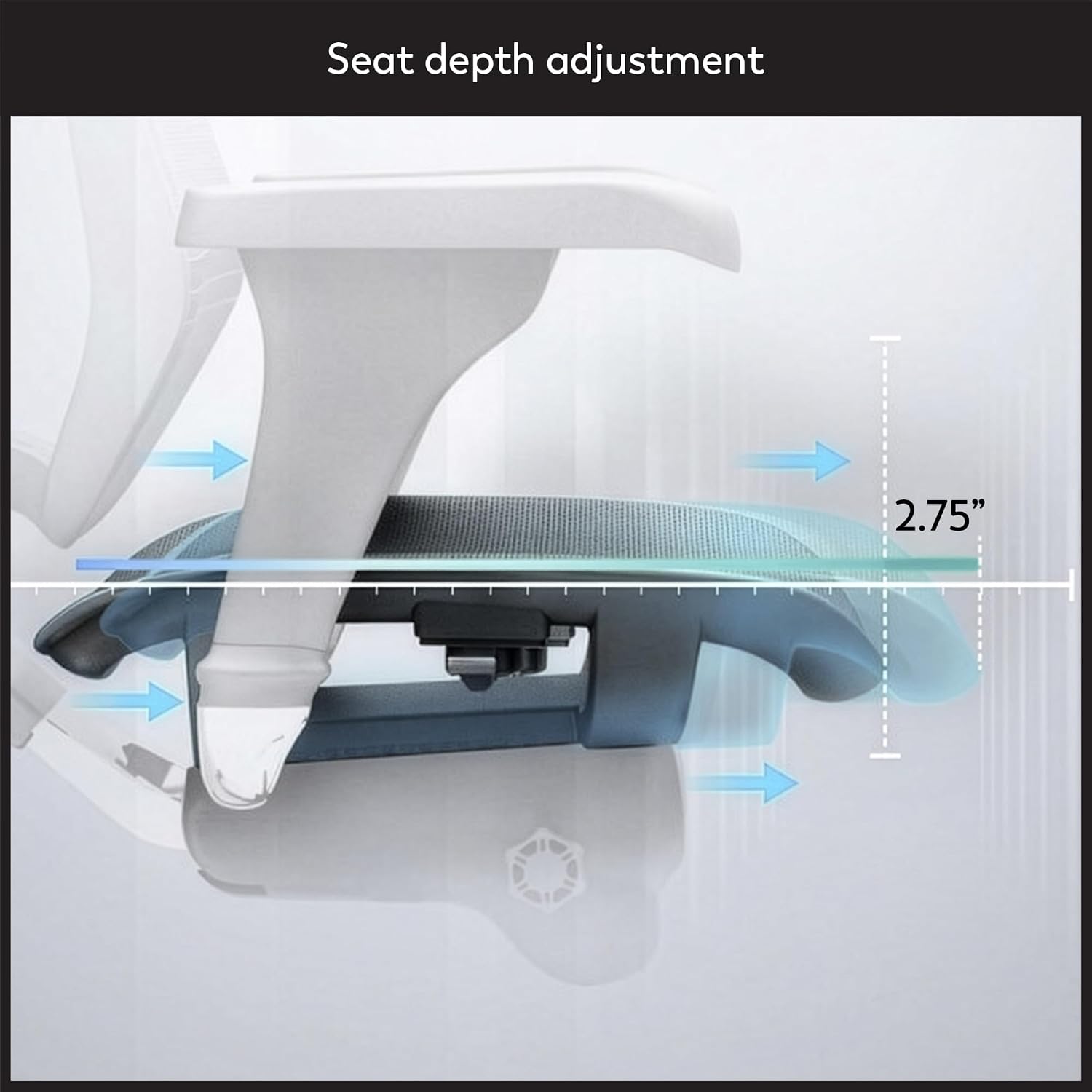
This diagram shows how to adjust the seat depth, allowing users to slide the seat forward or backward to achieve optimal leg support and comfort.
3. Backrest Height Adjustment
The backrest height can be adjusted to align with your spine's natural curve. Grasp the backrest and lift it upwards. It will click into one of six locking positions. To lower, lift it to its highest point, and it will then release to its lowest position, allowing you to reset the height.

This image demonstrates the backrest height adjustment feature, which offers six locking positions to accommodate various user heights and ensure proper spinal alignment.
4. Lumbar Support Adjustment
The chair features adjustable lumbar support to provide targeted lower back comfort. Locate the button control on the backrest. Adjust the tension by rotating the button to increase or decrease the firmness of the lumbar support.

This diagram details the adjustable lumbar support system, featuring a button control for tension adjustment to provide personalized lower back comfort.
5. Armrest Adjustments
The armrests are fully adjustable in three dimensions: height, front/back, and pivot. Use the buttons or levers on the armrests to modify their position until your arms are comfortably supported.

This diagram highlights the three-dimensional adjustability of the armrests, allowing for height, front/back, and pivot adjustments for optimal arm support.
6. Synchro-Tilt and Tilt Tension
The chair features a synchro-tilt mechanism, allowing the seat and backrest to recline together. Use the lever on the left side to lock or unlock the tilt function. The tilt tension knob, located underneath the seat, can be rotated to adjust the resistance of the recline. Turn clockwise for more resistance, counter-clockwise for less.

This image explains the synchro-tilt function, which allows the seat and backrest to recline together, and shows the three available locking positions for customized back support.
Maintenance
To ensure the longevity and optimal performance of your WorkPro Quantum 9000 Series chair, follow these maintenance guidelines:
- Cleaning: For general cleaning, use a soft, damp cloth. For spills or stains, spot clean immediately with a mild detergent and water. Avoid harsh chemicals or abrasive cleaners.
- Mesh Care: The mesh back and seat are designed for durability and breathability. Avoid sharp objects that could snag or tear the mesh.
- Hardware Check: Periodically check all bolts and screws to ensure they are tight. Retighten as necessary to maintain stability and prevent squeaks.
- Caster Care: Keep casters free of debris (hair, dust, etc.) to ensure smooth rolling. Clean them regularly.
Troubleshooting
If you encounter any issues with your WorkPro Quantum 9000 Series chair, refer to the following common troubleshooting tips:
- Chair Squeaks: Squeaking noises often indicate loose hardware. Check and tighten all assembly bolts, especially those connecting the seat, backrest, and armrests. Applying a small amount of silicone lubricant to moving parts can also help.
- Difficulty Adjusting Height: Ensure the gas lift lever is fully engaged or disengaged as needed. If the chair does not raise or lower smoothly, the gas lift cylinder may need replacement.
- Backrest Clicking Noise: If you hear clicking noises when moving from a reclined to an upright position, this may be related to the tilt mechanism. Verify that the tilt lock is fully engaged or disengaged. Check the tilt tension knob for proper adjustment.
- Unstable Chair: Ensure the chair is on a flat, even surface. Check that all casters are properly inserted into the base and that the gas lift cylinder is fully seated.
Specifications
| Feature | Detail |
|---|---|
| Brand | WorkPro |
| Model Name | Quantum 9000 Series Ergonomic Mesh/Mesh Adjustable-Back Office Chair |
| Model Number | Quantum 9000 (EJ-LAM) |
| Color | Black |
| Overall Dimensions (H x W x D) | 37-1/2" to 43-3/4"H x 29-1/2"W x 28"D |
| Weight Capacity | 275 lb |
| Recommended Use | 8-10 hours per day |
| Material | Mesh (back and seat), Plastic (frame) |
| Frame Material Type | Functional Polymeric Composite (FPC) |
| Arm Style | With arms, 3D adjustable |
| Back Style | Mesh Back |
| Reclining Positions | 3 (Synchro-tilt) |
| Item Weight | 54.7 pounds |

This image illustrates the Functional Polymeric Composite (FPC) material used in the chair's frame, highlighting its smooth, light, and durable properties compared to traditional nylon.
Warranty and Support
The WorkPro Quantum 9000 Series Ergonomic Mid-Back Mesh Office Chair comes with a limited lifetime warranty. For warranty claims, replacement parts, or any support inquiries, please contact the manufacturer directly. They are committed to providing assistance and typically ship parts within 1-2 business days.
For further assistance, please refer to the contact information provided in your product packaging or visit the official WorkPro website.
