
1. Introduction
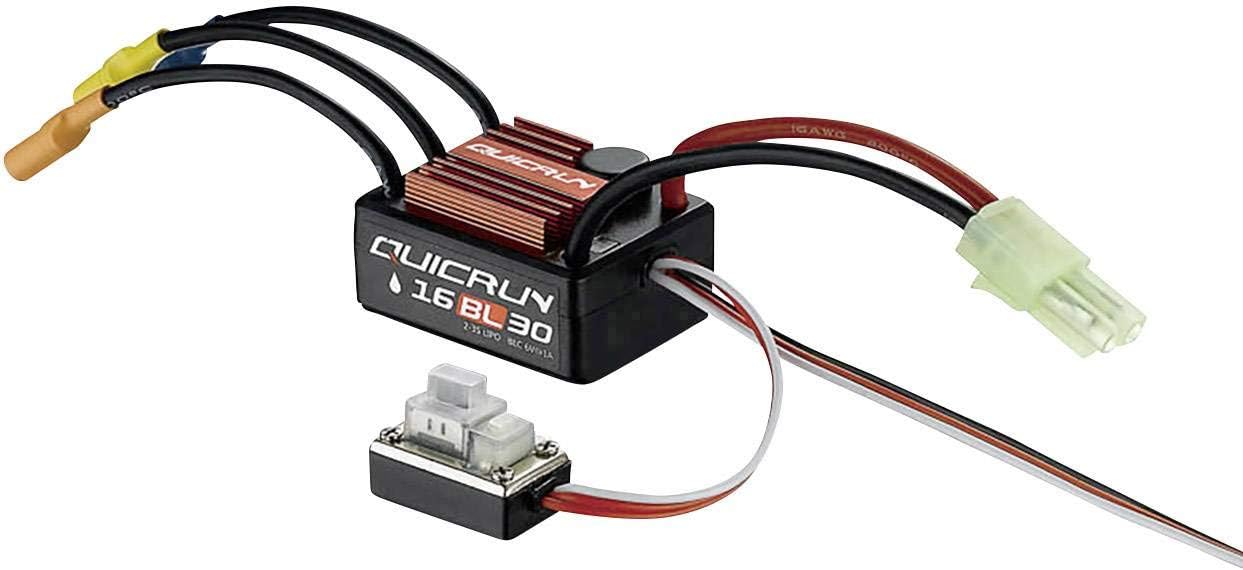
This manual provides comprehensive instructions for the installation, operation, maintenance, and troubleshooting of your Hobbywing QuicRun WP16BL30 Brushless Electronic Speed Controller (ESC). This high-performance ESC is designed for remote-controlled vehicles, offering reliable power delivery with a maximum current handling of 180A. Please read this manual thoroughly before using the product to ensure proper function and safety.
2. Safety Precautions
- Always disconnect the battery from the ESC when not in use to prevent accidental activation.
- Ensure all connections are secure and properly insulated to avoid short circuits.
- Do not operate the ESC in wet conditions unless explicitly stated as waterproof.
- Keep the ESC away from heat sources and ensure adequate ventilation during operation.
- Use only batteries and motors that are compatible with the ESC's specifications.
- Adult supervision is recommended for users under 14 years of age.
3. Package Contents
Upon opening the package, please verify that all components are present and in good condition.
- 1x Hobbywing QuicRun WP16BL30 Brushless ESC
- 1x User Manual (this document)
- Additional accessories (e.g., connectors, mounting tape) may be included depending on the specific product variant.
4. Setup and Installation
Follow these steps to properly install and set up your ESC in your RC vehicle.
- Mounting the ESC: Securely mount the ESC in your vehicle's chassis using double-sided tape or screws, ensuring good airflow around the heatsink.
- Motor Connection: Connect the three black wires from the ESC to the corresponding motor wires. For sensorless brushless motors, the connection order typically does not matter for initial setup, but reversing any two wires will reverse motor rotation if needed.
- Battery Connection: Connect the red and black power wires from the ESC to your battery pack. Ensure correct polarity (red to positive, black to negative) to prevent damage. The ESC is compatible with 2-3S LiPo batteries.
- Receiver Connection: Plug the thin multi-colored signal wire from the ESC into the throttle channel (usually Channel 2) of your RC receiver.
- ESC Calibration:
Before first use, the ESC must be calibrated to your radio system's throttle range. Refer to your radio system's manual for specific calibration procedures, but generally, the steps involve:
- Turn on your transmitter and set throttle trim to neutral.
- Hold the ESC's set button (if present) or follow the power-on sequence while holding full throttle, then full brake, then neutral.
- The ESC will emit beeps or flashes to confirm each throttle position.
5. Operating Instructions
Once the ESC is properly installed and calibrated, you can begin operating your RC vehicle.
- Power On: Connect the battery to the ESC. The ESC will emit a series of beeps indicating battery cell count and readiness.
- Throttle Control: Use your transmitter's throttle stick to control the motor speed. Pushing forward typically increases speed, while pulling back applies brakes or reverse (depending on ESC mode).
- Power Off: Always disconnect the battery from the ESC first before turning off your transmitter.
- Driving Modes: The QuicRun WP16BL30 typically supports various driving modes (e.g., Forward/Brake/Reverse, Forward/Brake only). Refer to the detailed programming instructions (often available on the manufacturer's website) to change these settings using a program card or transmitter input.
6. Maintenance
Regular maintenance helps ensure the longevity and optimal performance of your ESC.
- Cleaning: Periodically clean the ESC and heatsink to remove dirt, dust, and debris that can hinder cooling. Use a soft brush or compressed air.
- Connection Check: Regularly inspect all wires and connectors for signs of wear, fraying, or corrosion. Replace damaged components immediately.
- Storage: When not in use, store the ESC in a cool, dry place, away from direct sunlight and extreme temperatures.
- Firmware Updates: Check the Hobbywing official website for any available firmware updates that may improve performance or add features.
7. Troubleshooting
If you encounter issues with your ESC, refer to the table below for common problems and their solutions.
| Problem | Possible Cause | Solution |
|---|---|---|
| ESC does not power on. | Battery not connected, low battery voltage, faulty connection. | Check battery connection and charge level. Inspect all wires and connectors. |
| Motor does not respond to throttle. | ESC not calibrated, motor wires disconnected, receiver issue. | Perform ESC calibration. Verify motor wire connections. Check receiver and transmitter. |
| Motor runs erratically or stutters. | Poor motor connection, incorrect motor timing, ESC overheating. | Check motor wire connections. Adjust motor timing if applicable. Ensure adequate cooling. |
| ESC overheats. | Insufficient airflow, motor/gear ratio too high, ESC overloaded. | Improve ventilation. Adjust gear ratio. Ensure motor is not too large for ESC. |
8. Specifications
Key technical specifications for the Hobbywing QuicRun WP16BL30 ESC.
| Feature | Detail |
|---|---|
| Brand | Hobbywing |
| Model Number | 2108310 |
| Product Name | QuicRun WP16BL30 Brushless Driving Regulator |
| Max Current (A) | 180 A |
| Color | Black |
| Spare Parts Availability | 1 Year |
| Manufacturer | Hobbywing |
9. Warranty and Support
Warranty Information: The Hobbywing QuicRun WP16BL30 ESC typically comes with a manufacturer's warranty covering defects in materials and workmanship. Based on available information, spare parts availability is indicated for 1 year. For specific warranty terms, duration, and claim procedures, please refer to the official Hobbywing warranty policy or contact your point of purchase.
Customer Support: For technical assistance, troubleshooting beyond this manual, or inquiries regarding your product, please visit the official Hobbywing website or contact their customer support directly.
Visit Hobbywing Official Website