
Tree SPS75
Tree SPS 75 Postal Scale User Manual
Model: SPS75
Introduction
This manual provides comprehensive instructions for the setup, operation, and maintenance of your Tree SPS 75 Small Postal Scale. Designed for accurate weighing of packages and envelopes up to 75 lbs, this scale is suitable for use in warehouses, homes, and offices. Please read this manual thoroughly before using the device to ensure optimal performance and longevity.
What's in the Box
Upon opening the package, verify that all components are present:
- Tree SPS 75 Postal Scale Unit
- Weighing Platter
- AC Adapter
- User Manual (this document)
Setup
Follow these steps to set up your Tree SPS 75 Postal Scale:
- Unpack the Scale: Carefully remove the scale and all accessories from the packaging.
- Place the Platter: Position the stainless steel weighing platter securely onto the scale's base. Ensure it sits flat and does not wobble.
- Power Connection:
- For continuous operation, connect the included AC adapter to the scale's power port and then to a standard electrical outlet.
- For portable use, install 6 AA batteries (not included) into the battery compartment located on the underside of the scale.
- Initial Placement: Place the scale on a flat, stable, and level surface to ensure accurate readings. Avoid placing it near vibrations or extreme temperature changes.

Figure 1: The Tree SPS 75 Postal Scale with a package being weighed.
Operating Instructions
Familiarize yourself with the scale's functions for efficient weighing:
- Power On/Off: Press the ON/OFF button to turn the scale on. The display will show "HELLO" and then "0.0" or "0.00" when ready. Press and hold the ON/OFF button to turn the scale off.
- Changing Units: Press the UNIT button to cycle through available measurement units: pounds (lb), ounces (oz), pounds:ounces (lb:oz), and kilograms (kg).
- Zero/Tare Function:
- To zero the scale (reset to 0.0 with nothing on the platter), press the ZERO button.
- To tare a container (subtract the weight of a container to weigh only its contents), place the empty container on the platter and press the ZERO button. The display will reset to 0.0, and you can then add items to the container.
- Hold Function: Press the HOLD button to lock the displayed weight. This is useful for weighing large packages that might obscure the display. Press HOLD again to release the reading.
- Weighing Items: Place the item to be weighed gently on the center of the weighing platter. Wait for the display to stabilize and show the final weight.

Figure 2: The scale accurately weighing a calibration weight.

Figure 3: Key features and components of the Tree SPS 75 Postal Scale.
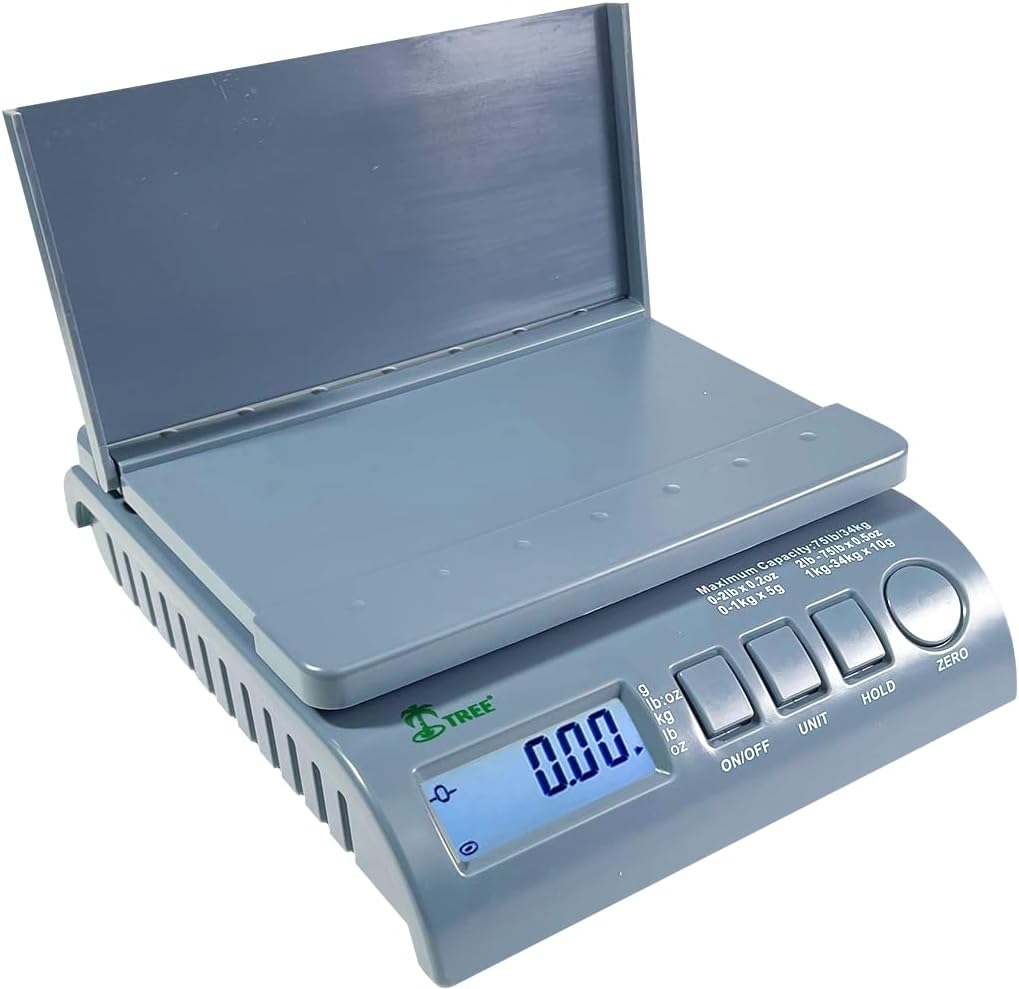
Figure 4: The foldable platform allows for weighing larger items without obscuring the display.
Maintenance
Proper maintenance ensures the longevity and accuracy of your scale:
- Cleaning: Wipe the scale surface and weighing platter with a soft, damp cloth. Do not use abrasive cleaners or immerse the scale in water.
- Storage: Store the scale in a dry, cool place away from direct sunlight, extreme temperatures, and high humidity.
- Handle with Care: Avoid dropping the scale or placing items on it that exceed its maximum weight capacity (75 lbs).
- Battery Replacement: If using batteries, replace them when the low battery indicator appears on the display to ensure consistent performance.
Troubleshooting
If you encounter issues with your Tree SPS 75 Postal Scale, refer to the following common problems and solutions:
| Problem | Possible Cause | Solution |
|---|---|---|
| Scale does not turn on. | No power, dead batteries, or faulty AC adapter. | Check AC adapter connection. If using batteries, replace them. Ensure power outlet is functional. |
| Inaccurate readings. | Scale not on a level surface, unstable surface, or overloaded. | Place scale on a firm, level surface. Ensure no external vibrations. Do not exceed 75 lb capacity. |
| Display shows "O-Ld" or "Err". | Overload indication. | Remove item from scale immediately. Do not exceed maximum capacity. |
| Display is dim or flickering. | Low battery power. | Replace batteries or use AC adapter. |
Specifications
Detailed technical specifications for the Tree SPS 75 Postal Scale:
- Brand: Tree
- Model: SPS75
- Color: Grey
- Weight Capacity: 75 Pounds (34 kg)
- Readability:
- 0.2 oz for 0-2 lbs
- 0.5 oz for 2-75 lbs
- Display Type: Backlit LCD
- Power Source: AC Adapter (included) or 6 AA Batteries (not included)
- Material: High-quality Plastic Housing, Stainless Steel Weighing Pan
- Product Dimensions: 10.5" x 8.5" x 2.8" (26.67 x 21.59 x 7.11 cm)
- Weighing Pan Dimensions: 8.5" x 7" (21.59 x 17.78 cm)
- Item Weight: 3 Pounds (1.36 kg)
- Recommended Uses: Packages, Envelopes

Figure 5: Physical dimensions of the Tree SPS 75 Postal Scale.
Warranty and Support
Your Tree SPS 75 Postal Scale comes with a comprehensive warranty and dedicated customer support:
- Manufacturer Warranty: All new Tree products include a 2-year manufacturer warranty.
- Customer Support: Real USA customer support is available to assist with any questions or issues you may have.
- For support, please refer to the contact information provided on the product packaging or the official Tree website.
Product Videos
No official seller videos are available for this product. The following video is provided by an independent influencer and demonstrates the scale's basic operation:
Video 1: Demonstration of the Tree SPS 75 Postal Scale's features, including power on/off, unit changes, and hold function. This video is provided by an independent influencer.
Related documentsSPS75

Ask a question about this manual
Ask about setup, troubleshooting, compatibility, parts, safety, or missing instructions. Manuals+ will review the question and use this page’s manual context to help answer it.