
1. Introduction
1.1 Product Overview
The AXIS T8120 Midspan is a 1-port Power over Ethernet (PoE) injector designed to supply power to network video products. It eliminates the need for separate power outlets and electrical cabling by delivering power and data over a single Ethernet cable. This midspan supports a power output of up to 15.4 Watts, making it suitable for various AXIS network cameras and devices.
This manual provides essential information for the safe and efficient installation, operation, and maintenance of your AXIS T8120 Midspan.
1.2 Package Contents
- AXIS T8120 Midspan 15W 1-Port Power Injector
- Power Cable (AC 100-240 V compatible)
- Installation Guide (this document)
Please verify that all components are present and undamaged. Contact your supplier if any items are missing or damaged.
2. Safety Information
- Read all instructions carefully before installation and operation.
- Do not expose the device to water or excessive moisture.
- Ensure proper ventilation to prevent overheating.
- Use only the power adapter supplied or recommended by the manufacturer.
- Do not attempt to open or repair the device yourself. Refer all servicing to qualified personnel.
- Keep the device away from heat sources and direct sunlight.
3. Setup
3.1 Connecting the Midspan
- Connect an Ethernet cable from your network switch or router to the LAN IN port on the AXIS T8120 Midspan.
- Connect another Ethernet cable from the PoE OUT port on the midspan to your PoE-compatible network video product (e.g., AXIS M1103, M1104, M1113, M1114, M1143-L, M1144-L).
- Plug the power cable into the midspan's power input and then into a suitable AC power outlet (100-240 V).
- Verify that the indicator lights on the midspan illuminate, indicating power and network activity.
Note: If your network video product does not have built-in PoE support, a separate PoE splitter must be used to separate power and data from the Ethernet cable before connecting to the device.
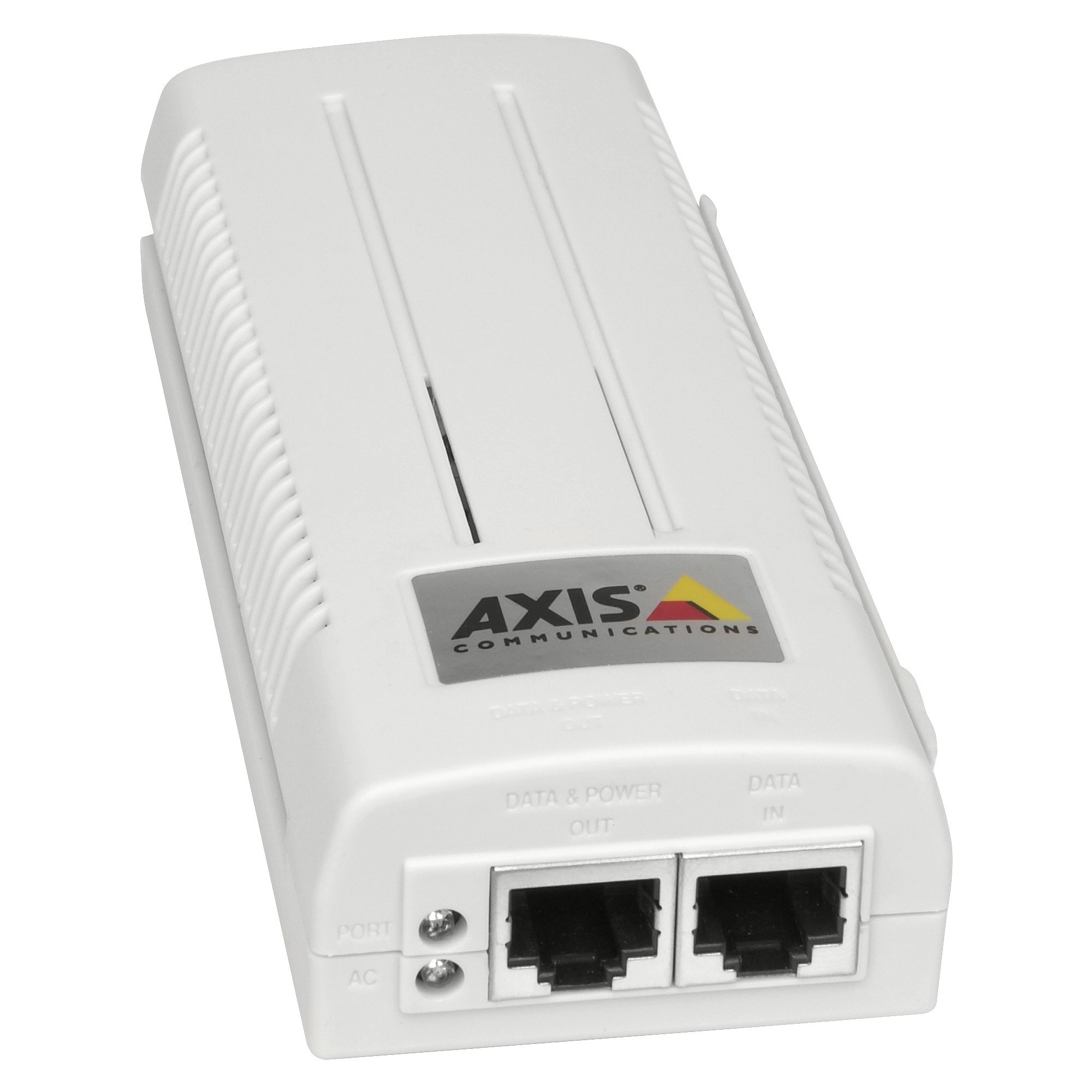
Image showing the AXIS T8120 Midspan 15W 1-Port Power Injector, a compact device designed to supply power over Ethernet to compatible network devices.
4. Operating Instructions
4.1 Powering PoE Devices
Once connected as described in the Setup section, the AXIS T8120 Midspan automatically provides power to the connected PoE-compatible network device. The midspan delivers up to 15.4 Watts of power, adhering to the IEEE 802.3af standard.
- Ensure the connected device is PoE-compatible or uses an appropriate PoE splitter.
- The midspan operates automatically; no configuration is typically required for basic power delivery.
- Monitor the status indicators on the midspan and your network device to confirm proper operation.
5. Maintenance
The AXIS T8120 Midspan is designed for reliable operation with minimal maintenance. Follow these guidelines to ensure longevity:
- Keep the device clean and free from dust. Use a soft, dry cloth for cleaning.
- Ensure adequate airflow around the unit to prevent heat buildup.
- Regularly check all cable connections for security and integrity.
- Avoid placing heavy objects on the midspan.
6. Troubleshooting
6.1 Common Issues and Solutions
- No Power to Device:
- Check if the midspan's power cable is securely connected to both the unit and the power outlet.
- Verify the power outlet is functional.
- Ensure the Ethernet cable from the midspan's PoE OUT port is connected to a PoE-compatible device or a PoE splitter.
- Confirm the connected device requires 15.4W or less power.
- No Network Connectivity:
- Check all Ethernet cable connections between the network, midspan, and device.
- Ensure your network switch/router is operational.
- Test with different Ethernet cables if possible.
- Overheating:
- Ensure the midspan is placed in a well-ventilated area.
- Remove any obstructions blocking airflow.
If problems persist, refer to the support section or contact technical support.
7. Specifications
| Model | AXIS T8120 (ASC106897ATE01) |
| Item Type | PoE Injector / Midspan |
| Input Voltage | AC 100-240 V |
| Output Voltage | 48 V DC |
| Output Power | 15.4 W (max) |
| Ports | 1 x LAN IN, 1 x PoE OUT |
| Data Link Protocol | Ethernet |
| Hardware Interface | Ethernet |
| Compatible Devices | Internet Protocol Camera (e.g., AXIS M1103, M1104, M1113, M1113-E, M1114, M1114-E, M1143-L, M1144-L) |
| Item Weight | 14.4 ounces (approx. 0.9 lbs) |
| Manufacturer | O.E.M. |
| UPC | 042111540754 |
8. Warranty and Support
8.1 Manufacturer's Warranty
The AXIS T8120 Midspan comes with a 3-year manufacturer's warranty from the date of purchase. This warranty covers defects in materials and workmanship under normal use. Please retain your proof of purchase for warranty claims.
The warranty does not cover damage caused by misuse, accidents, unauthorized modifications, or improper installation.
8.2 Technical Support
For technical assistance, troubleshooting, or warranty inquiries, please contact your authorized AXIS reseller or the manufacturer's support channels. Refer to the product packaging or the manufacturer's official website for the most current contact information.
When contacting support, please have your product model number (T8120) and serial number (if applicable) ready.