
1. Introduction
This manual provides instructions for the proper use and maintenance of your UPBRIGHT Handheld Push-To-Talk (PTT) Remote Speaker Microphone. This accessory is designed to enhance communication convenience for users of compatible Motorola Walkie Talkie Two-Way Radios.
For optimal performance and safety, please read this manual thoroughly before operating the device.
2. Product Overview
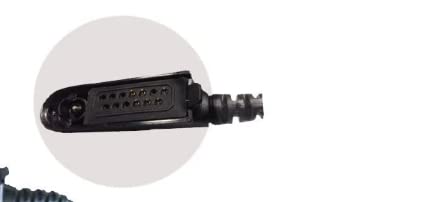
Figure 1: UPBRIGHT Handheld PTT Remote Speaker Microphone. This image shows the compact design of the microphone with its speaker grille and PTT button, ready for connection to a two-way radio.
The UPBRIGHT Handheld PTT Remote Speaker Microphone allows you to transmit and receive audio without needing to hold your radio. It features a built-in speaker for clear audio reception and a Push-To-Talk button for easy transmission.
3. Compatibility
This remote speaker microphone is compatible with various Motorola Walkie Talkie Two-Way Radio Series, including but not limited to:
- PMMN4021, PMMN4021A, PMMN4027, PMMN4027A, PMMN4039, PMMN4039A
- HMN9052, HMN9052E, HMN9053, HMN9053B, HMN9053C, HMN9053E
- BR950, GP140, GP240, GP280, GP318, GP320, GP328, GP340, GP329, GP338, GP339, GP360, GP380, GP540, GP580, GP640, GP650, GP680, GP960, GP1280, GP600
- MTX850, MTX850LS, MTX850XLS, MTX900, MTX950, MTX960, MTX8250, MTX8250LS, MTS8250XLS, MTX9250
- HT750, HT1250, HT1250LS, HT1550, HT1550XLS
- PR860, PRO5150, PRO5350, PRO5450, PRO5550, PRO5750, PRO7150, PRO7350, PRO7450, PRO7550, PRO7750, PRO9150
- PTX700, PTX760, PTX780, PTC780, XTS960
- MTP700, MTP750
It also features a 3.5mm jack for connecting an external earphone (earphone not included).
4. Setup and Installation
- Power Off Radio: Ensure your Motorola two-way radio is powered off before connecting the speaker microphone.
- Connect Microphone: Locate the accessory port on your Motorola radio. Align the connector of the UPBRIGHT speaker microphone with the radio's port and gently push until it clicks securely into place. Do not force the connection.
- Secure Clip: Use the rotating clip on the back of the speaker microphone to attach it to your clothing (e.g., lapel, shoulder strap) for convenient access.
- Power On Radio: Once the microphone is securely connected, power on your Motorola radio.
5. Operating Instructions
- Receiving Audio: When your radio receives a transmission, the audio will be played through the speaker on the remote microphone. Adjust the radio's volume control to set the desired listening level.
- Transmitting Audio (PTT): To transmit, press and hold the large Push-To-Talk (PTT) button located on the side of the microphone. Speak clearly into the microphone grille. Release the PTT button to stop transmitting and return to receive mode.
- External Earphone (Optional): If you wish to use an external earphone for private listening, plug a 3.5mm earphone into the jack located on the side of the speaker microphone. When an earphone is connected, audio will typically be routed through the earphone and not the built-in speaker.
6. Maintenance and Care
- Keep the microphone clean and dry. Wipe with a soft, damp cloth if necessary. Do not use harsh chemicals or abrasive cleaners.
- Avoid exposing the device to extreme temperatures, direct sunlight, or excessive moisture.
- Do not attempt to disassemble the microphone. This will void any warranty.
- Ensure the connector is free from dust and debris before connecting to the radio.
7. Troubleshooting
| Problem | Possible Cause | Solution |
|---|---|---|
| No audio from speaker microphone. |
|
|
| Cannot transmit (PTT button unresponsive). |
|
|
| Audio quality is poor or distorted. |
|
|
8. Specifications
- Brand: UPBRIGHT
- Model Numbers: PMMN4021, PMMN4021A, PMMN4027
- Item Weight: 4 ounces (113 grams)
- Compatible Devices: Two-Way Radios with compatible accessory port
- Earphone Jack: 3.5mm (for external earphone)
- UPC: 608410322479
9. Warranty and Support
This UPBRIGHT product is covered by a 30-day refund policy and a 24-month exchange warranty from the date of purchase. For warranty claims or technical support, please contact your retailer or the UPBRIGHT customer service department.
For more information, visit the UPBRIGHT Store.