
Introduction
This manual provides detailed instructions for setting up, operating, and maintaining your Lexmark MS312dn laser printer. Please read this guide thoroughly before using the printer to ensure optimal performance and longevity.
1. Unpacking and Initial Setup
Carefully remove the printer from its packaging. The printer weighs approximately 14 kg (30.85 lbs). It is recommended to have assistance when lifting.

Image: Front-right view of the Lexmark MS312dn laser printer, showing its compact design.
1.1 Power Connection
Connect the power cord to the printer and then to a grounded electrical outlet. Do not connect to a power strip or extension cord during initial setup.
1.2 Network and USB Connection
The Lexmark MS312dn supports both Ethernet and USB 2.0 connectivity.
- Ethernet Connection: Connect an Ethernet cable from your network router or switch to the Ethernet port on the printer.
- USB Connection: Connect a USB 2.0 cable from your computer to the USB port on the printer.
1.3 Software Installation
Insert the installation CD (if provided) into your computer's CD-ROM drive, or download the latest drivers and software from the official Lexmark support website. Follow the on-screen instructions to complete the installation.
The printer supports various operating systems, including Windows, Mac, and Linux. Server operating systems such as Windows Server 2003, 2008, and 2012 are also supported.
2. Printer Operation
2.1 Control Panel Overview
The printer features a two-line LCD display and a control panel for easy navigation and status monitoring.

Image: Close-up view of the printer's control panel, featuring the LCD screen and navigation buttons.
2.2 Loading Paper
The standard input capacity is 300 sheets, with a maximum input capacity of 850 sheets across multiple trays. The multi-purpose tray holds 50 sheets.
- Open the paper tray.
- Adjust the paper guides to fit the paper size.
- Load the paper stack into the tray. Ensure the stack does not exceed the maximum fill line.
- Close the paper tray.
Supported media types include plain paper, card stock, envelopes, labels, and transparencies. Standard ISO A-series sizes (A4, A5, A6) and JIS B-series sizes (B5) are supported, along with non-ISO sizes like Letter, Legal, Executive, and Folio.
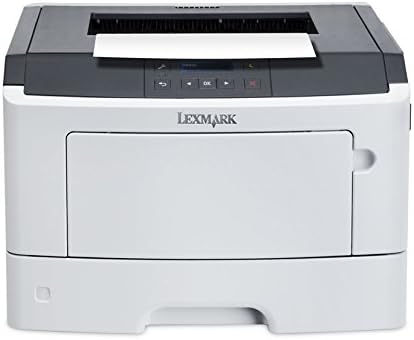
Image: Front view of the Lexmark MS312dn printer with the main paper input tray extended.
2.3 Printing Documents
The printer offers a print speed of up to 35 pages per minute (ppm) for black and white documents on A4/US Letter paper.
- Standard Printing: Send your document to the printer from your computer.
- Duplex Printing: The printer supports automatic duplex (two-sided) printing. This feature can be enabled through your printer settings on your computer.
- Mobile Printing: The printer is compatible with Apple AirPrint for convenient printing from mobile devices.

Image: Top view of the Lexmark MS312dn printer, showing the paper output tray and control panel.
2.4 Network Management
The Lexmark MS312dn is network-ready with Ethernet connectivity and supports Wi-Fi via optional connectivity. It features web-based management, allowing administrators to configure settings and monitor printer status remotely using supported network protocols such as HTTP, HTTPS, SNMP, DHCP, and DNS.
3. Maintenance
3.1 Replacing the Toner Cartridge
When the toner level is low, a message will appear on the printer's LCD display. Follow these steps to replace the toner cartridge:
- Open the front cover of the printer.
- Carefully remove the old toner cartridge.
- Unpack the new Lexmark 501H toner cartridge (or compatible model) and gently shake it to distribute the toner.
- Insert the new cartridge into the printer until it clicks into place.
- Close the front cover.

Image: A Lexmark 501H toner cartridge shown with its packaging, indicating the type of consumable used by the printer.
3.2 Cleaning the Printer
Regular cleaning helps maintain print quality and extends the life of your printer.
- Wipe the exterior of the printer with a soft, damp, lint-free cloth.
- Clean the paper path rollers if paper jams occur frequently. Refer to the printer's on-screen help or Lexmark support for detailed instructions.
3.3 Duty Cycle
The recommended monthly duty cycle for the Lexmark MS312dn is 500 - 2500 pages. The maximum duty cycle is 50,000 pages per month. Adhering to the recommended duty cycle helps ensure optimal printer performance and longevity.
4. Troubleshooting
This section addresses common issues you might encounter with your Lexmark MS312dn printer.
4.1 Paper Jams
If a paper jam occurs, the LCD display will show an error message indicating the location of the jam. Follow the on-screen instructions or consult the Lexmark support website for specific steps to clear the jam.
- Open the relevant covers and trays as indicated by the error message.
- Carefully remove any jammed paper, pulling in the direction of the paper path to avoid tearing.
- Close all covers and trays. The printer should resume printing.
4.2 Print Quality Issues
If print quality is poor (e.g., streaks, faded text, smudges):
- Check the toner cartridge level and replace if low.
- Ensure you are using recommended paper types.
- Perform a print quality test from the printer's control panel or software to diagnose further.
4.3 Connectivity Problems
If the printer is not connecting to your computer or network:
- Verify that all cables (power, USB, Ethernet) are securely connected.
- Restart the printer, computer, and network router.
- Check network settings on the printer's control panel and your computer.
- Ensure the correct printer drivers are installed.
5. Technical Specifications
Below are the detailed technical specifications for the Lexmark MS312dn laser printer.
| Feature | Specification |
|---|---|
| Brand | Lexmark |
| Model Name | MS312dn |
| Print Technology | Laser (Monochrome) |
| Maximum Resolution | 1200 x 1200 DPI |
| Print Speed (Black, A4/US Letter) | 35 ppm |
| Duplex Printing | Automatic |
| Standard Input Capacity | 300 sheets |
| Maximum Input Capacity | 850 sheets |
| Standard Output Capacity | 150 sheets |
| Processor Frequency | 800 MHz (2-Core) |
| Internal Memory | 128 MB (Max 128 MB) |
| Connectivity | Ethernet, USB 2.0, Optional Wireless LAN |
| Mobile Printing Technologies | Apple AirPrint |
| Display | 2-line LCD |
| Maximum Duty Cycle | 50,000 pages per month |
| Recommended Duty Cycle | 500 - 2500 pages per month |
| Power Consumption (Typical) | 520 W |
| Dimensions (W x D x H) | 398.7 mm x 381 mm x 261.6 mm |
| Weight | 14 kg (30.85 lbs) |
| Supported OS | Windows, Mac, Linux, Windows Server |
6. Warranty and Support
For detailed warranty information, please refer to the documentation included with your printer or visit the official Lexmark website. Lexmark provides customer support and resources for troubleshooting, driver downloads, and service inquiries.
You can find additional support and contact information on the Lexmark Support Website.


