
Introduction
This manual provides essential information for the safe and efficient operation of your ASK Proxima C3257-A Portable LCD Projector. Please read this manual thoroughly before using the projector and retain it for future reference. It covers setup, operation, maintenance, troubleshooting, and technical specifications.
Setup
Unpacking and Placement
Carefully remove the projector and all accessories from the packaging. Place the projector on a stable, flat surface. Ensure adequate ventilation around the unit to prevent overheating. Avoid placing the projector in direct sunlight or near heat sources.
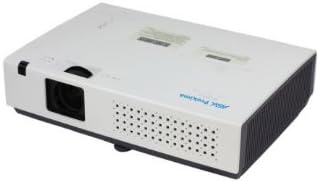
Figure 1: Front-right view of the ASK Proxima C3257-A Portable LCD Projector, showing the lens and ventilation.
Connecting Devices
The C3257-A projector supports various connectivity options:
- HDMI: Connect high-definition video and audio sources.
- DisplayPort: Connect compatible video sources.
- USB: For connecting USB devices or for service.
Connect the appropriate cable from your source device (e.g., laptop, DVD player) to the corresponding input port on the projector. Plug the power cord into the projector and then into a wall outlet.

Figure 2: Top view of the ASK Proxima C3257-A Portable LCD Projector, illustrating the control panel and labels.
Initial Power On
Press the power button on the projector or the remote control to turn on the unit. The power indicator light will illuminate. Allow a few moments for the projector to warm up and display an image.
Operating Instructions
Focus and Zoom Adjustment
Rotate the focus ring on the lens to achieve a clear image. Use the zoom ring (if available) to adjust the image size without moving the projector. The projector features 1.2x optical zoom.
Image Size and Throw Distance
The projector can produce an image size ranging from 30 inches to 300 inches diagonally. The optimal throw distance is between 31.5 inches and 425.2 inches, depending on the desired image size.
Keystone Correction
If the projected image appears trapezoidal, use the automatic keystone correction feature to adjust the image to a rectangular shape. The projector supports auto keystone correction of ±30 degrees.
Input Source Selection
Use the 'Source' button on the projector's control panel or remote control to cycle through available input sources (HDMI, DisplayPort, USB).
Projection Methods
The C3257-A supports various projection methods:
- Front Projection: Projector placed in front of the screen.
- Rear Projection: Projector placed behind a translucent screen.
- Ceiling Projection: Projector mounted upside down on the ceiling, either front or rear.
Adjust the projection settings in the projector's menu to match your chosen method.
Maintenance
Lamp Life and Replacement
The projector uses a 215 W UHP lamp. The typical lamp life is approximately 4,000 hours in normal mode and up to 6,000 hours in Eco mode. When the lamp life is nearing its end, a warning message may appear on the screen. Refer to the full service manual for detailed lamp replacement instructions.
Cleaning the Projector
Regularly clean the projector's exterior with a soft, dry cloth. For the lens, use a lens cleaning cloth and solution specifically designed for optical surfaces. Do not use abrasive cleaners or solvents. Ensure ventilation grilles are free from dust and obstructions.
Troubleshooting
No Image Displayed
- Ensure the projector is powered on and the power indicator is lit.
- Verify that the input source cable is securely connected to both the projector and the source device.
- Select the correct input source using the 'Source' button.
- Check if the source device is outputting a signal.
Image is Blurry
- Adjust the focus ring on the projector lens.
- Ensure the projector is within the recommended throw distance for the screen size.
Image is Trapezoidal
- Use the automatic keystone correction feature to adjust the image geometry.
- Ensure the projector is placed as perpendicular to the screen as possible.
Projector Overheating
- Ensure all ventilation grilles are clear and unobstructed.
- Operate the projector in a well-ventilated area.
- If the issue persists, power off the projector and allow it to cool down before restarting.
Specifications
| Feature | Detail |
|---|---|
| Brand | ASK Proxima |
| Model | C3257-A |
| Display Device | 0.63" LCD |
| Native Resolution | XGA (1024x768) |
| Maximum Display Resolution | 1920 x 1080 |
| Brightness | 2700 ANSI lumens |
| Contrast Ratio | 4000:1 |
| Aspect Ratio | 4:3 |
| Number of Colors | Full Color |
| Lamp Type | 215 W UHP |
| Typical Lamp Life | Normal: 4,000 hours, Eco: 6,000 hours |
| Lens | F: 2.1-2.3, 1.2x optics, f=18.82-22.60mm |
| Digital Zoom | 1/4~16 |
| Throw Ratio | 1.46 - 1.76 |
| Image Size | 30” - 300” |
| Throw Distance | 31.5” - 425.2” |
| Keystone Correction | Auto ±30 degrees |
| Projection Methods | Front, Rear, Ceiling |
| Connectivity Technology | DisplayPort, HDMI, USB |
| Video Signals Supported | PAL, SECAM, NTSC 4.43, PAL-M, PAL-N, 480i, 480p, 576i, 576p, 720p, 1035i, 1080i |
| Special Feature | Internet-ready (for network control/connectivity) |
Warranty and Support
For warranty information and technical support, please refer to the documentation provided with your purchase or visit the official ASK Proxima website. Keep your proof of purchase for warranty claims.


